Welcome to XboxIssues

Welcome. I decided to make this blog after being a Xbox Ambassador for a number of years.

If you don't know an Ambassador is a Volunteer that Microsoft uses to help ease the load on the actual hard working support people.

I noticed that alot of the questions I would get could easily be solved by using Microsofts Xbox.com site.

Since some of the help articles may be hard to find, understand or the issue may be called something different in the gaming community making it more difficult to solve, I've decided to make this blog to make it easier for fellow gamers to get xbox assistance, news and all things Xbox.

If you have any Xbox related question you can find the answer to feel free to contact me on YouTube, twitter or in the comments.
Showing posts with label New Dashboard. Show all posts

Wednesday, March 25, 2026

SYSTEM UPDATE: March Xbox Update

Xbox announced several March updates, including new customizable console features for Xbox Insiders like expanded Home groups, custom colors, per-game Quick Resume settings, and profile badges. At GDC, they previewed future plans such as the next-gen “Project Helix” console, broader Xbox Play Anywhere support, and Xbox mode coming to Windows 11 devices. New dynamic backgrounds were added for select games, and a handheld compatibility program now highlights games optimized for portable play, with recent additions like Crimson Desert, Kingdom Come: Deliverance II, and Towerborne.


Here’s What’s New

New Console Features for Xbox Insiders


Earlier this month, new features were introduced for select Xbox Insiders to test ahead of a broader console rollout. These include:
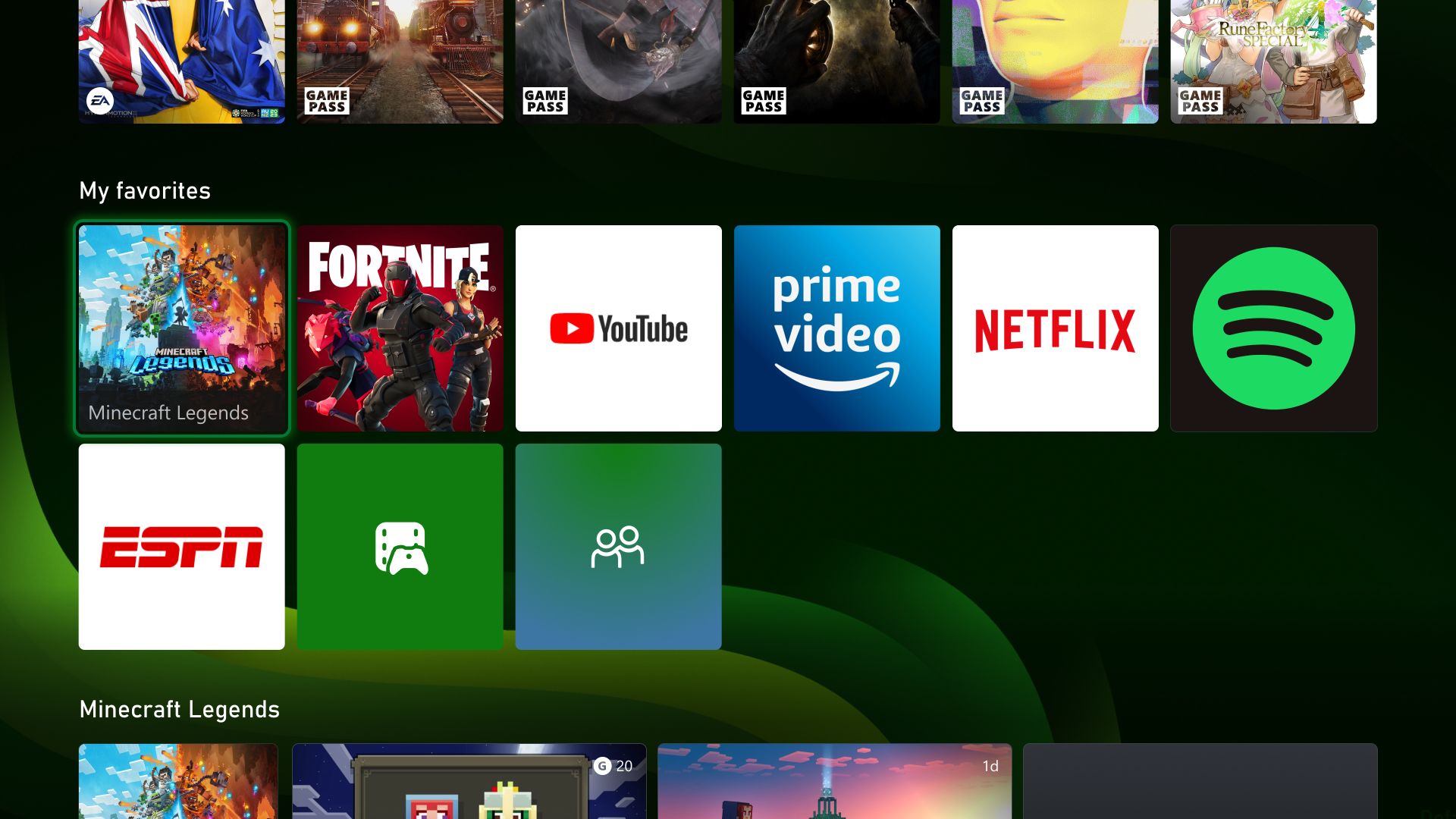
  • More Groups on Home. Players can now customize Home with up to 10 groups.
  • Custom Color. Players can now create a custom color that’s uniquely theirs to express themselves across the console.
  • Quick Resume Settings. Players can now disable Quick Resume on a per-game basis to ensure those games always launch fresh.
  • Profile Badges in Guide. See a player’s five most recently unlocked badges when viewing their profile.
Xbox at GDC


Earlier this month at GDC, more details were shared about how the next generation of Xbox is being developed for players and creators. This included an early look at Project Helix, a next-generation console designed to support both Xbox and PC games. It was also announced that Xbox mode will begin rolling out to all Windows 11 devices in April, alongside continued growth of Xbox Play Anywhere, which now includes over 1,500 titles.

Xbox Console – Dynamic Backgrounds

Crimson Desert, Sea of Thieves and Towerborne introduced new dynamic backgrounds for Xbox Series X|S consoles, allowing you to customize your console to celebrate these games.

CLICK READ MORE to Continue

Wednesday, February 14, 2024

SYSTEM UPDATE: The February 2024 System Update is Starting to Roll Out

Team Xbox continues to bring new ways to make Xbox better, with players at the center, as we refine the experience and deliver brand-new features based on player feedback. This month’s update offers touch controls enabled in Xbox remote play, and improved filtering and sorting in My games & apps. There’s a new thumbstick calibration tool for Xbox Wireless Controllers, and a new access restriction option to make it easier for many players to play on shared consoles in places like hospitals.


Touch controls enabled in Xbox remote play
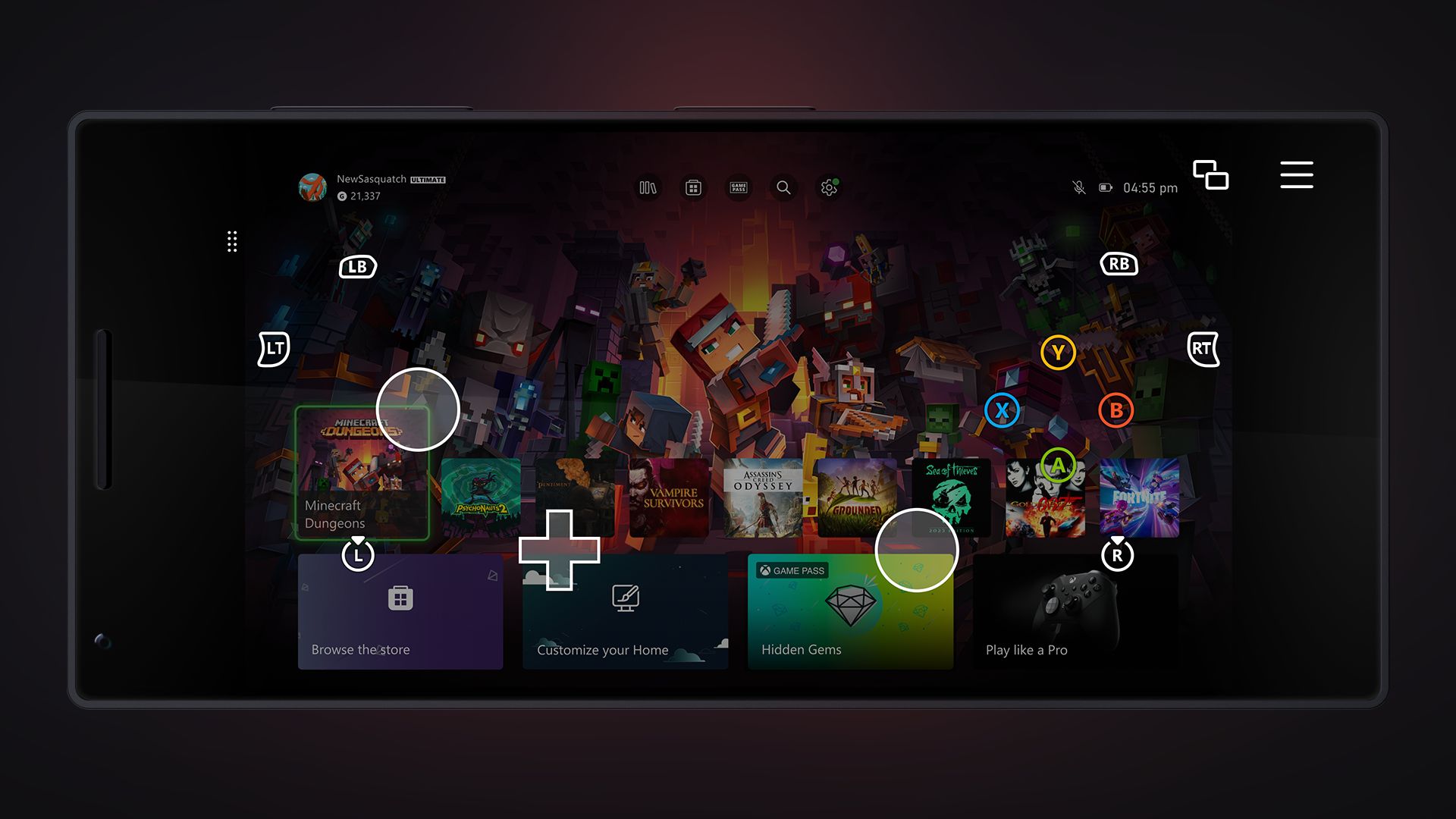
Want to play games when away from your console, but don’t have your Xbox Wireless Controller handy? No problem! Xbox remote play now supports custom touch control layouts on more than a hundred games when using the Xbox app on iOS, Android, and Windows devices. The same custom touch layouts available through Xbox Cloud Gaming (Beta) will now be available when remotely playing games from your personal console. This includes games like Minecraft Dungeons, Psychonauts 2, Sea of Thieves, and many more. Additionally, a basic touch control layout can now be used for most other games.


New thumbstick recalibration tool for Xbox Wireless Controllers
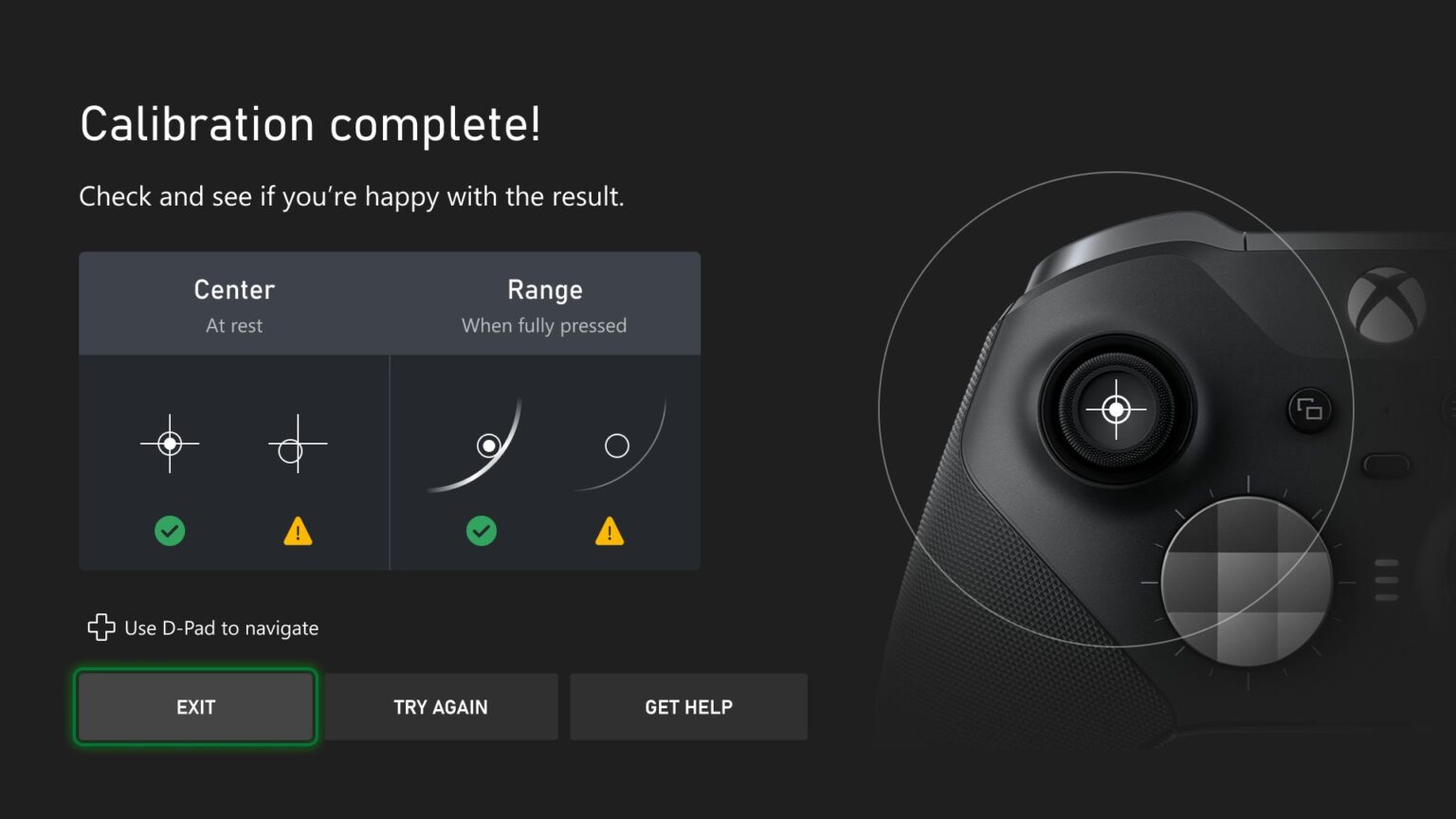
We’re excited to release a user-guided, self-calibration tool on the Xbox Accessories app that helps you to recalibrate thumbsticks for Xbox Wireless Controllers. This is part of Xbox’s continued investment in improving the repairability experience of controllers. To address minor thumbstick issues such as inconsistent responses, use the self-calibration tool in the Xbox Accessories app on console or PC to resolve issues without the need for support calls, controller repairs, or returns. 

Xbox enables owners of Xbox Wireless Controllers to self-repair their devices by selling official replacement parts in the Microsoft Store. If you’re self-repairing your controller, the thumbstick recalibration tool should be used after you have replaced the controller’s base and circuit board, as that will likely disrupt thumbstick calibration values. Not all thumbstick issues can be resolved with this recalibration tool, including drift due to normal wear and tear.


Improved filtering and sorting – My games & apps
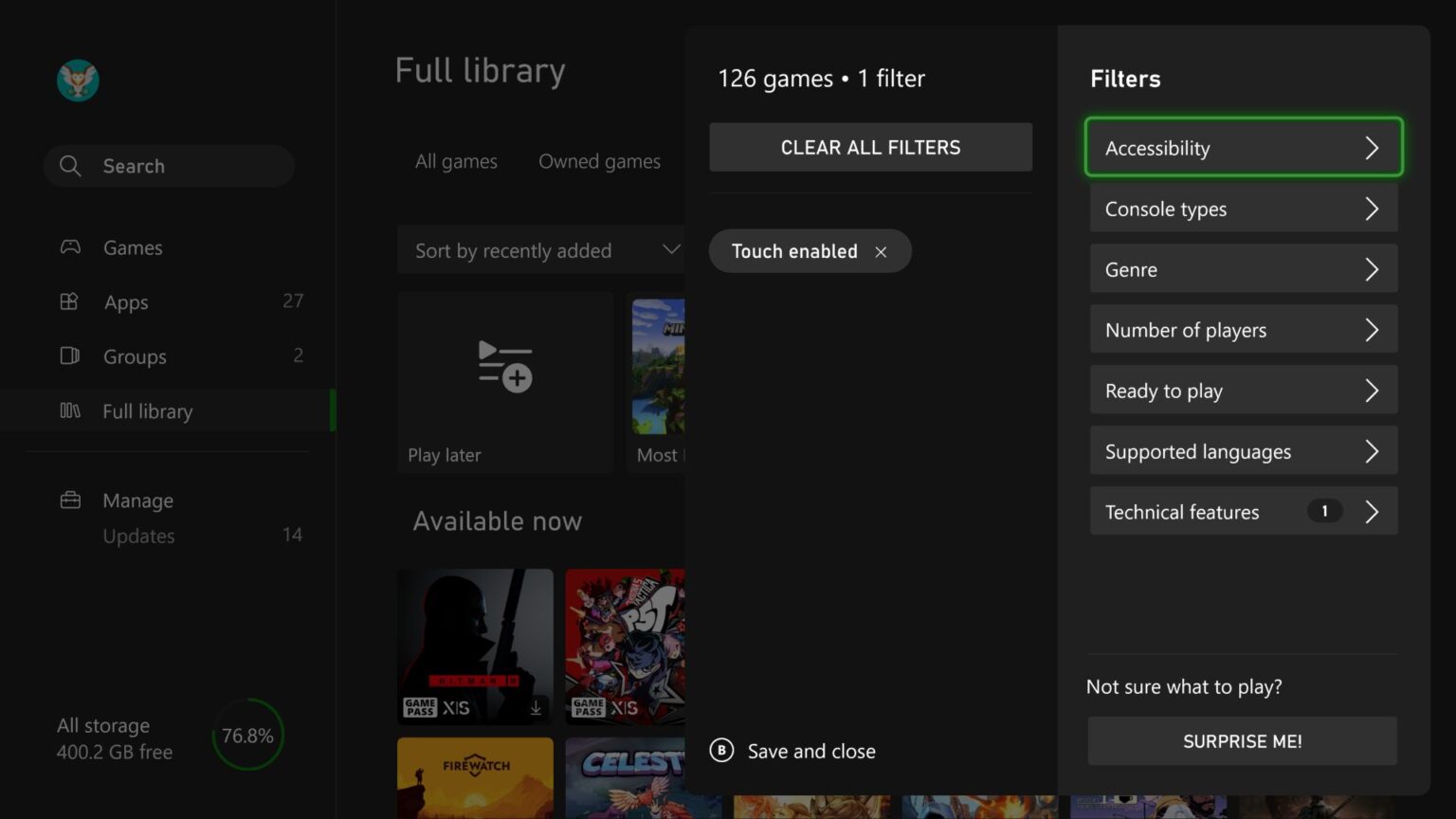
We’ve added new filters and sorts to My games & apps to help you find exactly what you’re looking for on your Xbox. You can now filter games by accessibility, supported languages, and technical features. For example, if you want to see which games are touch-enabled for remote play, you can filter by Technical features > Touch enabled and find your next game to play.

Additionally, subscription tabs in your full library have been updated to sort by Recently added, making it easier to see what’s new in subscriptions like Xbox Game Pass and EA Play. You can always adjust the sorting to find games to play in your library. Just head to My games & apps > Full library, and you’ll find all the new filtering and sorting options.


Automatic profile sign-out
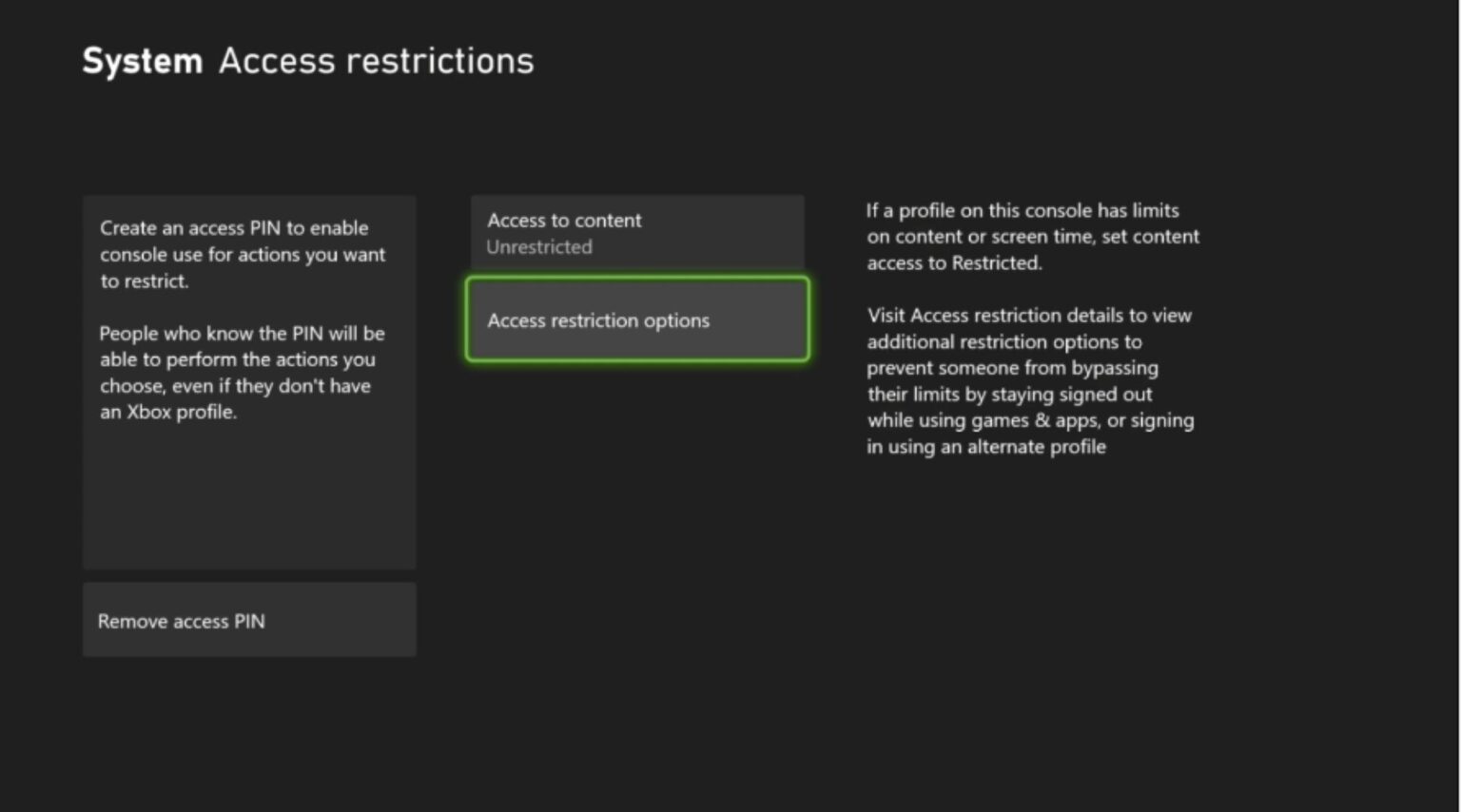
A new access restriction option has been created to make it easier to play on shared consoles in places like hospitals. Some children’s hospitals have programs to provide consoles that can be wheeled into a patient’s room and give them time to play and connect with friends. The new option makes it easier for player’s profiles to be deleted when they sign out, and it removes the need to check if patients have signed out of the consoles when the gaming cart gets moved between patients.

To view and adjust the new options, navigate to Settings > System > Access restrictions to allow use of the Edge web browser, set a Home console, and to delete profiles on sign-out.

SOURCE


DON'T FORGET TO SHARE:


Wednesday, July 26, 2023

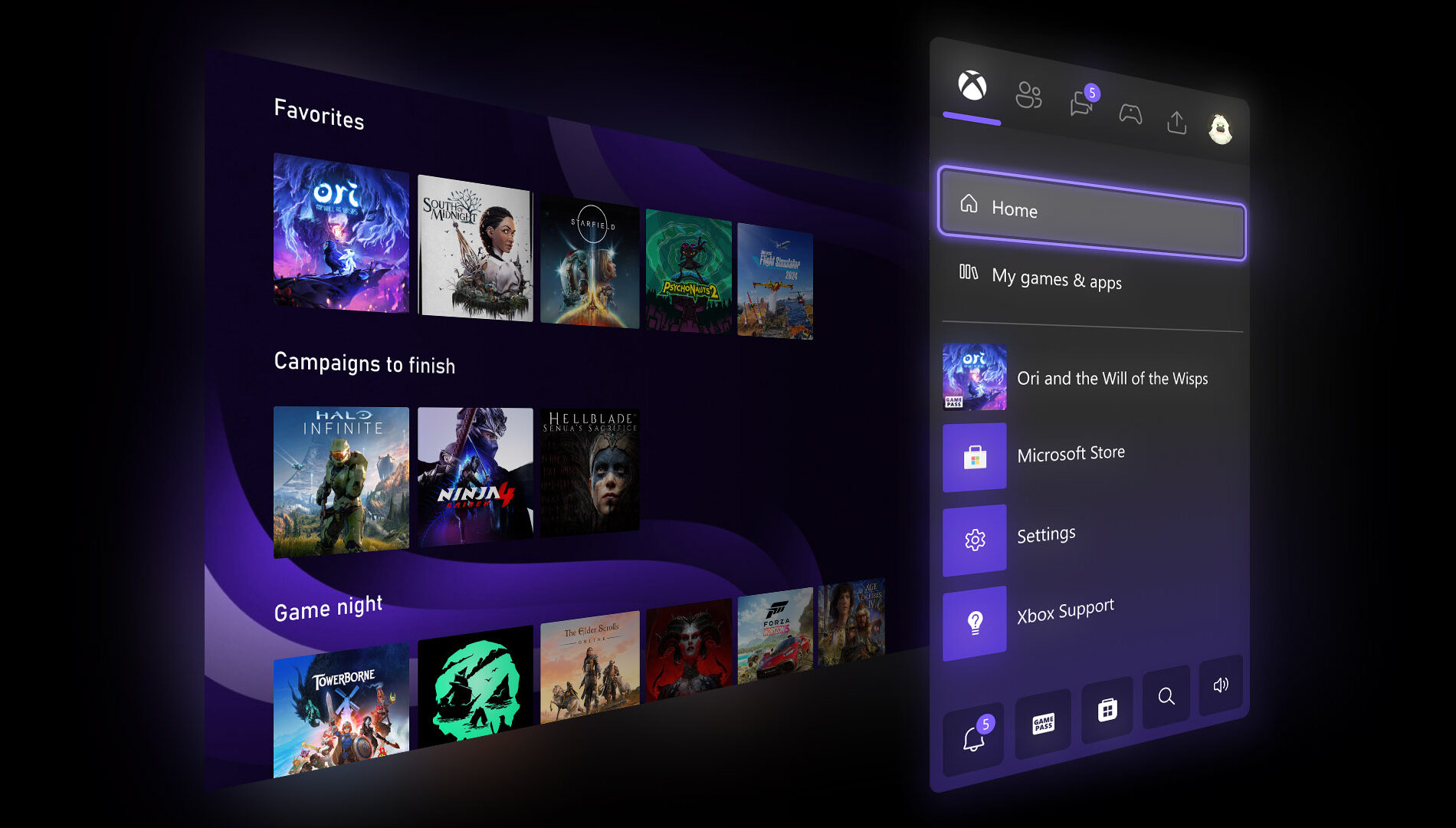
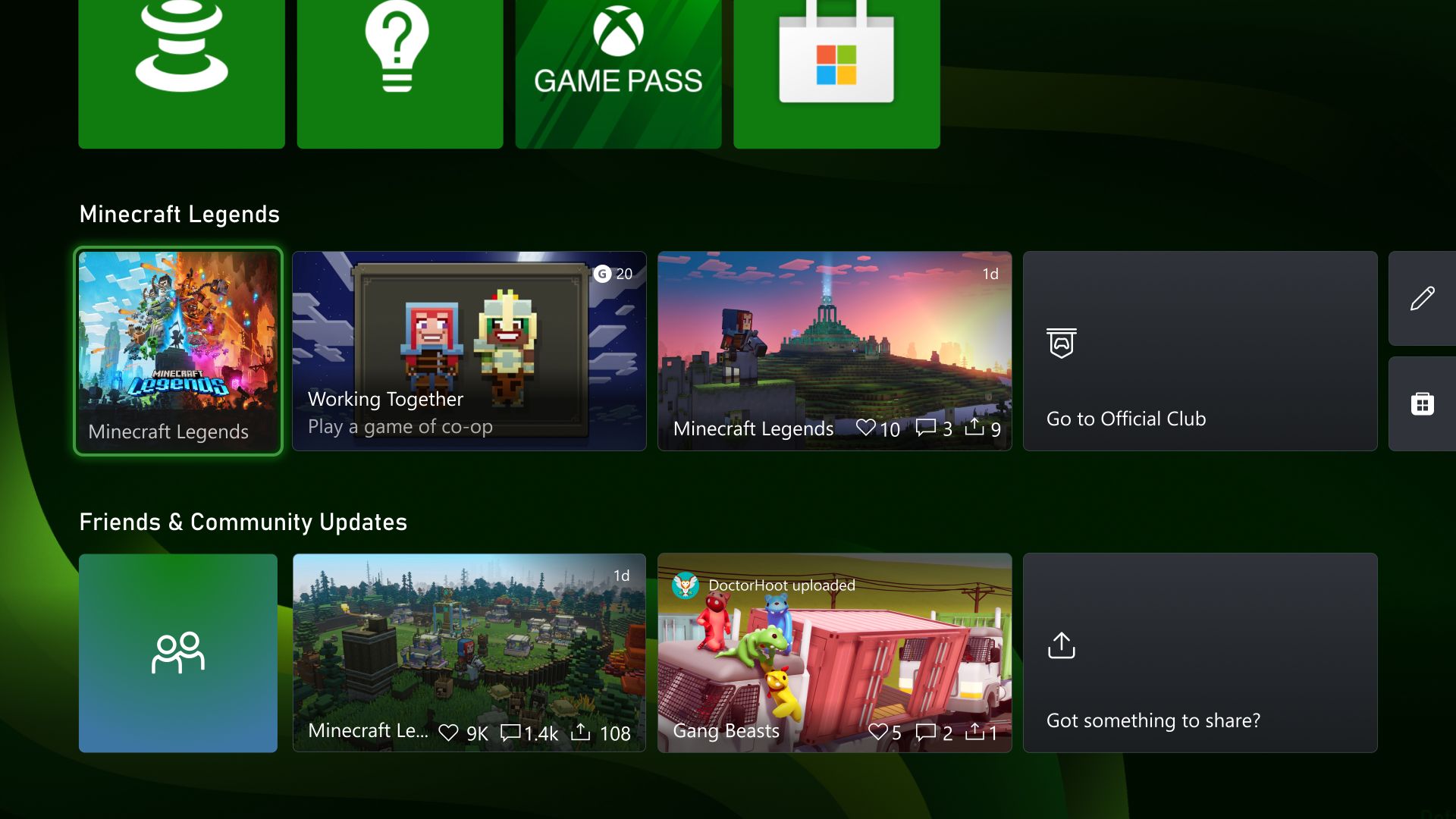
UPDATE: A new Home experience is rolling out to all Xbox Series X|S and Xbox One consoles

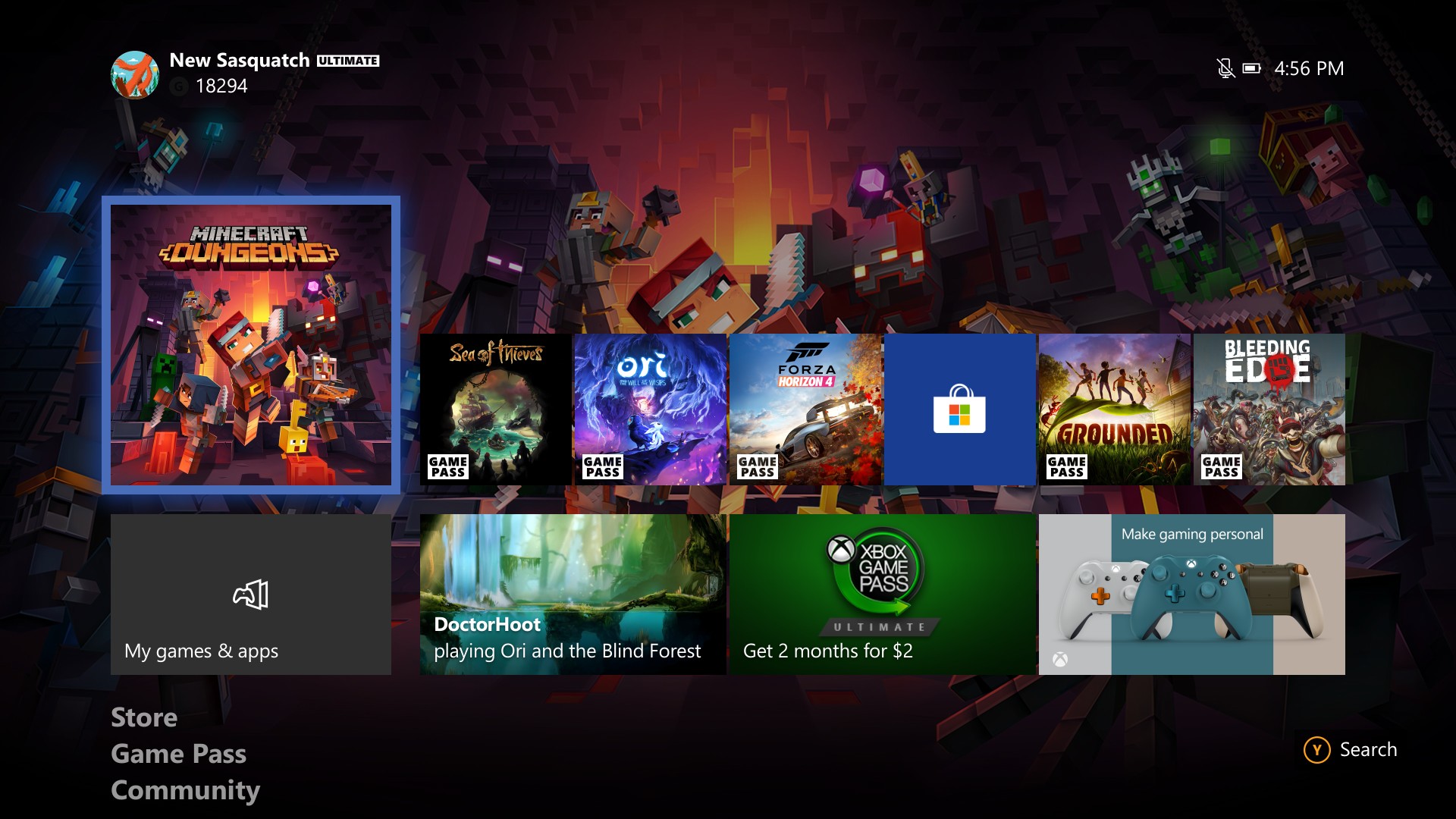
Starting today, a new Home experience is rolling out to all Xbox Series X|S and Xbox One consoles. This update is designed from player feedback and makes it easier to discover new games, rediscover games you already love, connect with communities, and create a more personalized experience.

Xbox is excited to share more about the journey that led us here, and what you can expect with this new update.


Your new Xbox Home
1: Makes it easy to go to your Library, the Microsoft Store, Xbox Game Pass, Search, and Settings at the very top of your Home by introducing a quick access menu.

2: Creates more space for your personalized background by simplifying the layout and putting the games you recently played and other content and apps towards the bottom of the screen.


3: Adds an option to change your background to match the game you are highlighting in the recently played list.

4: Improves game discovery by introducing lists of games curated and personalized for you.

5: Allows you to customize your experience by pinning your favorite games, curated groups, and system groups like Quick Resume to Home.


6: Helps you find what’s going on in your community through the updated Friends & Community Updates row.


7: Shows you what media apps and content are available to you via a Watch & Listen spotlight and list of entertainment apps


The journey to update Home
Improving the Home Experience has been truly a Team Xbox effort —from engineers to designers to researchers and many more. we started by investing in infrastructure that would allow us to try different layouts of the page with different content for different situations and customers. We then evaluated many different elements of the design process including what people interact with in the experience, how easy it is for people to complete the action they want to take, and how satisfied they are with the overall experience. Once we had a version that was ready to share, we started to roll it out to our Xbox Insiders.

When we first showed Xbox Insiders what we were working on we heard your feedback clearly – you wanted more room to show off custom backgrounds or game art, quicker navigation options, and more personalization. Over the last 8 months since initial release, we’ve implemented changes to meet those requests and have a new Home that feels fresh, puts the focus on your games and apps, and creates space for beautiful backgrounds.

How to try the new Home UI on your Xbox
We’re currently rolling the new Home experience out to a subset of all Xbox consoles. This means that some customers will need to wait a few weeks to get their hands on it. Rest assured over the next few weeks, it’s coming to a console near you! If you’re seeing the new Home on your console and you want to customize it to your liking, our guide has you covered.

Thank you for all your feedback, and your patience as we built your new Xbox Home. We look forward to hearing what you think!


DON'T FORGET TO SHARE:

Thursday, October 21, 2021

SYSTEM UPDATE: October Xbox Update 4K Dashboard and more

Team Xbox is excited to continue bringing new ways to make Xbox better, with you at the center, as we refine the experience and deliver brand new features based on your feedback. This month’s update includes the natively rendered 4K dashboard on Xbox Series X consoles, Xbox night mode, Quick Settings and more.

4K Dashboard on Xbox Series X
One of the ways Xbox Series X delivers next gen gaming is with true-to-life 4K gaming. Prior to today’s update, the Xbox Series X dashboard, Guide, and other menus were upscaled from 1080p to 4K. We know players with an eye for detail and an appreciation for 4K wanted a crisp experience even when navigating the dashboard. We heard your feedback and started testing increased resolution for the dashboard.

We’re excited to share that starting today, players with an Xbox Series X connected to a 4K display will see the dashboard natively rendered in 4K. You can experience 4K while browsing the Home, My Games & Apps, Guide, and many other experiences. UI elements on the screen, such as game art and buttons, will have increased sharpness and improved text readability.


Xbox Night Mode


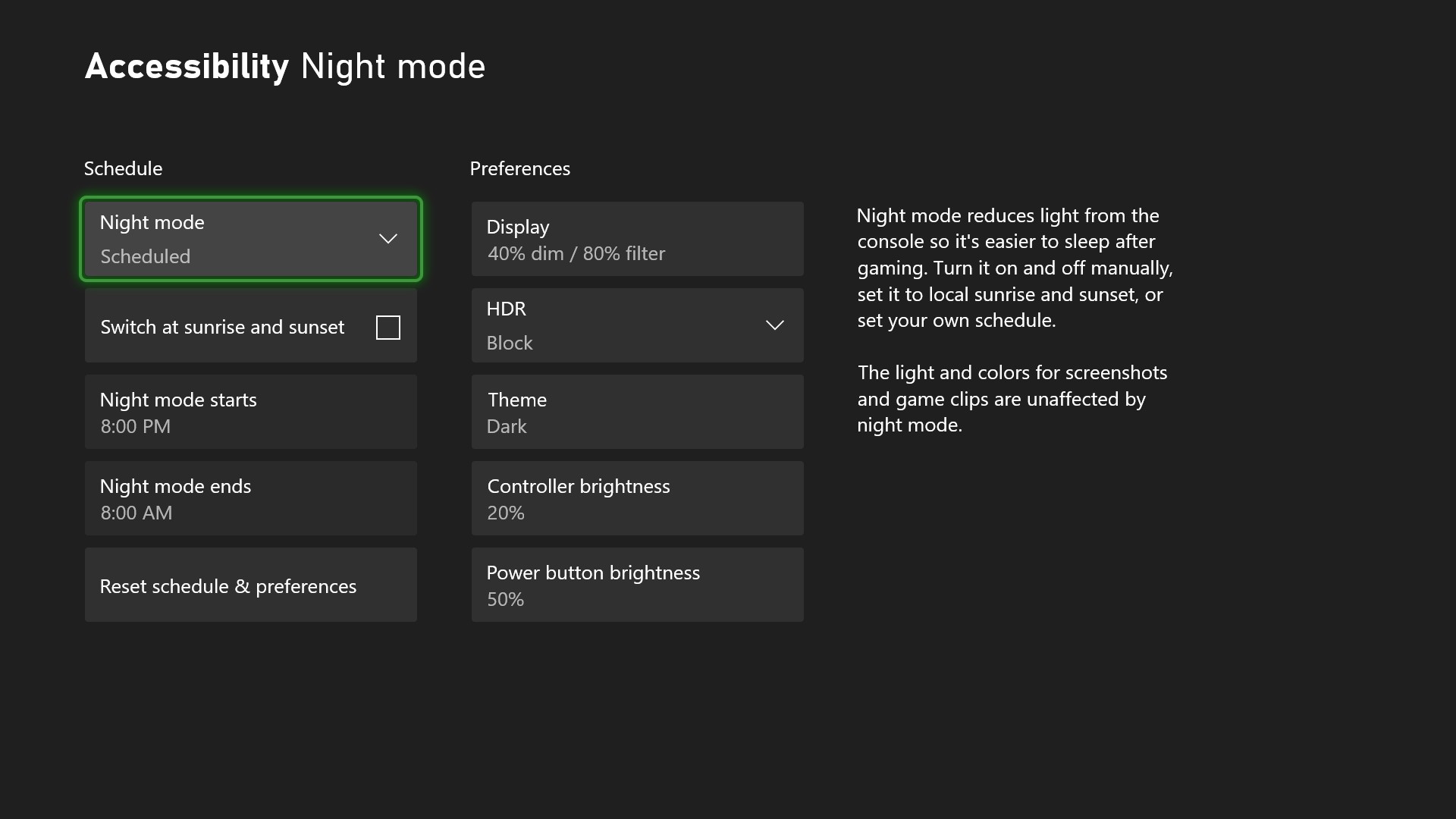
Xbox night mode is a suite of settings that adjusts light sources to help keep rooms dark at night and support gamers who are sensitive to light. You can dim and customize the light from the connected display, the power button on your controller, and the power light on your console. If you’re a movie fan, you can now enjoy theater-like total darkness while watching your favorite films!


In addition to dimming, Xbox night mode also adds a customizable blue light filter for your display. This feature is specific for Xbox Series X|S consoles.

All of this customization works across the Xbox system, apps, and games, and does not impact performance, screenshots or game clips.

You can also create a night mode schedule that will dynamically switch between Dark and Light theme. You can manually toggle night mode on and off, time it with the sunrise and sunset, or create your own schedule.


To start using Xbox night mode to dim and filter your screen, as well as dim your console & controller LED brightness, go to Settings > Accessibility > Night mode or Settings > TV & display options > Night mode.

Quick Settings
We are making it even easier for you to quickly access and customize your accessibility settings by adding the Quick Settings menu to the Xbox Guide. This allows you to quickly toggle accessibility features without leaving your game or app. It’s also a big benefit for families if you share a console with others who have different accessibility needs. You can use quick settings to switch features on or off, depending on who is currently using the console. That means everyone in the family can easily flip the settings to their tailored experience.


Please Don't Forget To Share:

Tuesday, June 16, 2020

SYSTEM UPDATE: Xbox June 2020 Update

Many Xbox gamers use a digital game library, downloading titles to their consoles through memberships like Xbox Game Pass, Xbox Live Gold or EA Access. This month we’re announcing updates that make it easier to manage that ever-growing digital games collection. The June 2020 Update is available now and includes improvements for digital game management, verified Official Clubs and more.


Managing Your Digital Games
Today’s game collections are often a mix of games played on a disc, purchased via a digital store, or downloaded with a subscription like Xbox Game Pass. All these great games can make it tough to decide which ones to keep local when you run low on storage space. The June 2020 Update adds overlays to game tiles in My Games & Apps, Home, and Guide to make it easier to tell at-a-glance where you got a game. This release will support games from Xbox Game Pass, Xbox Live Gold, and EA Access subscriptions.


Xbox Home, shown with new game tile overlays and membership badge.


Celebrating Your Membership
Members of any Xbox Game Pass membership or Xbox Live Gold will also now see a badge next to their Gamertag on Home and in the Guide, highlighting those memberships. In addition, we want Xbox Game Pass members to have an easier time finding their subscription-related content. When a new member joins, we will add the Xbox Game Pass content block to the top of their Xbox One dashboard so they can start discovering new games right away!

Official Clubs Get Verified
Team Xbox is always looking for ways to bring players together, and we love seeing how active Clubs have become on Xbox One since they were first introduced. Since the start, a plethora of fan-based and Official Clubs have cropped up, creating homes for communities within the Xbox ecosystem.

But how are Official Clubs different from fan-based ones? Official Clubs are created and managed by game developers and their community managers, and serve as an official source for information and updates. With all the Clubs on Xbox, it can be tough to immediately tell if the one you’re looking at is the Official Club. We’ve added verification badges to make it easier to see which Clubs are run by the developers directly.


Please Don't Forget To Share:

Tuesday, October 8, 2019

SYSTEM UPDATE: October 2019 Xbox Update Delivers New Features

October is here and we know many gamers are already spending quality time with their favorite horror games (we won’t judge if you turn the brightness up). But never fear, we’re here to share lots of new features and improvements with the October 2019 Xbox One Update, which begins rolling out to everyone today. This month’s update unveils new Family Settings options to balance your family’s screen time, Wish List notifications, improvements to the Mixer viewing experience on Xbox One, the ability to refer Xbox Game Pass titles to friends, and even more improvements based on your feedback. Read on for a breakdown on each new feature and update.


App and game limits for Family Settings
With the October 2019 Xbox Update, we’re taking additional steps to improve our existing family settings that work across Xbox One and Windows devices. We’re giving parents more control over what their children see and interact with on the devices in your home, which is part of our commitment to make gaming a fun, inclusive, and safe experience for everyone. For us, that means offering tools that provide choice so families can create the right balance of screen time in their lives.

With the new app and game limits feature, we introduce two new key elements to screen time:Parents can now set how much time their children spend within specific apps or games in addition to the total time spent on a device. Parents have the added option to set limits at the app or game level, enabling you to be more specific with how your kids are spending their time with technology.
The app and game limits you set will apply across Windows devices and Xbox One. We want to provide families the convenience of setting this up once, and letting it carry over across your child’s devices. This means one hour of a specific game or app per day is one hour of that game or app – no trying to sneak in extra screen time by switching from one device to another.
Check out today’s Family Settings announcement for a full overview.

Wish List notifications
We’re excited to see everyone enjoying the Wish List feature on the Microsoft Store! The October 2019 Xbox Update enhances this feature with notifications to alert you when an item in your Wish List has a price discount. The new Wish List notifications will make sure you never miss a great deal on games you want. Check out and update your current Wish List here.


Mixer viewing improvements
Mixer is integrating even further into the Xbox One experience with the October update. We’ve built a full Mixer viewing experience right into the dashboard with a focus on speed and simplicity. Viewers will no longer have to navigate to a separate app to enjoy Mixer streams, so getting to the content you want to watch has never been easier! Simply click the stream you’d like

Recommend an Xbox Game Pass title
Games are more fun when shared with friends. Xbox Game Pass for Console has a curated library of over 100 high-quality games, so you may find a gem that you want to share with your friends. You can now recommend a game from Xbox Game Pass for Console directly to your friend via a message or to your whole community via your activity feed or share to a club. Your friends will be able to easily get to the page for the games you recommend and can start downloading right away if they are an Xbox Game Pass member.

Recent Players improvements
Thanks to your feedback, we’ve made significant improvements to the Recent Players experience, making the service more reliable and allowing you to connect with the gamers you play with instantly. We understand the popularity of this feature and know it can be especially helpful with large-scale multiplayer games. You can now more quickly and easily engage with your Recent Players, whether you are sending a message, inviting players to a party, or adding them to your Friends List.

Under-the-hood game update improvements
Players can jump into their favorite games even faster with the October update. We’ve added improvements to automatic game updates, significantly reducing when you encounter the “update required” screen when launching a title.

Events app
Later this month, you may notice the Events app installed on your console. With Events, we will be introducing new ways for gamers to discover and be reminded of events happening within your favorite Xbox games or gaming communities such as a start of a new season or in-game holiday events. We’ll have more to share soon about how we plan to evolve this feature, so stay tuned for future announcements.

More flexible Capture Settings and Capture & Share experiment
The “Allow game captures” setting now has multiple options, giving you more control over your game capture experience. Previously, game capture could either be enabled or disabled in Settings, with certain games automatically recording memorable moments when this feature was enabled. With the October update, you may now select between “Captures by me,” “Captures by me or games,” or “Don’t capture” settings, providing you more choice over how you build your highlight reel.
In addition to the above, some people may also see an experimental update we are making to improve the Capture & Share experience. For now, we’re rolling out an improved “Capture & Share” tab for a limited portion of the Xbox One audience to gauge interest and collect feedback. We’re eager to hear their feedback before we share more.

The renamed “Capture & Share” Guide tab aims to improve usability by elevating your three capture options, “Record what happened,” “Start recording,” and “Capture screenshot,” to the top of the screen as well as allowing you to quickly revisit your last capture. When you’re ready to share, the following “Share to” menu has also been updated to focus more on what you want to do with your content – quickly and easily share it with your friends, the world via Twitter or your Xbox Activity Feed, or save it in your collection for safekeeping.


Please Don't Forget To Share:

Wednesday, July 24, 2019

NEWS: New Approaches to Home and Xbox Voice Commands Roll Out to Xbox Insiders


As Xbox Insiders, your feedback helps inform the decisions and updates we make on Xbox, from new features to how gamers interact with the console itself. Based on your valuable feedback, we’ve been continuing to iterate on two key experiences on Xbox, delivering you a faster Home experience and evolving the way we support Xbox voice commands to improve the voice experience.


Evolving Home
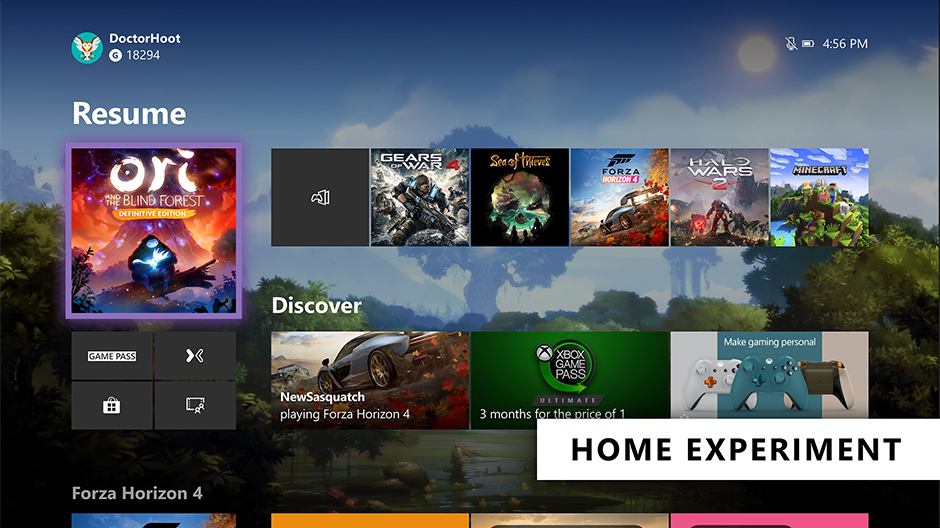
The Home on Xbox One is the first thing you see when you turn on your Xbox One, and we want to deliver an easy and seamless experience for you to navigate your console. We’ve heard your feedback and have continued to iterate on Home to get you into your gaming experiences faster and keeping more of your content front and center. With today’s update, we’re experimenting with a streamlined user interface.

With this new experimental Home design, the first thing you’ll notice is we’ve removed the Twists from the top of Home in favor of separate buttons that launch your gaming experiences. The goal is to let you jump into Xbox Game Pass, Mixer, Xbox Community and Microsoft Store quicker than ever. We’ve also shifted things around to make more room for your recently played titles.

We need your help testing out the new interface. The new experimental Home rolls out this week to select Xbox Insiders in our Alpha and Alpha Skip Ahead rings. For more details on rollout, keep an eye on the Xbox Insiders section of Xbox Wire. The Home experience will continue to evolve and change based on your feedback, so please let us know what you think and share your ideas for Home at the Xbox Ideas Hub. You may see this layout change and even come and go as we iterate on your feedback.

Changes to voice commands on Xbox One
Last fall, we expanded Xbox voice commands to hundreds of millions of smart devices by enabling Xbox One to connect with Xbox Skill for Cortana and Alexa-enabled devices. Xbox Skill continues to grow and change based on your feedback, including new updates that rolled out earlier this month.

Building on these efforts, we are now further evolving the way we support voice commands on Xbox and are moving away from on-console experiences to cloud-based assistant experiences. This means you can no longer talk to Cortana via your headset. However, you can use the Xbox Skill for Cortana via the Cortana app on iOS, Android, and Windows or via Harmon Kardon Invoke speaker to power your Xbox One, adjust volume, launch games and apps, capture screenshots, and more —just as you can do with Alexa-enabled devices today. We’ll also continue to improve the Xbox Skill across supported digital assistants and continue expanding our Xbox voice capabilities in the future based on fan feedback.

Starting this week, this update will roll out to our Alpha Skip Ahead ring and will fully rollout to all users this fall.  As part of these changes, this update will temporarily disable dictation for the virtual keyboard on Xbox One. Don’t worry though, our team is working to provide an alternative solution and will have more details to share soon.

SOURCE

Please Don't Forget To Share:

Monday, July 8, 2019

SYSTEM UPDATE: July 2019 Xbox Update Delivers New Features For Xbox Game Pass, And Xbox Skill For Alexa

Summer is here which means sunshine, cookouts and of course, gaming with friends after a long day outside. Team Xbox has been busy cooking up new features for the July 2019 Xbox Update, which begins rolling out today. This update includes a new way to interact with Xbox Game Pass, additional countries for the Xbox Skill for Alexa, and new Xbox Skill for Alexa voice commands. Here’s a rundown of what’s new:


New features for Xbox Game Pass
Xbox Game Pass offers a curated library of over 100 high-quality games on PC and console, available to download and play at full fidelity for one low-monthly price. Today, we’re rolling a new way to manage your Xbox Game Pass collection.

Play later – Play later enables you to make a list of games from the Xbox Game Pass catalog for you to come back to on your time, making it even easier to find your next game. Manage your collection from your Xbox console or the Game Pass mobile app and download your games when you’re ready.


Xbox Skill for Alexa – More countries and new voice commandsLast fall, we expanded voice control support by introducing the Xbox Skill for Alexa, which enables you to navigate and interact with Xbox One using voice commands through your Alexa-enabled devices. Today we are adding more supported countries and new Alexa voice commands to see what’s happening on Xbox Game Pass and check in with your Xbox Live friends.

*More countries – We heard our fans around the world loud and clear that they wanted Xbox Skill for Alexa support in their country. Today, we are excited to be adding support for customers in Australia, Canada, France, Germany, Italy, Mexico, and Spain. Click here to learn how to set up the Xbox Skill for Alexa.

*New Alexa voice commands for Xbox Game Pass and more – Have you always wanted to be able to use your voice to find out the latest games in Xbox Game Pass? Good news, so have we! The July 2019 Xbox Update introduces the ability to find out what’s new to Xbox Game Pass, what the popular games are, what’s leaving the catalog, and more; simply by asking Alexa. Try saying, “Alexa, ask Xbox what’s new on Game Pass?”

Want to stay up-to-date with what your friends are doing on Xbox? You can ask Alexa who’s online, what your friends are playing, and more. Try saying, “Alexa, ask Xbox what are my friends playing?”
Finally, you are now able to start pairing your controller with your Xbox from the convenience of your couch. Just say, “Alexa, ask Xbox to pair my controller.” to put your console into pairing mode!
For a full list of what you can say, check out this link.

These updates are based on feedback from our Xbox Insiders who have helped to shape these features. A huge thank you to all our Xbox Insiders for your valuable input and continued participation. If you’d like to help define the future of Xbox and get access to early features, download the Xbox Insider Hub app on your Xbox One or Windows 10 PC today and share your ideas at the Xbox Ideas Hub. You can also visit the Xbox Insider Blog here for the latest release notes and to learn more. Enjoy the July Update and happy gaming!

Please Don't Forget To Share:
Thursday, May 16, 2019

SYSTEM UPDATE: May 2019 Xbox Update, Getting Better Organized

Team Xbox is hard at work preparing for E3 and beyond, but we have a few new features that are rolling out broadly beginning today! The May 2019 Xbox Update includes improvements to your friends list, messaging, and better sorting in My Games & Apps. Here’s a rundown of what’s new:

Friends list now shows where your friends are playing
We know that your friends play games across many different devices, including Xbox One, Windows 10, and mobile. To make it easier for you to know what, and where, your friends are playing we are making an update to your friends list! With this feature, we are adding unique Xbox One, PC, or mobile icons next to each of your friends in your friends list showing you which device they are currently playing on.


Message Requests
Your messages are getting smarter. Xbox is adding a new Message Requests feature which will prioritize messages from your friends and anyone you want to communicate with while separating out messages from people you don’t know into a secondary message requests tab.
As part of this update, unfortunately all previous group messages will be lost in the transition and will require manual action to archive. If you want to back up any previous group messages, you can copy/paste them from Xbox.com for a limited time. Your messages with individual users will not be impacted. Please go here if you wish to review your messages.


Better Sorting in My Games & Apps
Our team has made it even easier to find the content you’re looking for in My Games & Apps. Articles such as “a,” “an” and “the” will no longer be used to sort titles when using the “Sort A-Z” and “Group by letter” views. For example, “The Witcher” will now be found under “W” instead of “T.” Thanks so much to our Xbox community for helping prioritize this change by voting in our recent “My Games & Apps” Idea Drive, and don’t forget to check the Xbox Idea Hub for other topics to which you can contribute.


These updates are available based on the input from our Xbox Insiders who have helped shape these features. Thank you to all of you for your valuable input and continued participation. If you’d like to help define the future of Xbox and get access to early features, download the Xbox Insider Hub app on your Xbox One or Windows 10 PC today and share your ideas at the Xbox Ideas Hub. You can also visit the Xbox Insider Blog here for the latest release notes and to learn more. Enjoy the May Update and happy gaming!

Please Don't Forget To Share:
Thursday, July 5, 2018

SYSTEM UPDATE: July Xbox Update Rolling Out Today

E3 may be in our rear view like a fall leaf in Forza Horizon 4, but we’ve been busy updating the Xbox experience and adding features that you’ve requested. The July Xbox Update adds features that make finding content even easier and offers a host of improvements to Mixer. Here’s what’s new:


FastStart Enabled for Select Titles
Announced back at E3 2018, FastStart is a new innovation from our Xbox Platform team that allows you to jump into your games twice as fast and play after downloading just a fraction of it. FastStart works by identifying which files are needed to begin playing and prioritizes the download of those files first, enabling you to quickly jump into full-fidelity gameplay while the remainder of your title downloads in the background. Simply find the FastStart-enabled title you want to play in our catalog, hit ‘Download’ and your console will take care of the rest. It’s that simple. What’s more, it’s now enabled for select English language titles in our Xbox Game Pass catalog, and will expand to more games in more languages over time. You can learn more about FastStart here.


Group Your Games and Apps
With so much content available, fans have asked for more options to organize libraries of games and apps.  Today, we’re introducing a powerful new enhancement to Pins, which we call “Groups.” With Groups, you can create multiple collections of content made up of anything from within My Games & Apps. You can also assign custom names to each Group, organize and order them, and add individual Groups to Home. Groups will appear across My Games & Apps, Home and Guide, so you’ll be able to access your Groups at a moment’s notice. Best of all, Groups are tied to your Xbox Live account, so they will automatically sync across multiple Xbox One consoles. We’ve started you off with a Group that should look very familiar — your Pins!

More Search Options
Searching for content is now even easier!  Now pressing the Y button anywhere in the dashboard will bring up the search dialog, allowing you to easily launch your content, sift through Settings, or find products in the Store.  This process is found in many apps, but now you can do it anywhere within the dashboard.  Not seeing enough results for your search? Hit enter or click the “more results” button to view a full page for your search results.


 Mixer Share Controller Improvements
We’ve made it easier to use Share Controller on the web. First, we’ve enabled full mouse and keyboard support for PC users, along with Share Controller Key Bindings.

Second, we’ve added multi-touch support for touch-enabled devices. This allows multiple controls to be used at the same time! For example, you can control the joystick and press A at the same time on your touch laptop.

And lastly, we’ve added a per-channel leaderboard that spotlights viewers who have contributed to a streamer’s channel the most during a Share Controller session.

Full Screen Broadcasting on Mixer
Mixer streamers can now go full screen with their webcam while broadcasting. You can switch to full screen webcam broadcasting at any time you want. While in this mode game audio is muted, making it perfect for talking to your audience while switching from game to game or setting up before you start playing. You can even do all IRL broadcasts!

For the best experience we recommend using one of these cameras:

  • Microsoft LifeCam Studio
  • Logitech HD Pro Webcam C922
  • Logitech Webcam C930e
  • Microsoft LifeCam HD-3000


Console broadcasting quality and stability improvements
We’ve made a number of changes and fixes to improve overall broadcast video quality.  You will now experience improved performance when broadcasting bandwidth-heavy multiplayer.

All of these updates are available because of the Xbox Insiders who have helped shape these features, so big thanks to all of you for your valuable input.  If you’d like to help create the future of Xbox and get access to early features, download the Xbox Insider Hub app on your Xbox One or Windows 10 PC.  You can also visit the Xbox Insider blog here for the latest release notes and to learn more. Happy gaming!


Thursday, May 17, 2018

SYSTEM UPDATE: May Xbox Update Becomes Available Today

Today the May Xbox One update arrives for gamers around the world.  As part of our ongoing effort to continually improve the Xbox experience, we’ve got a feature-packed update that enables you to get even more out of your console with some exciting new features. Here’s what’s new:


Connect with Gamers Across Xbox Live and Discord
In response to your feedback, you now have the option to link your Discord account to your Xbox account, making it easier than ever to see what your friends are playing. Starting from the Discord app on PC or on a mobile device, you will see an option to link your Xbox account with your Discord account through the Connections tab under User Settings. Click on the Xbox Live option and sign in to your account. After enabling permission, your accounts will be linked. Starting from your Xbox One, open the Account Settings menu and select “Linked social accounts.” Here, you will see a new option for linking your Discord account. Once you receive your unique code from Xbox, open the Discord app and insert the code within the Connections tab. After following these few simple steps, your accounts will be linked and your Xbox Live presence will be shared across Discord, enabling friends and users in your same Discord servers to see what you are playing on Xbox Live.

How To Set It Up: http://xboxoneguide.blogspot.com/2018/05/how-to-link-your-discord-account-to.html


120Hz Video Refresh Rate Support
Console owners already enjoy variable refresh rates, the option of 1440p resolution, and auto low latency mode (read more about that here).  In this update, we’re adding support for additional panel refresh rates. Gamers using monitors and televisions that support a 120Hz refresh rate can now turn on 120Hz support for 1080p and 1440p output resolutions on Xbox One S and Xbox One X. This high refresh rate option means you can now take full advantage of displays with 120Hz capabilities. High refresh rate support can provide a smoother gaming experience and lower latency on some displays, and games may benefit from reduced tearing and stuttering via 120Hz output.


Trim Clips Directly in the Guide
With the April Xbox Update, we added a new sharing feature that helps gamers upload their captured screenshots and videos directly to Twitter. Now, sharing is getting even quicker! With the May update, you can trim your recent game captures directly from the Guide, so you won’t need to switch to Upload Studio to make a quick cut to your saved clips.


Improved Family Settings
Xbox One continues to help parents keep their families safe with updates to family settings. We’re adding a “Details” page where parents can easily find and manage all family settings on Xbox One. Parents will easily be able to tell which family and content settings are set up and configured. Important settings that are turned off or require attention will be flagged for parents, as well. Some settings, such as activity reports and Screen Time Limits, can only be accessed through the web: We’ll identify those settings and provide links where parents can easily set them up.


New Intuitive Button Commands
Some of the button commands throughout the dashboard are being refreshed for easier navigation. For example, you can now use the “View” button on Home to edit the order of blocks or reorder items within Groups.  Pressing the “View” button on the main tab of the Guide will also now display additional capture options. Note: If you group your collections in My Games & Apps by letter, you will now need to select a letter to view all groups.


Improvements to the Xbox Accessories App
The Xbox Accessories app has been modernized to make it easier to navigate, and to look and feel more consistent with the rest of the Xbox One dashboard.


Monday, October 16, 2017

NEWS: New Fall Update for Xbox One starting to roll out today

Today we announce that the next Fall Update for Xbox One will begin rolling out today. Mike Ybarra has this post on Xbox Wire but here is a list of some of the new features in this update:


You can personalize your “Home” more than ever before: You can…
  • Make Home uniquely yours. Add your favorite games, friends, Xbox Live Gold, Xbox Game Pass, and more directly to your Home screen with a new concept that we call blocks. Once you’ve added blocks, you can remove or change the order of the blocks as you see fit.
  • Have up to 40 pins!  All these pins will appear in the Pin block on Home, as well as the Pins flyout in the new Guide!
  • Easily discover new things, such as friend activities, leaderboards, LFG posts, tips, quick links to Game Hubs, across both your console and Xbox Live at the top of Home.
  • Choose dark, light, or high-contrast theme option in Settings.
You’ll experience a fast, powerful and convenient Guide:
  • It’s now faster and easier to move left and right through horizontal tabs with the left thumb stick or bumpers.
  • When you bring up Guide while in an active party or broadcast, Guide will automatically open the party or broadcast section by default for faster access to controls.
  • New “Friends in games” flyout informs you of friends playing the same game.
  • Game invites wills how up in the Multiplayer tab of the guide.
  • The new Tournaments section in the Multiplayer tab of the Guide provides a quick portal into the official and community tournaments that you’ve joined. Enjoy more Xbox Arena tournament options with the addition of new titles.
Don’t worry about missing any actions when you step away from your console:
  • With the enhanced notification system, when your Xbox One is idle, time-sensitive activities and status are visible from far away.
  • The screen-dimming functionality has also been updated to better prevent screen ghosting, both when the screen is dimmed and when it’s showing notification snapshots of what’s happening on Xbox Live.
  • The newly redesigned Game Hub Welcome tab now features a summary of all the great content around the game on one page.
  • Profiles now enable faster access to recent activity. You can now easily manage who sees your activity feed content through the “Others can see your activity feed” privacy setting.
  • See more content at a glance with new Community feed, and view screenshots and game clips in an immersive, full-screen view.
TO VIEW MORE DETAILS OF THIS UPDATED CLICK "READ MORE"

Tuesday, August 8, 2017

SYSTEM UPDATE: Latest Xbox Update Releases To Insiders Starting Today


It’s an exciting day at Team Xbox as Xbox Insiders in the Alpha Ring will get a first look at the latest Xbox update. This release is the next major update for gaming on Xbox One and Windows 10 PC, and is designed to make the Xbox gaming experience more fun, personalized, and social than ever.

We’ve heard feedback from our fans that they want the ability to customize Home the way they want. This new experience on Xbox One gives gamers more choice and delivers fun faster. Updates to Home, Guide and Community are available today, with updates to Avatars, Game Hubs, Profiles and more coming this fall.


Customize Your Home: The first thing Insiders will notice is the new Home on Xbox One. This update is all about personalization; we’re putting the control in your hands, so that you can decide what to see when you turn on your console. The new look and feel is part of a design system called Microsoft Fluent Design; the look, feel, and movement of the dashboard has been updated to focus on speed, customization and expression—for you. Now, customize your Home screen to be uniquely yours, and view all the things you love at-a-glance. Have a favorite game or friend? Add them to Home!  Select one, press the Menu button on your controller, and select “Add to Home.”  This now creates an entire block of content that can be moved up or down—or removed altogether, should your interests or habits change. These blocks will evolve over time based on the things you like to do. For example, adding a game to your Home screen may pull in an Activity Feed post from the developer, show when your friends are playing that game online, suggest your next Achievement, and provide a quick shortcut to the Game Hub for that title. We’ll be adding additional types of content blocks in the coming months, so stay tuned for more. The team is always pushing to make the Xbox experience faster and faster. In this release, we’ve eliminated the wait between Home, Social, and My Games and Apps by consolidating them into one dashboard experience. No more splash screens means you get to fun even faster.


Effortless Guide Navigation: With this update, it’s faster than ever to switch between tabs in the guide so you can join friends, broadcast, switch between apps, and get back Home. New tab flyouts make it easier to see more content quickly, too. The new Guide layout quickly gets you to the stuff you care about, so you never miss a moment. It’s now even easier to switch between apps or get back to Home, and the new layout will enable you to quickly jump to different tabs using the left thumbstick, d-pad, or bumpers on your controller. Sign-in, Achievements, multiplayer (including parties, Looking for Group, and tournaments), People, Home and recent messages, broadcasts and captures, and a new action center (including settings) each have their own tab in the new Guide


A More Immersive Community: Staying connected with Friends and Clubs is now better than ever. The community section has an entirely new Activity Feed layout, showing more content at-a-glance.  When looking at feed items in detail, they are presented in an immersive, full-screen view—sharing the experience just as it was captured.  Reading comments is now much easier since the comment window can be expanded to fill the screen. You’ll now be able to skim the feed quickly or lean back on the couch and walk through it in detail – it’s entirely up to you. This makes it easier than ever to stay current with the games and friends you care about. Game Hubs, Profiles, and Clubs are also refreshed to make them more dynamic and engaging than ever before.  We’re also making Improvements to Club discovery, to quickly display which Clubs you’re already a part of, and easily discover new Clubs to join.  There will also be new titles that will be coming to Arena over the next few months, soon offering even more options for tournaments powered by Xbox Live.


Wednesday, March 29, 2017

UPDATE: Beam Streaming, Intuitive Guide And More Come To Xbox One Starting Today

Mike Ybarra, Head of Platform Engineering discusses new features coming to the broader Xbox One community starting today. Read the details below:

We’re excited to announce that we are shipping new features to the broader Xbox One community today. This is a big release, and includes Beam streaming, an updated Xbox experience with the new Guide, home improvements, and much more. One major goal for this release is to make streaming your Xbox gameplay even easier. And by updating the navigation of the Xbox console through the new Guide, we’re aiming to put the features and experiences you love the most right at your fingertips. For our PC gamers, or anybody who loves to create and play, check out this post on the Windows Blog to learn about the gaming updates coming with the Windows 10 Creators Update on April 11.

Here’s a detailed look at some of the top new Xbox Live features rolling out to Xbox One today, which we announced and released to Xbox Insider earlier this year:

*An updated look at Home: One of the first things you’ll notice with this update is a new look for Home on Xbox One. We made these changes to simplify the UI and increase overall system performance. To do that, we’ve optimized for speed and are prioritizing the most valuable content for your games. Now, you’ll see a smaller icon for the game with options to dive deeper into the community surrounding the game, as well as the ability to interact with your Club or find Looking for Group posts, view your Achievements and more. If you do not have a custom background set, you’ll see that the updated Home also spotlights the game you’re currently playing by featuring hero art as your Xbox background.


CLICK READ MORE FOR DETAILS ABOUT THE WHOLE UPDATE

Monday, March 20, 2017

UPDATE: Arena, Custom Gamer Pics, & Other Fan-Inspired Feature Updates Start Rolling Out To Insiders This Month

Starting this month, we’re rolling out several feature updates inspired by your feedback to select Xbox Insider members. These features will begin appearing over the next few weeks, and your use of these features and feedback around them helps shape our release plans to the broader Xbox community moving forward. Gamers are at the center of everything we do at Xbox – we value your opinions and want you to help evolve the Xbox experience. Over the past few months, we’ve released brand new features to Insiders including Beam broadcasting through the Guide on Xbox One and the Game bar on Windows 10, the Beam app to watch streams on Xbox One, Game Mode on Windows 10, and a preview of Xbox Game Pass. In addition to adding exciting new features, the team has been hard at work continuing to update existing features based on what we hear from you at Xbox Feedback. Below is a summary of what’s starting to ship over the next month to select Xbox Insiders.

Arena on Xbox Live 

  • World of Tanks fans will be able to participate in new tournaments on their Xbox One, created by ESL and powered by Arena on Xbox Live.
  • Discover tournaments from your Xbox One or Xbox app on Windows 10, get notifications when your match is ready, jump directly into your match on the Xbox One, enjoy automatic results reporting, and show off the results on your activity feed.

Profile and Activity Feed 
  • Custom gamerpics are finally here! From your console, Windows 10 PC, or mobile phone, update your gamerpic with a custom image. We’re excited to bring this top fan-requested feature to Xbox Live and expect it to be in preview longer than other features to ensure it’s great for everyone when released.
  • New ‘Join broadcast’ button in your profile, one of the many ways to access the game stream of someone broadcasting their gameplay.
  • Your profile will display your Arena tournament history and upcoming tournaments.
  • In your Activity Feed, we’re adding the ability to hide individual posts, pin posts to the top of your feed, and filter posts by friends, games or Clubs.

Clubs and Looking for Group (LFG) 
  • When you create an LFG post, as the owner you will be able to see new vetting cards that include hero stats from gamers interested in joining your party. Hero stats are contextual to the game you’re playing, showing you relevant stats like kill/death ratio, rank, or score.
  • Achievement hunters, this one is for you! You will be able to search LFG posts from the Achievements tab, related to the Achievement you’re trying to finish.
  • We’re adding the number of open LFG posts to the Game Hub and Club Hub headers.
  • Have you made a successful LFG post that you want to create again? Now you can see previous LFG posts that you have created, participated or shown interest in, and can copy them to create new posts.
  • When creating an LFG post, see all the recent tags you’ve used and easily select them.
  • Club owners can upload custom images for their Club logo and Club background. Just like custom gamerpics, we expect this to be in preview longer than other features to ensure it’s great for everyone when released.
  • Club owners and admins will be identified and labeled in their text posts to better help them stand out and manage their community.
  • Club owners and admins can pin a post at the top of their Club feed.

My Games and Apps, and Settings
  • In ‘My Games and Apps,’ we’re adding the ability to filter your game library by platform – Xbox One and Xbox 360.
  • Captive Portal support for wireless internet is coming to Xbox One, which allows for Wi-Fi authentication through a browser. Great for colleges, hotels, or public Wi-Fi locations.
  • In the Settings, we’re adding the ability to select Kinect auto-zoom for Beam and Twitch broadcasts, as well as for the Skype app.
  • On the Xbox app for Windows 10, we’re adding the option to select the audio input and output sources for Party chat.

These features will appear for select Xbox Insiders over the next few weeks. We look forward to hearing more from you, and are excited to update our features based on your feedback. Thank you!