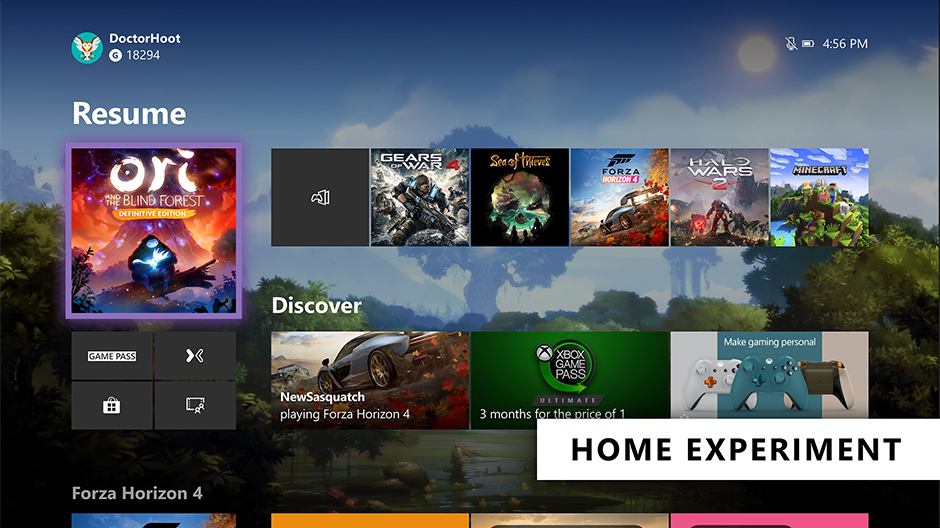
As Xbox Insiders, your feedback helps inform the decisions and updates we make on Xbox, from new features to how gamers interact with the console itself. Based on your valuable feedback, we’ve been continuing to iterate on two key experiences on Xbox, delivering you a faster Home experience and evolving the way we support Xbox voice commands to improve the voice experience.
Evolving Home
The Home on Xbox One is the first thing you see when you turn on your Xbox One, and we want to deliver an easy and seamless experience for you to navigate your console. We’ve heard your feedback and have continued to iterate on Home to get you into your gaming experiences faster and keeping more of your content front and center. With today’s update, we’re experimenting with a streamlined user interface.
With this new experimental Home design, the first thing you’ll notice is we’ve removed the Twists from the top of Home in favor of separate buttons that launch your gaming experiences. The goal is to let you jump into Xbox Game Pass, Mixer, Xbox Community and Microsoft Store quicker than ever. We’ve also shifted things around to make more room for your recently played titles.
We need your help testing out the new interface. The new experimental Home rolls out this week to select Xbox Insiders in our Alpha and Alpha Skip Ahead rings. For more details on rollout, keep an eye on the Xbox Insiders section of Xbox Wire. The Home experience will continue to evolve and change based on your feedback, so please let us know what you think and share your ideas for Home at the Xbox Ideas Hub. You may see this layout change and even come and go as we iterate on your feedback.
Changes to voice commands on Xbox One
Last fall, we expanded Xbox voice commands to hundreds of millions of smart devices by enabling Xbox One to connect with Xbox Skill for Cortana and Alexa-enabled devices. Xbox Skill continues to grow and change based on your feedback, including new updates that rolled out earlier this month.
Building on these efforts, we are now further evolving the way we support voice commands on Xbox and are moving away from on-console experiences to cloud-based assistant experiences. This means you can no longer talk to Cortana via your headset. However, you can use the Xbox Skill for Cortana via the Cortana app on iOS, Android, and Windows or via Harmon Kardon Invoke speaker to power your Xbox One, adjust volume, launch games and apps, capture screenshots, and more —just as you can do with Alexa-enabled devices today. We’ll also continue to improve the Xbox Skill across supported digital assistants and continue expanding our Xbox voice capabilities in the future based on fan feedback.
Starting this week, this update will roll out to our Alpha Skip Ahead ring and will fully rollout to all users this fall. As part of these changes, this update will temporarily disable dictation for the virtual keyboard on Xbox One. Don’t worry though, our team is working to provide an alternative solution and will have more details to share soon.
SOURCE
Please Don't Forget To Share: