Welcome to XboxIssues

Welcome. I decided to make this blog after being a Xbox Ambassador for a number of years.

If you don't know an Ambassador is a Volunteer that Microsoft uses to help ease the load on the actual hard working support people.

I noticed that alot of the questions I would get could easily be solved by using Microsofts Xbox.com site.

Since some of the help articles may be hard to find, understand or the issue may be called something different in the gaming community making it more difficult to solve, I've decided to make this blog to make it easier for fellow gamers to get xbox assistance, news and all things Xbox.

If you have any Xbox related question you can find the answer to feel free to contact me on YouTube, twitter or in the comments.
Showing posts with label Cortana. Show all posts

Wednesday, July 24, 2019

NEWS: New Approaches to Home and Xbox Voice Commands Roll Out to Xbox Insiders


As Xbox Insiders, your feedback helps inform the decisions and updates we make on Xbox, from new features to how gamers interact with the console itself. Based on your valuable feedback, we’ve been continuing to iterate on two key experiences on Xbox, delivering you a faster Home experience and evolving the way we support Xbox voice commands to improve the voice experience.


Evolving Home
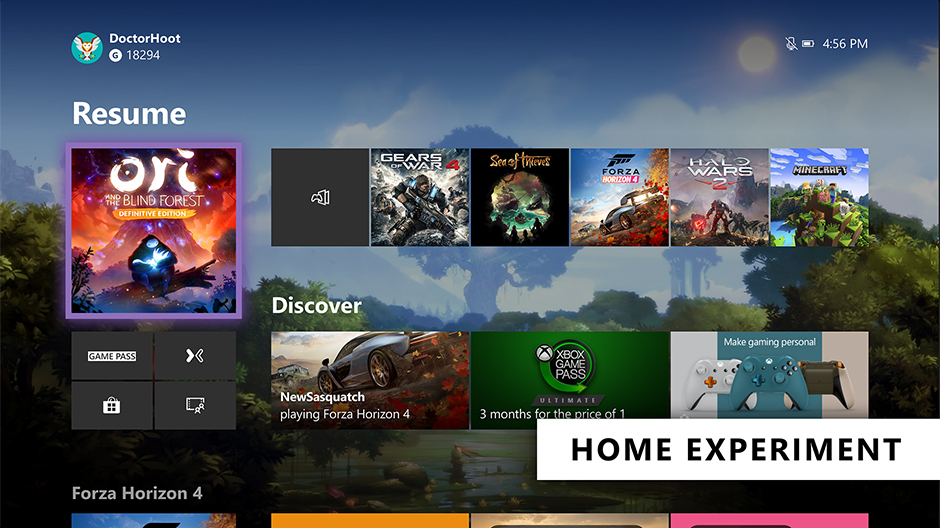
The Home on Xbox One is the first thing you see when you turn on your Xbox One, and we want to deliver an easy and seamless experience for you to navigate your console. We’ve heard your feedback and have continued to iterate on Home to get you into your gaming experiences faster and keeping more of your content front and center. With today’s update, we’re experimenting with a streamlined user interface.

With this new experimental Home design, the first thing you’ll notice is we’ve removed the Twists from the top of Home in favor of separate buttons that launch your gaming experiences. The goal is to let you jump into Xbox Game Pass, Mixer, Xbox Community and Microsoft Store quicker than ever. We’ve also shifted things around to make more room for your recently played titles.

We need your help testing out the new interface. The new experimental Home rolls out this week to select Xbox Insiders in our Alpha and Alpha Skip Ahead rings. For more details on rollout, keep an eye on the Xbox Insiders section of Xbox Wire. The Home experience will continue to evolve and change based on your feedback, so please let us know what you think and share your ideas for Home at the Xbox Ideas Hub. You may see this layout change and even come and go as we iterate on your feedback.

Changes to voice commands on Xbox One
Last fall, we expanded Xbox voice commands to hundreds of millions of smart devices by enabling Xbox One to connect with Xbox Skill for Cortana and Alexa-enabled devices. Xbox Skill continues to grow and change based on your feedback, including new updates that rolled out earlier this month.

Building on these efforts, we are now further evolving the way we support voice commands on Xbox and are moving away from on-console experiences to cloud-based assistant experiences. This means you can no longer talk to Cortana via your headset. However, you can use the Xbox Skill for Cortana via the Cortana app on iOS, Android, and Windows or via Harmon Kardon Invoke speaker to power your Xbox One, adjust volume, launch games and apps, capture screenshots, and more —just as you can do with Alexa-enabled devices today. We’ll also continue to improve the Xbox Skill across supported digital assistants and continue expanding our Xbox voice capabilities in the future based on fan feedback.

Starting this week, this update will roll out to our Alpha Skip Ahead ring and will fully rollout to all users this fall.  As part of these changes, this update will temporarily disable dictation for the virtual keyboard on Xbox One. Don’t worry though, our team is working to provide an alternative solution and will have more details to share soon.

SOURCE

Please Don't Forget To Share:

Wednesday, November 14, 2018

UPDATE: November 2018 Xbox Update With Keyboard/Mouse Support Rolling Out Today


Following an info-rich X018 event with a ton of announcements, Microsoft is releasing some new Xbox One features that start rolling out today. The November 2018 Xbox Update adds new ways to play some of your favorite games with mouse and keyboard support, more console interaction with Xbox Skill updates, listen to your favorite songs with the new Amazon Music app, and the ability to find your games faster than ever via improved Search. Here’s a rundown of what’s new:


Mouse and Keyboard Support for Xbox One

As revealed by Phil Spencer on the September episode of Inside Xbox, the November update brings mouse and keyboard support to Xbox One! With support for mouse and keyboard, developers can now choose to add mouse and keyboard support for their games on Xbox One. This enables both developers and players with more choice on how they want to play.

Announced at X018, Fortnite will be one of the first titles to support mouse and keyboard input, matchmaking players using the same input together with one another to ensure a fair and fun experience for everyone. Fortnite’s support for keyboard and mouse launches alongside previously announced Warframe via today’s update, with Bomber Crew, Deep Rock Galactic, Strange Brigade, Vermintide 2, War Thunder and X-Morph Defense adding support in November, and Children of Morta, DayZ, Minion Master, Moonlighter, Vigor, Warface, and Wargroove adding support in the future.

Additionally, we’re partnering with Razer to offer gamers a premiere mouse and keyboard experience through an all new Razer-created ‘Designed for Xbox’ mouse and keyboard. Built from the ground up for gaming on Xbox One and Windows 10, it will come equipped with a dedicated Xbox key, and support for the new Xbox Dynamic Lighting capability – enabling immersive game-controlled lighting effects.

Try out mouse and keyboard in some of your favorite games today and be sure to tune into CES in January to learn more about the ‘Designed for Xbox’ mouse and keyboard coming from Razer.

Xbox Skill for Cortana and Alexa Updates
Launched in the U.S. last month, the Xbox Skill for Cortana and Alexa allows gamers to get more done using just their voice. This feature will continue to grow and improve over time, based on fan feedback. Coming this week, we have the first set of updates:

  • Alexa Beta for the U.K. (EN-GB): The Xbox Skill for Alexa is now in Beta for all Xbox gamers in the U.K. with the addition of U.K. English voice recognition. To get started with Alexa, just say, “Alexa, open Xbox.”
  • Cortana improvements: In the U.S, the Xbox Skill for Cortana becomes easier to use. Cortana will automatically discover and pair your Xbox, so there’s no need to login. Just say “Hey Cortana, pair my Xbox” to any Cortana device (mobile phone or Harmon Kardon Invoke speaker). Try your favorite commands, like “Hey Cortana, start Netflix” or “Hey Cortana, pause my Xbox.” Get started with the latest Cortana on Android or Cortana on iOS app this week.
  • New Commands added: In response to fan feedback, we’re adding a few new commands to both the Cortana and Alexa skill. Now, you have the ability to fully close a game or app via “Quit [game or app name]” or use your assistant as a controller with our new navigation mode. This lets you use your voice to hit the “A” button or navigate around your console (e.g. up, down, left, right, A button, B button). Just say “Start navigation mode” or “Press [button name]” to try it out!

 Amazon Music app comes to Xbox One
Amazon Music is launching a brand-new app for Xbox One in the U.S. on Nov. 14th, with availability in more countries coming soon. The Amazon Music app for Xbox enables Amazon Music Unlimited subscribers to stream more than 50 million songs and thousands of playlists and stations through their Xbox One family of devices. Prime members can also use the app to stream more than two million songs and hundreds of playlists and stations at no additional cost to their membership with Prime Music. Download the new Amazon Music app from the Store today!
Search Expansion

We’re expanding search to include results from Xbox Assist and games you have “Ready to Install” or currently own as part of your memberships, including Xbox Game Pass, EA Access, and more! This makes it easier than ever to find the game you are looking for and start playing.

These updates are available because of the Xbox Insiders who have helped shape these features, so big thanks to all of you for your valuable input. If you’d like to help create the future of Xbox and get access to early features, download the Xbox Insider Hub app on your Xbox One or Windows 10 PC today. You can also visit the Xbox Insider Blog here for the latest release notes and to learn more. Enjoy the November 2018 Xbox Update and happy gaming!


SOURCE


Please Don't Forget To Share:

Wednesday, August 31, 2016

HOW TO: Turn Cortana Off On Xbox One

If you are like me and feel that saying "Hey Cortana, Record That," takes too long and you actually miss the moment. This will tell you how to turn Cortana Off

Turning off Cortana will return your Xbox One to the default voice commands, which are triggered by saying "Xbox..." followed by your orders. Cortana specific commands such as "Cortana, what's the weather like?" or any of the natural language commands relating to Xbox Live will no longer work as a result of this. Additionally, you will no longer be able to use voice commands via a headset as Cortana will revert to her legacy, Kinect-only implementation.


  1. Double tap the Xbox logo button on your controller. Or, if you're using a Kinect or headset microphone, just say "Hey Cortana, go to settings" and skip to step #3.
  2. Select Settings. It is the gear icon.
  3. Select All Settings.
  4. Select System.
  5. Select Cortana Settings.
  6. Tap the A button on your controller. Cortana will snap to the right side of the screen.
  7. Tap down to select the toggle in the Cortana pane.
  8. Tap the A button to switch Cortana off. You will be prompted that your Xbox will require a restart for this change to take effect.
  9. Select Reset console. Your Xbox One will reboot with the legacy voice commands enabled instead of Cortana.


How to turn on Cortana on the Xbox One

  1. Double tap the Xbox logo button on your controller. Or, if you're using a Kinect, just say "Xbox, go to settings" and skip to step #3.
  2. Select Settings. It is the gear icon.
  3. Select All Settings.
  4. Select System.
  5. Select Cortana Settings.
  6. Tap the A button on your controller. You will then be guided through some telemetry agreements and prompted to reboot your Xbox.


Monday, June 6, 2016

NEWS:Here is What's Coming in the Xbox Summer Update

Starting this summer, Xbox One and the Xbox app will receive the first of two updates that will help you stay connected with friends on Xbox Live and enjoy even more games across your favorite devices. Cortana will come to Xbox One; the Xbox and Windows Stores will start to become unified; we will begin to introduce your top PC games with Game Hubs to Xbox Live, and more. These updates are crucial to giving our fans around the world a great gaming experience wherever and whatever they play.

Here are some of the features that are expected to start to rollout to Xbox One Preview this week, and the Xbox app (beta) in the coming weeks:


Xbox One

Cortana on Xbox One:
Cortana is coming to Preview in the U.S., U.K., France, Italy, Germany and Spain first, and gamers can expect the familiar Cortana experience found on other Windows 10 devices. Cortana voice commands on Xbox One will work with both headsets and Kinect. You’ll be able to use Cortana to find great new games, see what your friends are up to, start a party, accomplish common tasks, turn on your Xbox One if you’re using Kinect, and more. We’ll continue to build Cortana features over time and our vision is to use Cortana to help elevate your experience as your personal digital assistant for gaming. Just say “Hey Cortana” or launch the app to get started!


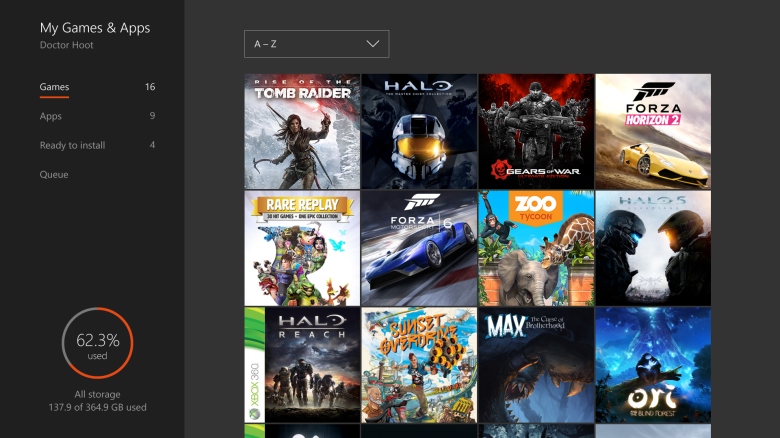
New Game Collection: We’re updating the Game Collection interface to make it faster and easier to find and launch the games you’re looking for. Now you’ll be able to see more of your Game Collection, quickly access your own ‘Ready to Install’ tab, and get more information about titles in your queue.


Facebook Friend Finder on Xbox One: Facebook Friend Finder is expanding from the Xbox app to Xbox One and is a great way to find and add your Facebook friends on Xbox. As more gamers link their Facebook and Xbox Live accounts, you’ll start seeing more suggestions for Facebook friends to add and game with on Xbox Live.


Improved sharing on Xbox One: We’ve made it easier to share your screenshots, GameDVR clips, and achievements on Xbox One. Gamers can now share their most epic clips and captures with the community in fewer steps.


Xbox app and Windows 10 gaming


  • Edit and share GameDVR clips on any video editor: Create that perfect gaming montage with your favorite video editor with clips you recorded on either Xbox One or your PC. Once you’re finished editing, you’ll be able to upload the clip back to Xbox Live through the Xbox app. 
  • Updated GameDVR management: You can now manage your captures straight from your profile. This new destination allows you to share, start your own uploads, and see progress in the queue. 
  • 60 fps game clip recording with the Game bar: Using the new “Very High” video quality setting in the Xbox app, you will be able to record your game clips in up to 60 frames per second (in addition to 30 frames per second) easily, all from the Game bar (Windows + G). 
  • Share to Twitter from Xbox app: In the Xbox app, you’ll be able to share game clips and screenshots from Xbox Live to Twitter through the sharing options on each capture. 
  • Windows Game bar improved full-screen support: One of the most common requests we see for the Windows 10 GameDVR feature is the ability to use the Windows Game bar with more games running in full-screen. We’ve added support for six additional games in full-screen mode with Windows game bar: League of Legends, World of Warcraft, DOTA 2, Battlefield 4, Counterstrike: Global Offensive, and Diablo III. With those games, you can now use Windows + G to bring up the Windows Game bar when the game is running full-screen.


Xbox One and Xbox app 

Top PC games show up on Xbox Live: We’re bringing the top PC games like League of Legends and XCOM 2 together with the Xbox Live community. Meaning, your favorite PC games will have their own Game Hubs on Xbox Live. Whether you’re on your PC, Xbox, or mobile phone, you’ll be able to see what PC games your friends are playing, share your own PC gaming clips and screenshots with the community, and message your friends on Xbox Live. On both Xbox One and Windows 10 PCs, you‘ll also be able to party chat with your friends no matter what they’re doing.


Xbox and Windows Store convergence: We’re starting to combine the best of the Xbox Store and Windows Store to give gamers a single cohesive experience across their devices. On Xbox One, we’ve streamlined the shopping experience to help you find the games you love faster and at the best prices. You’ll be able to filter, browse and search results by genre, read reviews written by fellow gamers – including those voted “most helpful” by the Xbox Live community, easily recognize what titles are on sale with strikethrough pricing in lists, and more. We’ve also added several new channels to help you discover the content you love even faster. On the Windows Store, we’re adding support so gamers can browse and purchase bundles, episodic games, season passes, virtual currency and other game add-ons and DLC.


More personal Activity Feed: Being able to choose what’s posted to your Activity Feed across Xbox One and the Xbox app is a big fan-requested feature. With the new settings, you can now decide what will get automatically shared to your feed. You can now also craft the perfect Activity Feed posts. At the top of your Activity Feed, easily access and choose from recently unlocked achievements and captures, preview what your post would look like, and then share your greatest gaming moments.


For the update coming this summer, we’re taking the same approach we used for the New Xbox One Experience with an opt-in program to let fans choose how they want to participate. We’ll begin testing a set of features expected this week with an opt-in audience in Xbox Preview. Like all Preview releases, the features are a work-in-progress as we refine them before they launch to the broader community, and some features can stay in Preview for extended periods of time. Additionally, we’re merging the Windows Insider program with the Xbox One Preview program to streamline feedback and updates.

As we continue to evolve the Xbox experience, we appreciate each and every suggestion provided on Xbox Feedback. In just this past year, we’ve released more than 200 new features inspired by fan feedback on Xbox One through our regular updates and the New Xbox One Experience. In the upcoming months, the team will be focusing all of our efforts on the next two updates and won’t be releasing an update every month.

We’re very excited for the Xbox update coming this summer. Keep the feedback coming and thanks for helping make Xbox great! I’ll see you on Xbox Live.




Wednesday, March 30, 2016

NEWS: Background music and more coming to Xbox One

An Excerpt from the Windows 10 Anniversary Update


4. UWP apps come to Xbox through a Unified Windows Store and every Xbox One can become a dev kit

Gaming gets better with the Windows 10 Anniversary update, including background music and Cortana coming to Xbox One. Cortana can become your personal gaming assistant and help you find great new games, new challenges or tips and tricks. On Xbox One, we’re continuing to deliver on top fan-requested features like support for multiple GPUs and the ability to turn off v-sync. Game developers have access to a fully open ecosystem with the Universal Windows Platform, making it easy to bring the games people love to both Xbox One and other Windows 10 devices. With the Anniversary Update, any Xbox One can be a developer kit with Xbox Dev Mode, enabling anyone to develop for the living room. And, the Windows Store will offer a unified store experience for all developers, creating new opportunities to reach millions of new customers.


Thursday, June 18, 2015

NEWS: MS Plans Xbox One dashboard update includes a huge new design and Cortana

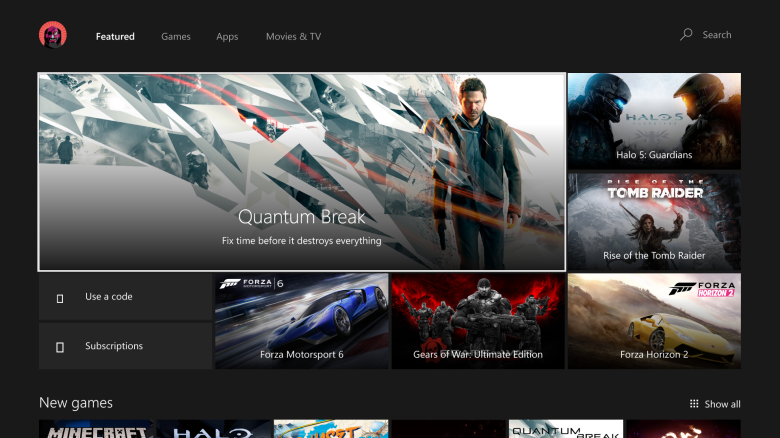
Microsoft is planning to update its Xbox One console with a huge new update. The software giant provided an early look at a new dashboard update today, which is said to be "coming soon," and there are a lot of changes. Firstly, Microsoft appears to be moving away from the tiled interface that was introduced with the Xbox One. The new dashboard includes features that focus on speed and performance, and a design that's a lot more simplified.

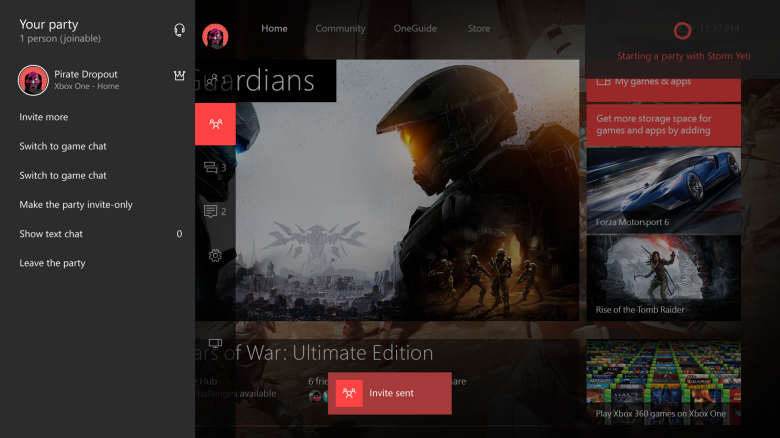
There's one-click access to things like sharing or achievements, and a new pane that can slide in when you double-tap the Xbox button on a controller. The pane appears to be the quickest way to access notifications, messages, quick settings, and your friends list. If you're using a party on an Xbox One then this will be shown in the quick pane, and it's easy to add and remove friends from party chat. There's also a new trending section on the right that highlights top Xbox gamers, suggested friends, and a lot more.


he biggest new addition is Cortana integration. It looks like Microsoft's Kinect system will be getting a big upgrade. Microsoft demonstrated Cortana on Xbox One today, and the commands are a lot more powerful than what exists today. Saying "Hey Cortana, record the last minute and share it to my activity feed" will publish a game clip straight away. Likewise, "Hey Cortana, start a party and invite Amanda" will invite a friend into a voice chat all without having to lift your fingers from your controller. Cortana appears in the top left of the interface and works in the background. It's not clear whether you'll need Kinect to use Cortana, or whether a headset will work, but the integration looks impressive.


Microsoft isn't stating exactly when this new Xbox One dashboard update will be rolled out, but the company does say it's "coming very soon" and arriving in the fall. So expect to see this debut some time after Windows X is available next month.