Welcome to XboxIssues

Welcome. I decided to make this blog after being a Xbox Ambassador for a number of years.

If you don't know an Ambassador is a Volunteer that Microsoft uses to help ease the load on the actual hard working support people.

I noticed that alot of the questions I would get could easily be solved by using Microsofts Xbox.com site.

Since some of the help articles may be hard to find, understand or the issue may be called something different in the gaming community making it more difficult to solve, I've decided to make this blog to make it easier for fellow gamers to get xbox assistance, news and all things Xbox.

If you have any Xbox related question you can find the answer to feel free to contact me on YouTube, twitter or in the comments.
Showing posts with label New Xbox One Experience. Show all posts

Wednesday, July 24, 2019

NEWS: New Approaches to Home and Xbox Voice Commands Roll Out to Xbox Insiders


As Xbox Insiders, your feedback helps inform the decisions and updates we make on Xbox, from new features to how gamers interact with the console itself. Based on your valuable feedback, we’ve been continuing to iterate on two key experiences on Xbox, delivering you a faster Home experience and evolving the way we support Xbox voice commands to improve the voice experience.
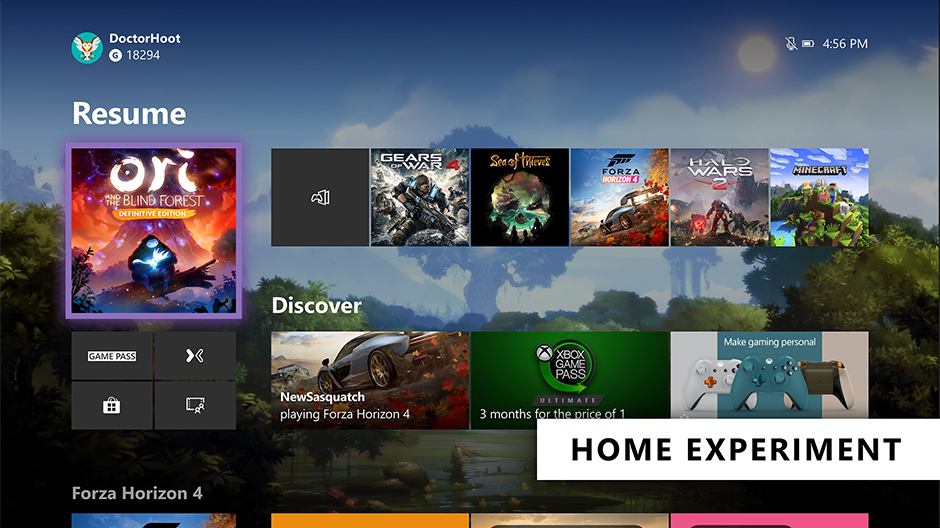


Evolving Home
The Home on Xbox One is the first thing you see when you turn on your Xbox One, and we want to deliver an easy and seamless experience for you to navigate your console. We’ve heard your feedback and have continued to iterate on Home to get you into your gaming experiences faster and keeping more of your content front and center. With today’s update, we’re experimenting with a streamlined user interface.

With this new experimental Home design, the first thing you’ll notice is we’ve removed the Twists from the top of Home in favor of separate buttons that launch your gaming experiences. The goal is to let you jump into Xbox Game Pass, Mixer, Xbox Community and Microsoft Store quicker than ever. We’ve also shifted things around to make more room for your recently played titles.

We need your help testing out the new interface. The new experimental Home rolls out this week to select Xbox Insiders in our Alpha and Alpha Skip Ahead rings. For more details on rollout, keep an eye on the Xbox Insiders section of Xbox Wire. The Home experience will continue to evolve and change based on your feedback, so please let us know what you think and share your ideas for Home at the Xbox Ideas Hub. You may see this layout change and even come and go as we iterate on your feedback.

Changes to voice commands on Xbox One
Last fall, we expanded Xbox voice commands to hundreds of millions of smart devices by enabling Xbox One to connect with Xbox Skill for Cortana and Alexa-enabled devices. Xbox Skill continues to grow and change based on your feedback, including new updates that rolled out earlier this month.

Building on these efforts, we are now further evolving the way we support voice commands on Xbox and are moving away from on-console experiences to cloud-based assistant experiences. This means you can no longer talk to Cortana via your headset. However, you can use the Xbox Skill for Cortana via the Cortana app on iOS, Android, and Windows or via Harmon Kardon Invoke speaker to power your Xbox One, adjust volume, launch games and apps, capture screenshots, and more —just as you can do with Alexa-enabled devices today. We’ll also continue to improve the Xbox Skill across supported digital assistants and continue expanding our Xbox voice capabilities in the future based on fan feedback.

Starting this week, this update will roll out to our Alpha Skip Ahead ring and will fully rollout to all users this fall.  As part of these changes, this update will temporarily disable dictation for the virtual keyboard on Xbox One. Don’t worry though, our team is working to provide an alternative solution and will have more details to share soon.

SOURCE

Please Don't Forget To Share:

Tuesday, January 5, 2016

HOW TO: Play Xbox 360 games on Xbox One (NXBOE)

So it's the New Year, everyone now has their shiny new Xbox Ones with the New Xbox One Experience (NXBOE).  Most importantly everyone has backwards capability.

What is backwards capability, you ask?

You can play a growing number of your Xbox 360 games on Xbox One at no additional cost. With over 100 titles available now, and hundreds more in the months to come, Xbox One is now the best place to play your Xbox 360 games.

So how do I get to experience the greatest games lineup in Xbox history?


1. From the Xbox Home Screen go down to My Games and Apps
2. In My Games and Apps scroll to the right until you find the "Ready To Install" section
3. Find any Xbox 360 game that was digitally purchased and is backwards compatible
4. Click the game and install, once installed just go back to "My Games and Apps" and select the game and play.

*If your Xbox 360 digital purchases do not show in the ready to install section make sure you purchased them using the same account that you use on the Xbox One, and make sure they are backwards compatibile by checking here: http://www.xbox.com/en-US/xbox-one/backward-compatibility/available-games

What if I have a game that shows on the Backwards Compatible list but it is on a Disc?

That's simple.  Just put the 360 Disc in to the Xbox One and the backwards compatible version will download and install, however you will still need the Xbox 360 disc in the Xbox One when you want to play that game.

Monday, November 16, 2015

NEWS: Button Remapping Now Available On Standard Xbox Wireless Controllers

As part of the New Xbox One Experience, we have added button remapping capability for standard Xbox One controllers through the Xbox Accessories App. This highly-requested feature offers a great alternative to remapping buttons on an individual game basis. Now each user on the console can have their own custom button mapping.

For those who want the ultimate degree of personalization, the Xbox Elite Wireless controller is the best choice for complete control. Here’s how the remapping capabilities compare across the Elite and standard controllers:


Standard controller remapping can be accessed in three ways through the New Xbox One Experience:

  1. Settings / Kinect & Devices / Devices & Accessories
  2. Settings / Ease of access / Button mapping
  3. Launch the Xbox Accessories app directly
For standard controllers, you can now swap button pairs. For example, if you choose to map LB to X, then X is automatically mapped to LB. This maintains that all buttons are always mapped on a standard controller. You can do multiple button swaps in sequence to move button commands to where you want them to be on the controller. When buttons are remapped on a standard controller, the remapping is not transferrable to other consoles. In other words, if you move to another console, you’ll need to go through the remapping process again with that new console. Remapping is available for both first party wireless and third party wired controllers. Remapping for standard controllers is available for Xbox One consoles only, with PC support to be confirmed at a later time.

For the Elite controller, the only required buttons that need to be mapped somewhere on the controller are A and B. Another unique remapping feature for the Elite Controller is that you can have multiple buttons mapped to the same function (e.g. multiple physical buttons or paddles can be mapped to X). Remapped settings are stored directly on Elite controller, so you can bring your custom settings to another console or PC.

On consoles, the Xbox Accessories app notifies users if their controller has an optional or mandatory firmware update. On the PC, the recently updated Xbox Accessories app can now be used to update the firmware on your standard controller, Elite controller, or Chatpad.

New Xbox One Experience background PSD template

The option to use a custom image for your Xbox One background has been available for quite some time, but now that the New Xbox One Experience is out, you might find its time to update your existing background. I asked the Xbox design team to create a Photoshop .psd template so you can easily create your own great looking custom made backgrounds for your Xbox One.

You can download the .PSD here (7 MB Zip File) 

Here is a refresher on how to set your own custom background.


Check out this subreddit for Xbox One Backgrounds.

Major Nelson: "I am providing this template as a community service. It’s not officially supported (don’t call Xbox Support for help.) If you have questions, feel free to ask them in the comments below and one of our community members may give you a hand."

HOW TO: Change the background of your Xbox One (NXOE)

Tired of looking at the same old background?

Here is how to change the background of your Xbox One with the New Xbox One Experience (NXOE) Update.

This is slightly different than it was on the old dashboard.


  1. Go to the Home Screen by pressing the Xbox button on the controller.
  2. Using the left stick move to the left.
  3. Go down to the settings options (the little gear)
  4. Select All Settings
  5. Go down to personalization
  6. Move right to My Color & Background press A
  7.  Select My background, and then select from the available choices on the Your background screen.


Achievement art. Allows you to use any of your app or game achievements as a background or to purchase background images. To do this, select one of your achievements and then select Set as background.

Custom image. Allows you to use an image from your Xbox One or upload one from a USB drive.
Note Custom images can only be used on the console where they were saved. You won’t see the background on any other console that you use.

Screenshot. Allows you to use one of your saved screenshots as a background image.

You can download a .PSD HERE to use as a template in Photoshop to make your own background.

Monday, November 2, 2015

NEWS: The New Xbox One Experience (NXOE) Launches In 10 Days

Starting on November 12, you will be able to update your Xbox One with the fastest and most social Xbox experience ever. And, you’ll be able to play Xbox 360 games on Xbox One at no additional cost. We’re delivering on some of the biggest requests you asked for – thanks for your continued input. The New Xbox One Experience is releasing alongside the greatest games lineup in Xbox history, making it an incredible holiday for gamers.


We’re going to give you a closer look at the New Xbox One Experience over the coming days, with today’s focus on your new Xbox One Home. We’ll be sharing more videos and updates, so check back often to see more details on what you can expect to see on Xbox One starting November 12.

When the update is released, the first thing you will see is a redesigned Home screen. The new design will look very familiar but we’ve made some important updates inspired by fan feedback. Your most recent items will still be front and center but we’ve added the ability to scroll vertically. You can scroll down to see the list of your most recently played games and apps, and each tile has contextual items that allow you to easily see messages straight from the developer, see which friends are playing games, and share your latest game clips and screenshots.


Pins are a fan favorite which enable you to save the games and apps that you care about most for quick access. In the New Xbox One Experience, your Pins are also included in your new Home at the bottom of the screen. You can scroll down or press the right trigger on your controller to quickly go straight to your Pins. You can also go straight to your Collection from your Pins to see all your games and apps – just pull the right trigger and then press A.

Another new feature we added that you’ll see on Home is a new tips tile. In the lower right corner of Home, you will see tips to help you get the most out of the New Xbox One Experience. For example, if you scroll down to your Pins frequently but haven’t used the right trigger shortcut to get to them faster, the tips tile will recommend you try it.

Tuesday, October 27, 2015

NEWS: New Xbox One Experience coming on Nov. 12

Microsoft is preparing a major update for Xbox One that will overhaul the look and feel of the user interface and, crucially, add backward compatibility support for a growing list of Xbox 360 games. It's called the New Xbox One Experience, and it's launching November 12, 2015.

The system update is currently being tested by members of the console's preview program. I'm not among them, but I've heard that certain apps are not working as intended, and had expected launch to happen toward the end of next month. Only a couple short weeks, now.


According to Microsoft, there are "over 100 titles slated for this fall, with hundreds more in the months to come." Back at gamescom in August, the company gave a list of publishers who plan to support Xbox 360 backward compatibility on Xbox One. That list includes 2K, Bandai Namco, Capcom, EA, Koei Tecmo, Sega, Square Enix, Ubisoft, and Warner Bros.


Source

Read More >>>>>

Friday, September 18, 2015

NEWS: The New Xbox One Experience Starts Rolling Out To Preview Today

Rolling out to a subset of preview program members in waves starting this weekend is the first hands-on look at the new Xbox One experience. At its core, the new Xbox One interface is centered around making it quick and easy for you to access and discover what you want, when you want. Our focus for the completely redesigned dashboard is speed, ease of use, and—of course—fan feedback.

The team at Xbox had a packed summer sharing what’s coming to Xbox One at E3 2015 and gamescom 2015, along with contributing to the launch of the best version of Windows ever for gaming: Windows 10. Throughout the summer, droves of Xbox fans have logged in and provided excellent feedback on Xbox One updates and the Xbox app on Windows 10. Today, we’re excited to take another step forward in bringing our vision to life for a new Xbox One experience.


This entirely new user experience is a work-in-progress and will undergo rigorous updating and polishing with the help of our Xbox One preview members. Here’s a closer look at what’s coming slowly to select early preview members in the first wave over the next week:


Read everthing new by clicking "Read More"

Friday, September 11, 2015

HOW TO: Opt-In To The New Xbox One Experience Preview

Microsoft is  getting ready for the release of the New Xbox One Experience to members of the Xbox One Preview Program. When it launches in November the New Xbox One Experience includes a completely redesigned Home, fast access to a brand new guide, new Community section, revamped OneGuide and more. But just like any other system update, Microsoft wants to do this with the help and feedback of our fans. Our team will be working to troubleshoot and polish the updated features until its release in November and we’re letting Preview members decide if they’d like to opt in or out of participating in the early look of some of the initial features.


Here’s how it works:

We will roll this update out over time to Preview members who opt in for it, starting with a set of Preview members who have historically submitted the most feedback. Our goal is to start with a group, get feedback on a set of features, then roll out to larger groups for additional feedback over time. It will not roll out to everyone at the same time. We’ll also be adding new features over time as we get closer to launch.

If you’re a Preview member, you’ll get an invitation sent to you in an Xbox Live message.

From the invitation, launch the Xbox Preview Dashboard and select the registration option.

You can then opt-in by selecting “Preview – New Xbox One Experience.”

If you don’t want to participate in this preview update, you will continue to receive “regular” Preview Program updates going forward. It will not remove you from the Xbox Preview Program altogether.

Over the next several weeks, new builds will regularly roll out to those who opt in, and our engineering team will work to improve the features and fix any bugs they identify during the preview testing.

We’ll release the New Xbox One Experience to all Preview members in waves following the initial opt in period so hang tight if you aren’t in the first few groups to get access. And of course, the whole reason we’ve opened up the Preview Program has been to gather your feedback and give you the opportunity to shape the future of Xbox One. Please, keep it coming and stay tuned for more news about the New Xbox One Experience. Thanks for all of your support.

Source

Tuesday, August 4, 2015

NEWS: New Xbox Hardware and Features Revealed

Xbox opened gamescom 2015 with highlights that will make the greatest lineup in Xbox history even better – including updates to the redesigned user experience coming this fall, more details on the Xbox Elite Wireless Controller, and the unveiling of the new Xbox Chatpad. Both the Xbox Elite Wireless Controller and the Xbox Chatpad are available to pre-order today and will be released in November.


New Xbox One Experience

As we announced at E3, gaming will get even better on Xbox One with a completely redesigned user experience launching globally this fall. The update will make it faster to get to your content and complete must-have tasks on Xbox One. It will also be easier than ever to find the games you love on Xbox One.


Among the new features available this fall is the new Community section we revealed at E3 that makes it easier to discover what your friends and others have been up to on Xbox. This section includes an upgraded Activity Feed and Trending on Xbox Live, a new area which allows you to interact with the most popular content, games, and people on Xbox Live. You can explore top posts, browse popular topics and view the game hubs of the most-played games, helping you more easily discover the top content within the Xbox Live community. You can also find interesting content creators and friend suggestions.

Xbox Elite Wireless Controller

At E3 we announced the new Xbox Elite Wireless Controller, built to meet the rigorous demands of hardcore, competitive-level gamers. The new controller, available for Xbox One or Windows 10, offers complete customization and flexibility. It includes thousands of different hardware configurations to choose from including interchangeable thumbsticks, D-pads and paddles to better configure the controller for any gaming scenario. It also features a new sleek design making the controller extremely durable and comfortable.


To enhance your experience, the easy-to-use custom application offers virtually unlimited ways of playing through software customization. Available on Xbox One and Windows 10 for the Xbox Elite Wireless Controller, you can create up to 255 controller profiles so that you have customized settings for any gaming scenario. With the app, you can remap buttons and paddles to be any of 14 different options.  Adjust thumbstick sensitivity, trigger set points, and rumble motors to feel just the way you want them. You can load two configuration profiles directly to the controller’s memory and instantly switch between them by sliding the Profile Switch on top of the controller.

Xbox Chatpad

Fans have been asking for an easier way to message with friend. Today we announced a new Xbox Chatpad. Coming this for Xbox One and Windows 10, the new Chatpad is available for pre-order today. With the new Chatpad, you can quickly compose messages, enter codes, and search for games and apps. It also puts audio controls at your fingertips and features a stereo jack for your gaming headset. Available mid-2016 on Xbox One only, two new programmable buttons will give you access to your favorite features like Game DVR, screenshots or apps at the touch of a button. The Xbox Chatpad is compatible with all Xbox One controllers and works with Xbox One and Windows 10.