Welcome. I decided to make this blog after being a Xbox Ambassador for a number of years.
If you don't know an Ambassador is a Volunteer that Microsoft uses to help ease the load on the actual hard working support people.
I noticed that alot of the questions I would get could easily be solved by using Microsofts Xbox.com site.
Since some of the help articles may be hard to find, understand or the issue may be called something different in the gaming community making it more difficult to solve, I've decided to make this blog to make it easier for fellow gamers to get xbox assistance, news and all things Xbox.
If you have any Xbox related question you can find the answer to feel free to contact me on YouTube, twitter or in the comments.
Showing posts with label Preview Program. Show all posts
Showing posts with label Preview Program. Show all posts
Feedback from our fans is important to all of us here at Xbox, and one of the more popular places to give feedback is through the Xbox Preview Program. Since the program launched in February 2014, your feature requests, ideas, and millions of votes have helped shape and improve your Xbox experience for the whole community. We’re happy to share news about what’s next for the Xbox Preview Program, including some improvements and more ways for fans to help shape the future of Xbox.
The first change is that the Xbox Preview Program is becoming the Xbox Insider Program. This new name reflects how we are expanding to offer opt-in opportunities to provide feedback on Game and App Previews alongside System Update previews.
Next, we have an update to the Xbox Preview Dashboard that has been rebuilt from the ground-up based on fan feedback. A few highlights include:
A new name – the Xbox Insider Hub
Personalized to give you more relevant announcements, quests, and Insider content opportunities to get early access to select games and apps
A new UI, inspired by the New Xbox One Experience, makes it easier to find the right info and provide more robust feedback
The Xbox Insider profile card where your contributions in the program come front and center
Support for multiple users on a console to participate and provide feedback
We’re starting to roll these changes out today to a small number of preview members who have provided the most feedback since the inception of the Xbox Preview Program. If you have your Xbox One console in Instant-on mode and you have the Xbox Preview Dashboard app installed, then you don’t have to do anything – the app will update automatically overnight. If you want to see the changes sooner, you can check for updates by going to My games and apps, and then looking at the updates section. Over the next few weeks, all existing Xbox Preview members will get access to the new Xbox Insider Hub.
Our final change is that the Xbox Insider Program will soon be open to all Xbox users. More fans will have the ability to provide feedback directly from their Xbox One consoles. The Xbox Insider Hub will provide great opportunities to try out games, apps, and other console experiences. Note that Xbox system updates will currently be limited to those already testing them (not open to new members), as we still have a huge number of volunteers already doing a great job testing and providing feedback. For more detailed info, check out the Xbox Insider Program FAQ located here.
Whether you’re an Xbox Insider who enjoys previewing the latest Xbox One system updates, or an Insider who loves checking out the beta of the latest installment in your favorite franchise, you’ll now get to choose how to participate. We hope you enjoy the new experience. Be sure to let us know what you think by taking surveys in the Xbox Insider Hub, or on the Xbox.com forums. Thank you for participating, and know that each of you is a huge part of making Xbox a great place for all of us to play!
This month’s update is all about our continued commitment to listen to all of you and transform the Xbox experience based on your feedback. Today, we’re excited to announce a few features that you’ve been asking for which are coming to Xbox One, the Xbox app, or both. The host of updates include top-voted Xbox Feedback requests such as the ability to purchase Xbox 360 Backward Compatible games on Xbox One and improving social features like Party Chat broadcasting to Twitch. The updates will begin to rollout to the Xbox One Preview audience starting today and to Xbox app (beta) members starting tomorrow.
Here’s what’s coming to Xbox One Preview:
– Purchase Xbox 360 Backward Compatible games on Xbox One: Fans have spent more than 30 million hours playing Xbox 360 games on Xbox One and so it’s natural that being able to purchase Xbox 360 Backward Compatible games on Xbox One ranks as one of your top requests. With this update, you’ll be able to do so! Find and purchase Xbox 360 Backward Compatible games the same way you would Xbox One titles and, once purchased, Xbox 360 Backward Compatible content will automatically download to your Xbox One and be ready to play!
– Include Party Chat in Twitch broadcasts: A top voted-for feature on Xbox Feedback, Xbox One Preview members will be able to broadcast Party Chat when using the Twitch app. If you are broadcasting from your console and in a party, you can invite other people to include their chat audio in your broadcast. If a member of your party declines, they’ll still be able to chat in the party; they just won’t be heard in the broadcast. Additionally, as the party leader, you have the option to mute a party member’s chat audio, even if they opted-in. You can also include party members on Windows 10 PCs in your Twitch broadcast.
– Output your Party Chat to headset and speakers simultaneously: Xbox One Preview members will be able to select their preference for where Party Chat audio is heard: their headset, speakers, or both. To do this, go to Settings – Display & Sounds – Volume.
– Customizable Game DVR recording length: Based on Xbox Feedback, it’s clear that fans want to be able to configure the length of their Game DVR recordings. Currently, Game DVR recording is fixed to a 30 second duration. With this update, Xbox One Preview members can adjust the recording length to 15 seconds, 30 seconds, 45 seconds, 1 minute, 3 minutes or 5 minutes. To change the preferences, visit Settings – Preferences – Game DVR & streaming.
– Track Achievement progress in the Xbox One guide: We’re making it easier to access your Achievements by including them in the Xbox One guide. In the new Achievements area you’ll find a quick link to see all of your Achievements and you’ll be able to track your Achievement progress in real time directly in the guide, without having to snap a separate Achievements app.
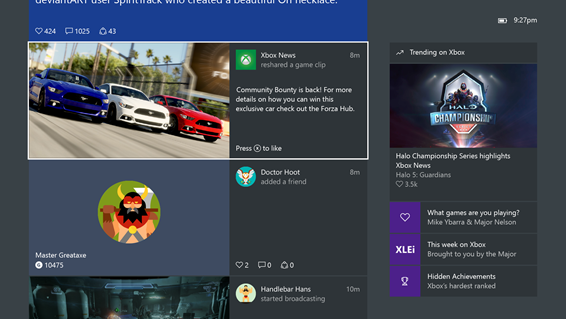
– Video playback directly in the Xbox One Activity Feed: We’ve made improvements to video playback in the Xbox One Activity Feed. Xbox One Preview members will be able to play an entire video inline rather than having to leave their feed to launch it. You can even ‘like’ the video while previewing it by pressing X. Preview members will also enjoy new pause, restart, and full-screen playback options, when they do choose to launch a video from their Activity Feed.
Here’s what’s coming to both Xbox One Preview and the Xbox app (beta) this month:
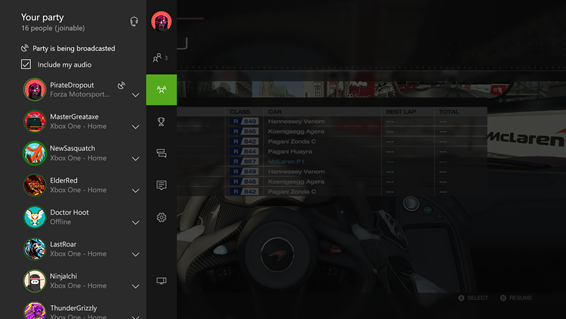
– 16-person Party Chat: Last fall, we expanded Party Chat to enable 12-person Parties on Xbox One and the Xbox app. This feature has been very popular with the community, so now we’re enabling 16-person Parties across both Xbox One Preview and the Xbox app (beta) starting today.
– Xbox 360 Achievements in Xbox One and Xbox app Activity Feeds: Starting this month for both Xbox One Preview and Xbox app (beta) participants, Xbox 360 Achievements will automatically post to your console and Windows 10 PC Activity Feeds. As with Xbox One game Achievements, the Xbox 360 Achievement graphic will feature a description of the Achievement, the game you earned it from, and the Gamerscore associated with it.
– Follow web links and YouTube videos from Game Hubs: Community managers of Game Hubs will now be able to populate Game Hubs with web and YouTube hyperlinks, making the Game Hubs experience even more interactive and engaging for gamers. For Xbox One Preview members, web links will display in a browser via the Edge app and YouTube links will open in the YouTube app. For the Xbox app (beta), links will open in your default web browser. As with any other item in your Activity Feed, you can caption, like, comment on, and share these links.
– Compare your Avatars: In Xbox One Preview shortly and releasing to the Xbox Avatars app later this month, you’ll be able to compare your Avatar with your friends’ Avatars. You can click through on a specific friend’s Avatar; preview their Avatar’s clothing, accessories and props on your Avatar; and also see how you can purchase or earn the items yourself. Using the ‘Compare Avatars’ feature will help you customize your Avatar leveraging the best of all your friends’ outfits! You can also compare your Avatar with anyone else’s in the Xbox Live community – just select ‘Compare Avatars’ when you are viewing another member’s profile.
– Reputation rating interface changes: The Xbox Live community is comprised overwhelmingly of players with positive reputations, and so, the vast majority of profiles are rated ‘good.’ As a result, we are changing our reputation interface to draw attention only to players who have been rated ‘needs work’ or ‘avoid me’. For Xbox One Preview and Xbox app (beta) members, ‘good’ players’ profiles will no longer feature a reputation gauge, however, gamers whose profiles are tagged ‘needs work’ or ‘avoid me’ will continue to feature the reputation flag.
CLICK READ MORE TO SEE WHAT'S COMING THE THE XBOX APP(BETA)
Xbox 360 Preview members can now send digital gift cards (available in the US, Canada, France, Germany, and the UK).
You can send a gift from the Social twist or the Xbox Guide by selecting the profile of the person you want to gift to and then selecting ‘Send Gift’. You will be asked for a gift amount and have an opportunity to confirm the purchase. The gift will be delivered as a token in an Xbox Live message and can be redeemed by the recipient by simply selecting “Redeem Code”.
Microsoft is rolling out a new set of features to Xbox One Preview program members starting today and Mike Ybarra from the Xbox & Windows Gaming Platform team discusses what’s included in this system update.
In November, we transformed Xbox One to make it the fastest and most social Xbox experience ever. We continue to evolve the Xbox experience based on your feedback and I’m excited to announce the first of a set of new features releasing in 2016. This month, we’re focused on continuing to improve social features to help you stay connected to the Xbox Live community across console and PC, while bringing these experiences closer together.
Brand new experiences and updates which will start to rollout to Xbox One Preview:
See who’s in a Party: Xbox One Preview participants will be able to see who’s in a Party before joining. When you view the profile of a friend who is in a Party in the guide, you will now be able to see who else they’re playing with. Click the ‘Chat’ button which appears immediately below the user to jump in and see who is in the Party.
Gamerscore Leaderboard: In Xbox One Preview, go to the Achievements section of your profile by clicking ‘View Achievements’ through the sign-in tab of the guide to check out the revived Gamerscore Leaderboard. Through the Gamerscore Leaderboard, see where you stand relative to your friends by comparing total gamerscore, as well as biggest gains over a rolling 30-day period. Click on the Gamerscore Leaderboard to see the full list of all your friends.
Re-arrange Pins on Home and access them offline: Many of you have told us that you want Pins on your Xbox One Home to be easier to organize. In Preview, you will now be able to rearrange individual pins. We also made Pins accessible for launching when you are offline.
Updating Activity Feed in Xbox One: Your activity feed in Xbox One Preview will inform you when there are new items in your feed. Clicking the link will take you to the top of your feed where you’ll see a run-down of the newest posts, so that you always have the freshest content at your fingertips.
Joinable Twitch Broadcasts: You want it to be easier to watch your friend’s game broadcasts. In Preview, Game Hubs as well as the game tile will allow you to easily launch Twitch.tv broadcasts if friends are broadcasting.
Improvements to Suggested Friends: Looking for people who you might know on Xbox or top content creators to follow? Check out the new Friend Suggestions area in Community and the Friends list in the Guide on Xbox One. Friend Suggestions include the gamertag, real name (if shared), gamerpic or Xbox Avatar image, and the reason the suggestion was made to you. Click through from the suggestion to view the member’s full profile and choose to grow your friends list.
Hide games from ‘ready-to-install’ list: Fans asked that we re-enable the ability to hide content like betas, trials, games, and apps that they no longer want to install. Xbox One Preview members will be able to start using this feature again.
Click Read More to see updates to the Xbox Beta App
Rolling out to a subset of preview program members in waves starting this weekend is the first hands-on look at the new Xbox One experience. At its core, the new Xbox One interface is centered around making it quick and easy for you to access and discover what you want, when you want. Our focus for the completely redesigned dashboard is speed, ease of use, and—of course—fan feedback.
The team at Xbox had a packed summer sharing what’s coming to Xbox One at E3 2015 and gamescom 2015, along with contributing to the launch of the best version of Windows ever for gaming: Windows 10. Throughout the summer, droves of Xbox fans have logged in and provided excellent feedback on Xbox One updates and the Xbox app on Windows 10. Today, we’re excited to take another step forward in bringing our vision to life for a new Xbox One experience.
This entirely new user experience is a work-in-progress and will undergo rigorous updating and polishing with the help of our Xbox One preview members. Here’s a closer look at what’s coming slowly to select early preview members in the first wave over the next week:
Today, Microsoft pleased to announce the next wave of updates for the Xbox app on Windows 10 rolling out today. In addition, just as they done on Xbox One, we’re releasing a new Xbox Beta app on Windows 10 later this month to offer a preview of coming updates before they become available. Let’s dive in.
Here’s a closer look of what’s rolling out today in the September release of the Xbox app on Windows 10:
Real-time Friends list presence. Your Friends list will automatically refresh with your friends’ on/offline status and the apps and games in which they’re currently engaged – including whether the game they’re playing can be joined via multiplayer or party.
Real-time Activity Feed updates. No need to hit refresh to see new Activity Feed items; keep the Xbox app open and your Activity Feed will let you know when there are new items to view, comment on, like, or re-share.
Game progress comparison. Feeling competitive? Discover how you stack up against your friends on specific game progress by visiting the Achievements section of your profile and selecting ‘Compare.’ You’ll enjoy a side-by-side comparison of your selected friends’ progress on games you’ve recently played, including game completion percentage, Gamerscore and Achievements earned.
Console text entry. We’re also bringing one of the most requested features from Xbox Feedback to the Xbox app on Windows 10 – the ability to use the Xbox app for text input on Xbox One. You will now be able to use the Xbox app and other inputs compatible with Windows devices – keyboards, touch keypads, and the like – to enter text in search boxes and more on Xbox One.
Introducing the new Xbox Beta app
Microsoft has embraced fan feedback for Xbox One updates via the Xbox One Preview Program, and similarly they are excited to introduce the Xbox Beta app, available later this month. The Xbox Beta app program gives fans an opportunity to provide early input on features and enhancements coming to the Xbox app on Windows 10, helping us shape the product based on fan feedback. To enroll later this month, visit the Windows Store to download and install the ‘Xbox Beta’ app.
Microsoft is getting ready for the release of the New Xbox One Experience to members of the Xbox One Preview Program. When it launches in November the New Xbox One Experience includes a completely redesigned Home, fast access to a brand new guide, new Community section, revamped OneGuide and more. But just like any other system update, Microsoft wants to do this with the help and feedback of our fans. Our team will be working to troubleshoot and polish the updated features until its release in November and we’re letting Preview members decide if they’d like to opt in or out of participating in the early look of some of the initial features.
Here’s how it works:
We will roll this update out over time to Preview members who opt in for it, starting with a set of Preview members who have historically submitted the most feedback. Our goal is to start with a group, get feedback on a set of features, then roll out to larger groups for additional feedback over time. It will not roll out to everyone at the same time. We’ll also be adding new features over time as we get closer to launch.
If you’re a Preview member, you’ll get an invitation sent to you in an Xbox Live message.
From the invitation, launch the Xbox Preview Dashboard and select the registration option.
You can then opt-in by selecting “Preview – New Xbox One Experience.”
If you don’t want to participate in this preview update, you will continue to receive “regular” Preview Program updates going forward. It will not remove you from the Xbox Preview Program altogether.
Over the next several weeks, new builds will regularly roll out to those who opt in, and our engineering team will work to improve the features and fix any bugs they identify during the preview testing.
We’ll release the New Xbox One Experience to all Preview members in waves following the initial opt in period so hang tight if you aren’t in the first few groups to get access. And of course, the whole reason we’ve opened up the Preview Program has been to gather your feedback and give you the opportunity to shape the future of Xbox One. Please, keep it coming and stay tuned for more news about the New Xbox One Experience. Thanks for all of your support.
Activity Feed is coming to the Xbox 360 Preview Program. Like, comment and share your friend’s activities, post new messages, watch game clips, view screenshots, and see what you’re friends are playing from your Xbox 360.
On your Xbox 360 you will see Xbox 360, Xbox One, and Windows 10 activity (achievements, text posts, GameDVR clips,
screenshots, broadcasts and more).
You will also be able to Like, Comment on, or Share any of those activities as well as post a new message to your feed.
To access the Activity Feed on your Xbox 360:
From Social, select your own avatar, then Activity Feed
You can also view a specific friend’s activity by selecting their avatar in Friends or their gamer card in the Guide. From their select View Activity Feed.
We’re continuing to improve Activity Feed with every new Preview update; use it yourself tonight.
Good news, Major Nelson announced over Twitter that if you own Gears of War or Shadow Complex on the 360 and you are in the Xbox One Preview program, these games will be backwards compatible starting today Aug 3 2015.
Xbox One Preview Members: Own Gears of War or Shadow Complex on Xbox 360? Play both for free via Back Compat pic.twitter.com/8PfrJmHA2N
Back in March we announced the Preview Program would expand to the Xbox 360 and work much like the Xbox One Preview Program – selected members would be able to sign-up directly from their Xbox 360 and once registered, have the opportunity to install system updates and experience the new or improved features before they release to the general audience. One of the most requested features at the Xbox Feedback website was for larger external storage for the Xbox 360.
The next update for Xbox 360 Preview Program members will allow the use of 2TB hard drives to store Xbox 360 data. If you are not part of the Preview program you will get this functionality later this year. In addition we will also no longer reserve space in advance on your hard drive. If you are using 16GB of hard drive space for games – we will only take 16GB of space. And just like today – you will be able to use two external drives at a time.
Note: Some drives may be incompatible or have performance issues. If you already have space reserved for storing Xbox 360 data, you will need to clear the Xbox 360 storage to gain full access to the drive. If you are in the Preview program, please review the list of known issues before formatting your drive.
As a reminder, the best way to recommend changes and improvements to the Xbox One or 360 is through the Xbox Feedback website. We appreciate your feedback and continue to work on improving the Xbox experience.