Welcome to XboxIssues

Welcome. I decided to make this blog after being a Xbox Ambassador for a number of years.

If you don't know an Ambassador is a Volunteer that Microsoft uses to help ease the load on the actual hard working support people.

I noticed that alot of the questions I would get could easily be solved by using Microsofts Xbox.com site.

Since some of the help articles may be hard to find, understand or the issue may be called something different in the gaming community making it more difficult to solve, I've decided to make this blog to make it easier for fellow gamers to get xbox assistance, news and all things Xbox.

If you have any Xbox related question you can find the answer to feel free to contact me on YouTube, twitter or in the comments.

Friday, July 21, 2017

NEWS: Play Destiny 2 Open Beta During The Multiplayer All Access Weekend

It’s simple — games are better with friends. Starting Friday, July 21 to Sunday, July 23, you can play online in any game you own with your friends for free during our Multiplayer All Access event on Xbox One and Xbox 360 — Xbox Live Gold membership not required.

And if you’re looking for a new multiplayer experience to try during the Multiplayer All Access Event, the Destiny 2 Open Beta on Xbox One also runs for free from July 21 to 23. Though let’s be real. You should play the Destiny 2 Open Beta even if you’re not actively looking for something new — it’s going to be spectacular.


As a reminder, these offers are only available from July 21-23, so log on your Xbox One or Xbox 360 now to get in on the action. For more details on Multiplayer All Access, visit Xbox.com.

Wednesday, July 19, 2017

HOW TO: Change Xbox One Privacy & Online Safety Settings (On Xbox.com)

Do you or one of your child account receive a message like this, "An Xbox Live Membership limitation does not allow you to use this feature" or something similar, when you are trying to use chat, messaging, share a clip or even try playing online?

Sound like you are having issues with your privacy and safety settings.

Here is how to Access and Change Xbox One Privacy & Online Safety Settings

You can change your child's privacy and online safety settings on the Xbox One console or online at Xbox.com. Content settings must be managed on the console.


  1. Using your favorite web browser, head over to xbox.com
  2. In the top right comer click, Sign In
  3. Now sign in using your Microsoft account info, if you are trying to change the privacy or security of a child account, make sure to log in using the parent's account
  4. Now click the user name or gamer tag in the top right corner
  5. On the drop down menu select "Xbox Settings"
  6. Under Privacy & online safety, select Privacy settings,  Online safety on Xbox One, or  Online safety on Xbox 3 60
  7. If you do not get a screen  listing your privacy,safety settings or similar, you are logged in under a Child's account and can't make changes, or something is wrong and you'll have to call support. . 
  8. Now Read each option carefully and change what you would like to.
  9.  Don't forget to click the save button at the bottom of the page

Tuesday, July 18, 2017

BACKWARDS COMPATIBILITY: Four Games Coming to Backwards Compatibility Today

It looks like we will be getting four more classic Xbox 360 games playable on the the Xbox One via Backwards Compatibility.

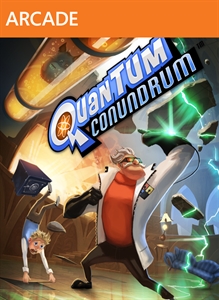
Costume Quest 2, Virtua Fighter 2, Quantum Conundrum & Frontlines:Fuel of War are coming to Xbox One Back Compatibility today.

*As always, those that own these games digitally will be able to download them again for free from the "Ready to Download" section of the Xbox One


Trick, treat and pick a fight with villainous dental soldiers in Costume Quest 2, the sweet sequel to Double Fine’s hit original, Costume Quest, that turned fans of all ages into candy obsessed crusaders. This inspired RPG adventure includes a range of new features and gameplay improvements to double the amount of mischievous fun. Explore spooky time-traversing landscapes, don adorable new costumes that transform into powerful Hallo-warriors, and collect even Creepier Treat Cards to wield in combat against a legion of hygiene obsessed baddies. Only heroic siblings Wren and Reynold can save Halloween forever!


Go back to the roots of 3-D fighting with Virtua Fighter 2, the second title in AM2's flagship fighting franchise. Experience the legendary polygon-based 3-D graphics and fluid fighting mechanics that made the game so influential in the arcades, and later on the Sega Saturn. With all-new online play you can battle friends throughout the world. Features include: True to its arcade form with all-new online modes All 10 original characters and arenas Online versus mode for head-to-head matches Online Room match mode for up to 6 players.


When you arrive to visit your uncle, you notice something’s wrong. He’s not there to greet you and there was an explosion just as you arrived. Rescue your uncle using his newest invention, the Interdimensional Shift Device. Shift between five different dimensions in real time and work your way through his crazy complex mansion!


Frontlines: Fuel of War is a military-themed infantry and vehicle based, open-world first person shooter. The newly formed Red Star Alliance, led by Russia and China, clash with Western Coalition (U.S. & the European Union) forces over increasing energy shortages. This sets the stage for a massive conventional apocalypse pitting the biggest military powers against each other as they try to defend their interests and support their collapsing economies. Frontlines™: Fuel of War Dedicated Servers will no longer be available for the Microsoft® Xbox 360 after August 31st, 2011. Players can continue to host their own sessions, with a maximum player count of 16.

Monday, July 17, 2017

HOW TO: Cancel Xbox Live and other Xbox Subscriptions

Are you subscribed to a service on your Xbox One or 360 and just can't find a way to end it's services?  Have you already played all the games in the EA Access Vault and wish to stop your subscription?

Here is how to "Cancel Xbox Live Subscriptions, Like Xbox Live, EA Access and Others.


  1.  On your computer, open your favorite browser
  2. in the address bar go to: http://account.microsoft.com
  3. Log in using your Microsoft account information
  4. On the blue menu bar click "Subscriptions and Services"
  5. Look for the subscription or service you wish to cancel, click Payment & billing
  6. Now click Cancel, you subscription or service will stop will will not continue when it is time to be renewed.


Thursday, July 13, 2017

HOW TO: How to Turn off Xbox One's Start Up Chime

Are you one of the people that are annoyed by the chime your Xbox One makes when you turn it on?

In a recent update, Microsoft gave us the ability to turn off the "Power On Chime", you can also make it so the chime only plays when the Xbox One is turned on using the Voice command or the power button on the console but not the controller.

Here is How to Turn off Xbox One's Start Up Chime


  1. Scroll left on the Home screen to open the guide. 
  2. Go down to the settings gear and select all settings
  3. Go down and select "Power & Start Up"
  4.  Select Power and Start up
  5. Move down and select "Start Up Chime"
  6. You can now choose to have the chime played when the Xbox One is turned on with the power button on the console or voice, but not with controller, or you can turn it off.

HOW TO: Use A Custom Xbox Gamerpic On Xbox One

For years people have been requesting the use of their own images as a gamer pic for their Xbox Live Profile.

Today it happens, once you get the update that starts rolling out to everyone, you will now have the option to use any image as your gamer pic.  You are no longer bound by the boring rarely updated gamer pics Microsoft has provide.

Here is  How To Use A Custom Xbox Gamerpic On  Xbox One


REQUIREMENTS:
  1. An Image that is at least 1080 X 1080 pixels, that follows the Xbox Live Terms of Service and Code of Conduct  DON'T GET BANNED
  2. A USB Stick or External USB Hard Drive, or a Microsoft OneDrive Account
  3. A Xbox Live Account that is not a child account
To get your image from OneDrive make sure to have the Xbox One OneDrive app installed

WARNING: When you plug an External USB Hardrive in, you may get a pop up that says USe For Media or For Games and Apps", Make Sure to chose “USE FOR MEDIA”, or your HD will be erased and formated for use on Xbox One Only to install games and apps.


HOW TO:

  1. Scroll left on the Home screen to open the guide.
  2. Move up to the profile selection at the top.
  3. Select My profile.
  4. Select Customize profile.
  5. Select Switch to a gamerpic or Change Gamer Pic
  6. Select Upload a custom image
  7. Next, the new UWP File Picker app will open.
  8. Navigate to a directory containing your picture, from a USB device,  using the hamburger menu in the top left, you can also press the view key on your controller to switch to a different app, such as Photos. Photos brings together any pictures you have saved in OneDrive's picture directory. You can access it on OneDrive.com or by signing into a Windows 10 PC with the same account.
  9. Navigate to the picture you would like to use.  Note: Any picture you use has to be at least 1080 x 1080 image size.
  10. Once you have selected the picture you want to use, crop it using the controls displayed on the screen
  11. When you are finished, select Upload. Microsoft will verify the picture, and a few moments, you will be good to go.


How To: Hard Reset or Power Cycle Xbox One (updated for Newest Xbox One System Update)

The first step to fix any Xbox One issue is to correctly "Hard Reset" your console. The technical term used by Xbox Support is  "Power Cycle your Xbox One." Think of this like Clearing the Cache on the 360

I know you're thinking "yeah buddy I did turn it off and back on, I'm not an idiot & can turn a console off and on."  Well I bet you didn't do it correctly.

To correctly  "Hard Reset" or Power Cycle your Xbox One" follow these steps:


How To Hard Reset or Power Cycle Xbox One  (New Way)

  1. Scroll left on the Home screen to open the guide. 

  2. Select Settings. 
  3. Select Restart console. 
  4. Select Yes to confirm. 

Note If you're unable to access the guide or if the console appears to be frozen, press and hold the Xbox button  on the console for about 10 seconds until the console turns off. After the console shuts down, touch the Xbox button  on the console again to restart.


How To Manually Hard Reset ot Power Cycle Xbox One (The Old Way)
  1. Turn off your console by holding the Xbox button on the front of the console for approximately 10 seconds. The console will power down.
  2. Turn your console back on by pressing the Xbox button on the console or the Xbox button on your controller. 
  • Note If you don't see the green boot-up animation when the console restarts, repeat these steps. Make sure that you hold the power button until the console completely shuts down. 

Again if you do not see the above screen on boot you did not do it correctly.

  • Important If your console is in Instant-On power mode, the above steps will shut the console completely off. Instant-On mode, or the ability to turn on your console by saying "Xbox on," won't be enabled until you restart the console.
This is not a "Factory Reset" you will NOT lose any data.  This simply clears the cache or temporary storage on the Xbox One


UPDATE: Custom Gamerpics, Console Co-streaming, Arena Updates And More Roll Out To Xbox Fans Today

Fan feedback is an important part of how we’ve built Xbox over the years, and this month’s update, which we expect to roll out later today, is all about addressing feedback from the community:

Upload custom Gamerpics to your Xbox profile; choose how you want to express yourself.

Mixer Co-streaming is now on console, for everyone: With just a few clicks, you and up to three of your friends can stream together in a single broadcast. Plus, never miss your friends’ streams inside your Club and Arena Tournaments.

Sign-in to your Xbox One with just one press of the Xbox button on your controller. Now you can make your controller truly your own.

New user-generated tournaments for Killer Instinct on Xbox One means it’s never been easier to go to battle with your friends.

Xbox App on iOS and Android updates bring support for LFG Sharing, Game Pass Browsing, an updated Language/Location Setting and an Android only feature supporting Messaging Chat Bubbles.

CLICK READ MORE TO SEE ALL THE INFO ABOUT THIS UPDATE

BACKWARDS COMPATIBILITY: Super Streetfighter IV Arcade Edition Is Now Backwards Compatible

To brighten any Street Fighter fan's day, Super Streetfighter IV Arcade Edition is Playable on the Xbox One via Backyards Compatibility Today.

*As always, those that own these games digitally will be able to download them again for free from the "Ready to Download" section of the Xbox One


Street Fighter IV took the world by storm and now it’s back, and more Super than ever with Super Street Fighter IV! Ten new fighters, nostalgic Bonus Stages, new spectator features and the awesome Replay Channel will draw you in for one more brutal fight!

Tuesday, July 11, 2017

BACKWARDS COMPATIBILITY: Today We Are Getting Two More Backwards Compatible Games

Today it looks like we are getting two classic Xbox 360 games playable on the Xbox One via Backwards Compatibility.

Earth Defense Force: Insect Armageddon and F1 2014 are coming to Xbox One Backwards Compatibility today.


*As always, those that own these games digitally will be able to download them again for free from the "Ready to Download" section of the Xbox One


Thousands of giant insects and aliens once again ravage the earth, and only the Earth Defense Force can stop them. Destroy these monsters at all costs, even if it means turning entire city blocks into rubble! • Raw hardcore shooter satisfaction returns in this follow up to Earth Defense Force 2017 • New! Intense 3 player online co-op multiplayer and 6 player survival modes • New! Collect over 300 weapons across 4 upgradeable armor types: Jetpack, Battle, Tactical, and Trooper


Feel the power of new turbocharged FORMULA ONE™ cars in the most accessible FORMULA 1™ video game yet, including a new driver evaluation system to adjust the game to your level, shorter career options and new Very Easy mode. F1 2014 features all the cars, drivers and circuits from the 2014 FIA FORMULA ONE WORLD CHAMPIONSHIP™ including new tracks in Russia and Austria.