Xbox has restructured Game Pass into three tiers—
Essential,
Premium, and
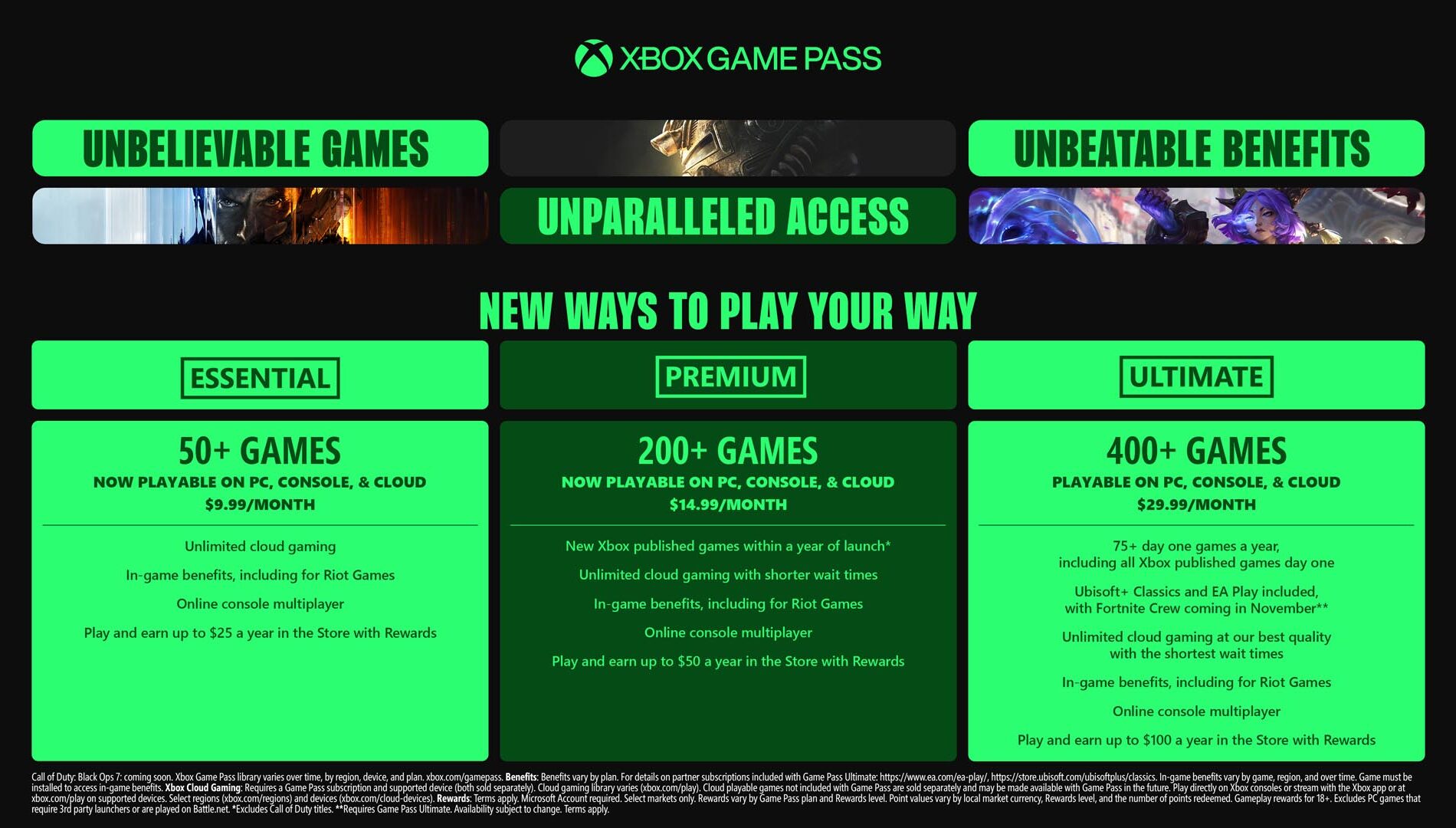
Ultimate—bringing expanded libraries, new perks, and higher costs. Ultimate, now $29.99/month, offers over 400 games including 75+ day-one releases,
Ubisoft+ Classics,
Fortnite Crew, and upgraded cloud streaming. Premium, still $14.99/month, expands to 200+ titles across console, PC, and cloud, adding hits like Diablo IV, Hogwarts Legacy, and Minecraft, with Xbox-published games arriving within a year of launch. Essential remains $9.99/month with online multiplayer, cloud gaming, and a 50+ game library featuring popular titles like Stardew Valley and Hades. While players get more games and benefits, the shake-up comes with notable price increases.
Since its launch in 2017, Xbox Game Pass has been pitched as a way to deliver value and a vast library of games to players. Microsoft points to record engagement and creator participation, but with its latest overhaul, subscribers will now face higher prices alongside bigger catalogs.
The service has been restructured into three tiers: Essential, Premium, and Ultimate. Each tier expands game libraries to include PC titles, cloud play, and in-game benefits, while also tying into a revamped Rewards with Xbox program. Current Core members will shift to Essential, Standard will move to Premium, and Ultimate users will remain on their existing plan.
Microsoft frames the change as offering more “flexibility, choice, and value” for players who want everything from day-one releases to hidden gems across console, PC, and cloud. However, the shift comes with a steeper cost, leaving some wondering whether the added perks justify the price increase.
Xbox Game Pass Ultimate Just Got Its Biggest Upgrade Yet
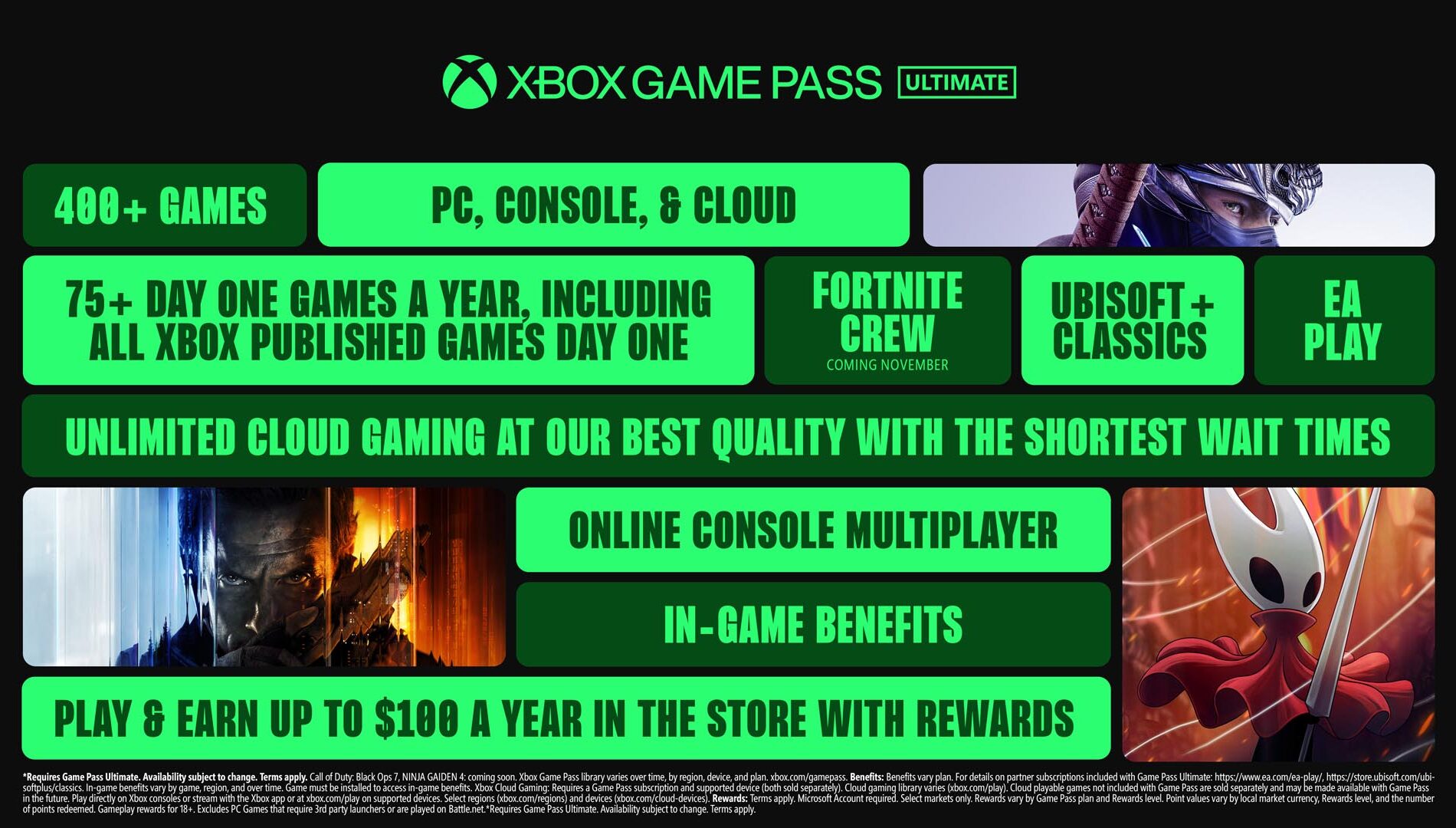
The Ultimate tier has received its biggest update yet, targeting players who want the most comprehensive experience. Subscribers now gain access to over 75 day-one releases per year, including highly anticipated titles such as Call of Duty: Black Ops 7, High on Life 2, Keeper, Ninja Gaiden 4, and The Outer Worlds 2. These join a library of more than 400 games playable across Xbox consoles, PC, and cloud, with over 45 new games added immediately. Hits like Blue Prince, Clair Obscur: Expedition 33, and Hollow Knight: Silksong are also included, alongside exclusive perks such as EA Play access.
Microsoft is also bundling Fortnite Crew ($11.99/month value) starting November 18, giving Ultimate members the Battle Pass, 1,000 V-Bucks monthly, and other perks, while Ubisoft+ Classics (~$15.98/month) brings access to a curated selection of Ubisoft titles like Tom Clancy’s Ghost Recon Breakpoint, Prince of Persia: The Lost Crown, and Assassin’s Creed IV: Black Flag.
Cloud gaming gets a notable boost, with Ultimate subscribers enjoying the highest streaming quality up to 1440p and shorter wait times, as Xbox Cloud Gaming officially exits beta. The “Stream your own game collection” feature is also expanding, allowing more seamless cross-device play.
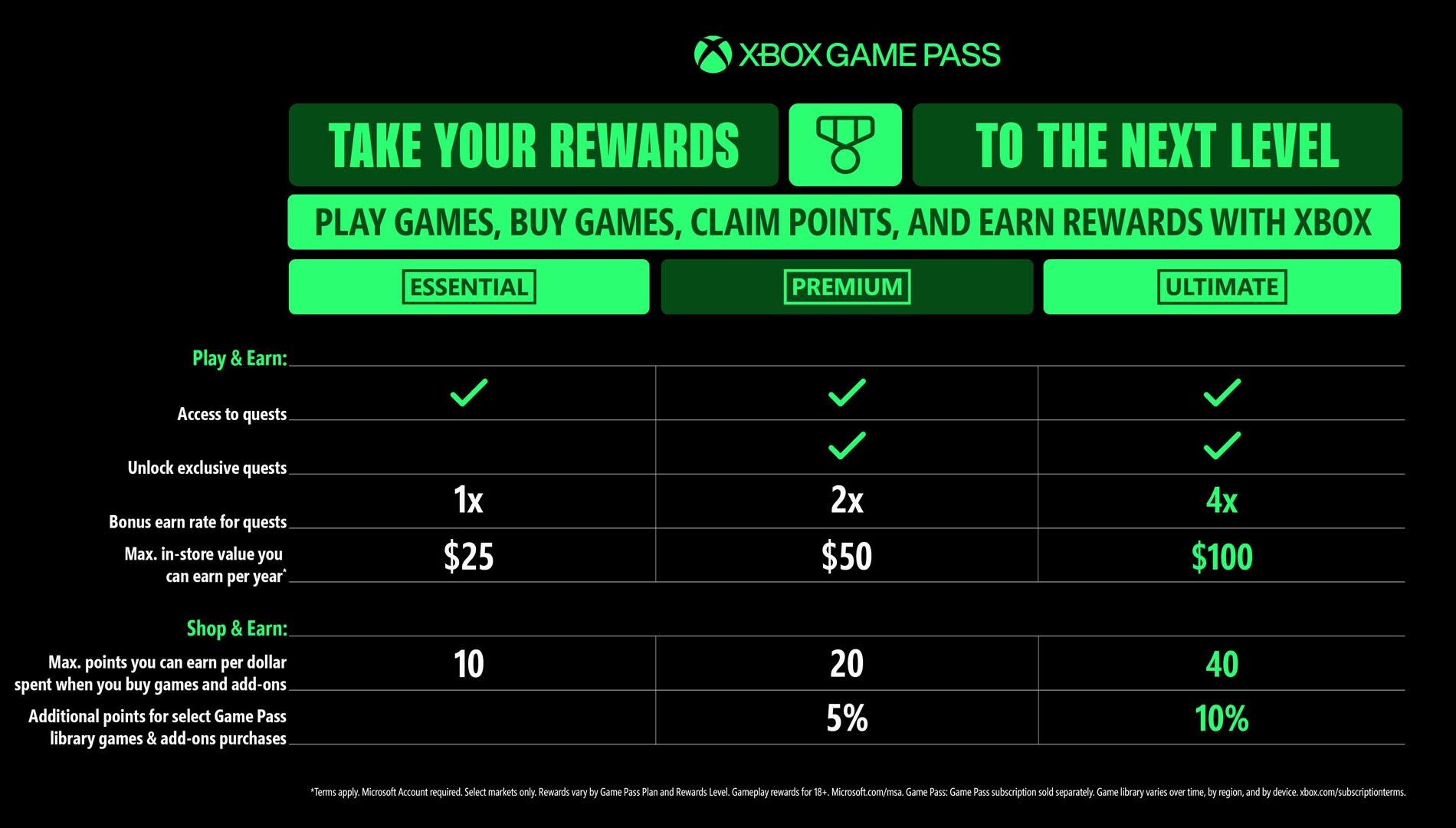
On the rewards side, Ultimate members can earn up to $100 per year in Xbox Store credit. The upgraded Rewards with Xbox program also offers up to 30% value on select Game Pass games, 4x points on game and add-on purchases, 10% back on select library titles, and up to 20% off certain Game Pass games.
Xbox Game Pass Premium – More Games, More Flexibility
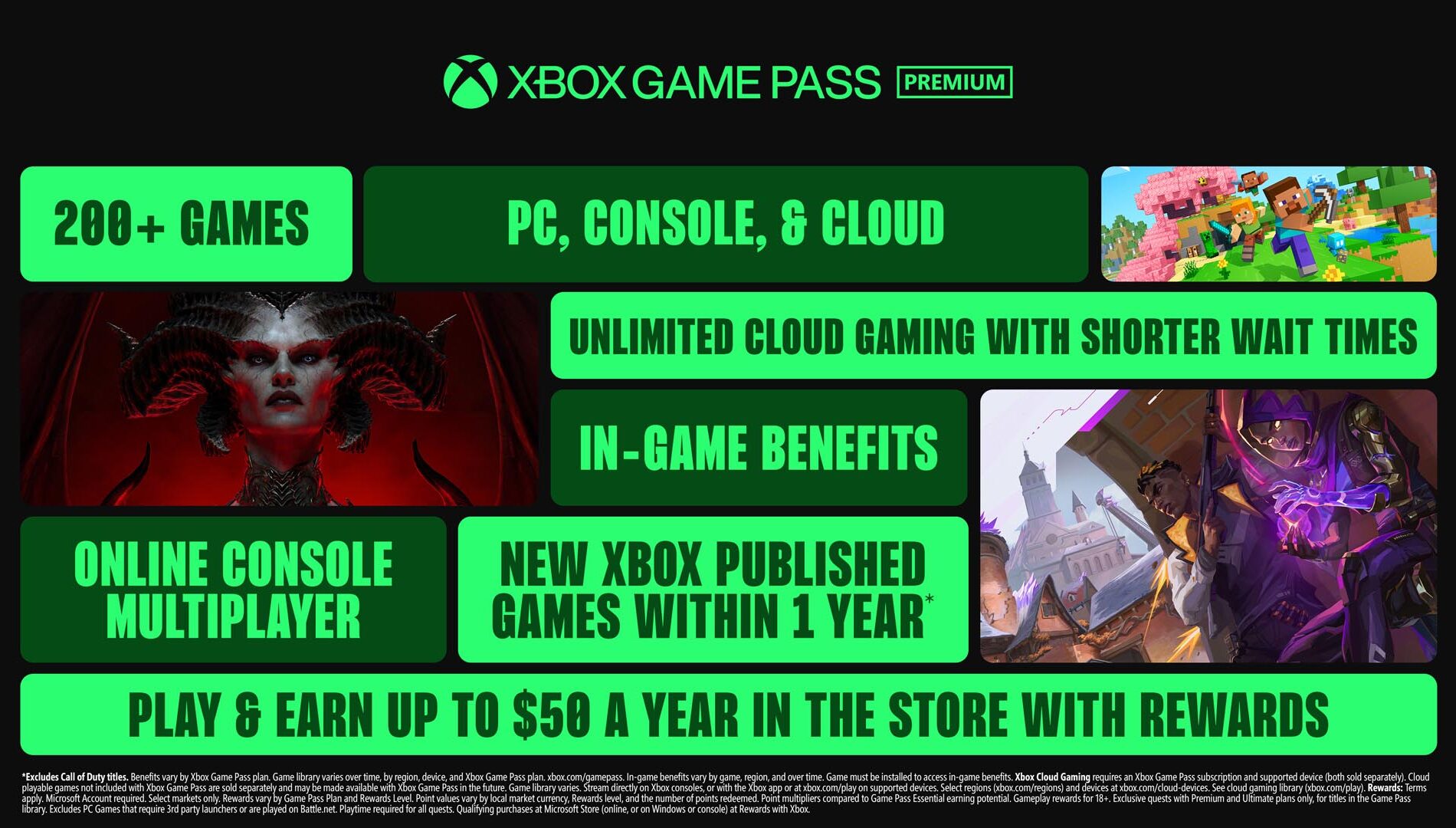
The Premium tier has been expanded to offer more games and greater flexibility for players who want a robust Xbox experience across console, PC, and cloud. Subscribers now gain access to over 200 titles, including major hits like Minecraft, Forza Horizon 5, and Grand Theft Auto V, as well as fan favorites such as Diablo IV and Hogwarts Legacy. Premium also includes new Xbox-published games within a year of release (excluding Call of Duty).
Cloud gaming is upgraded, giving Premium members unlimited access, including select games they already own. In-game benefits have been added for top titles like League of Legends, Call of Duty: Warzone, and Tom Clancy’s Rainbow Six Siege, unlocking cosmetics, characters, and more.
Premium also boosts rewards, letting subscribers earn up to $50 per year in Xbox Store credit. With 2x points on purchases and 5% back on select library titles, Microsoft aims to make this tier appealing for both casual and dedicated players—all while keeping the price at $14.99/month.
Xbox Game Pass Essential: A Great Way to Get Started
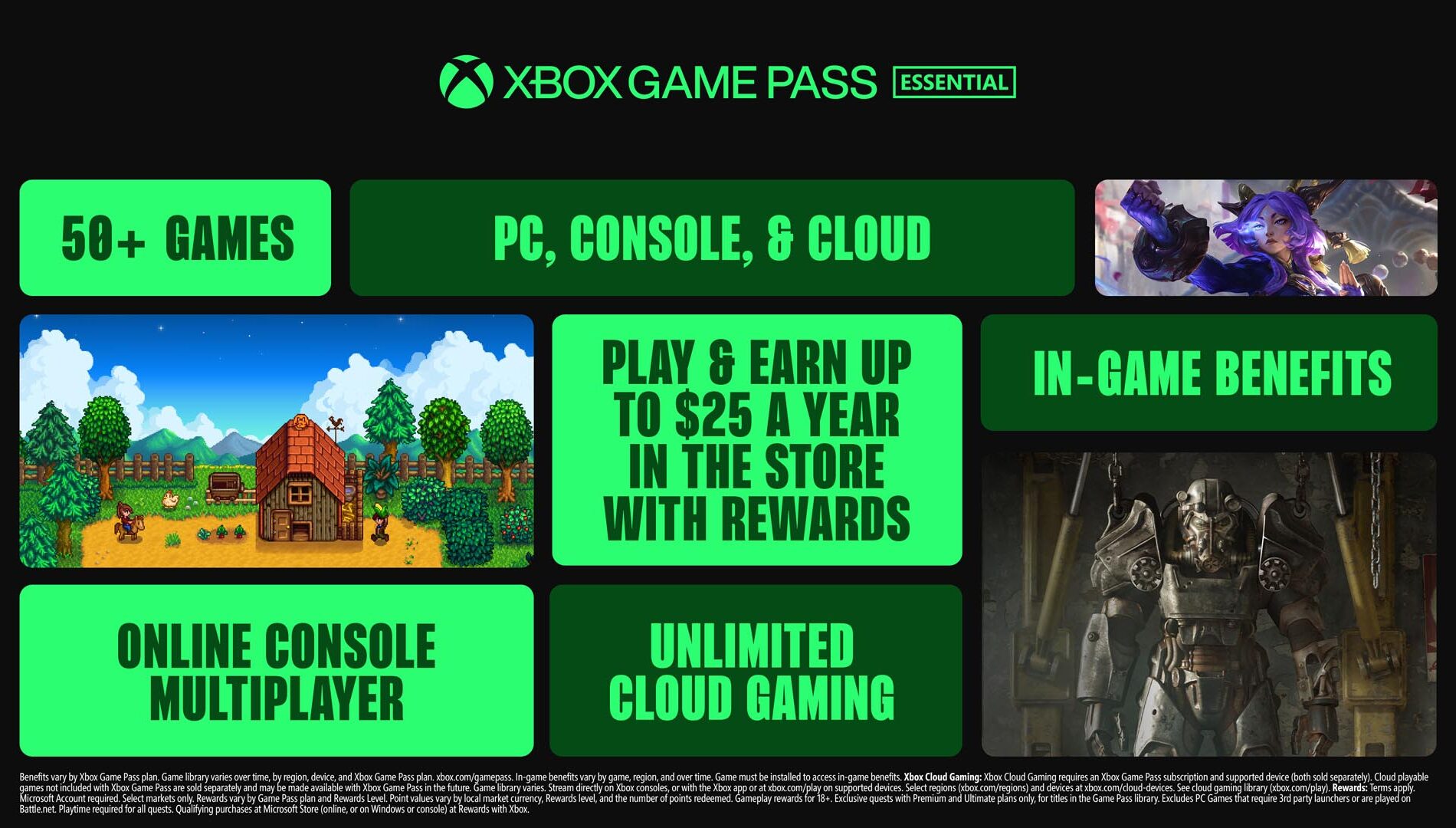
The Essential tier offers a streamlined Xbox experience for players who want access to games across console, PC, and cloud without breaking the bank. The plan includes 50+ curated titles like Hades, Cities: Skylines – Remastered, Stardew Valley, and Warhammer 40,000: Darktide, all fully playable on PC.
Subscribers also get unlimited cloud gaming, online multiplayer, and in-game perks for popular games such as League of Legends, Call of Duty: Warzone, and Overwatch 2. Through the Rewards with Xbox program, members can earn up to $25 per year in store credit, plus points on game and add-on purchases—making it a simple, entry-level way to jump into Xbox gaming.
More Rewards with Game Pass
DON'T FORGET TO SHARE:
CLICK "READ MORE" to Contnue Reading