Welcome to XboxIssues

Welcome. I decided to make this blog after being a Xbox Ambassador for a number of years.

If you don't know an Ambassador is a Volunteer that Microsoft uses to help ease the load on the actual hard working support people.

I noticed that alot of the questions I would get could easily be solved by using Microsofts Xbox.com site.

Since some of the help articles may be hard to find, understand or the issue may be called something different in the gaming community making it more difficult to solve, I've decided to make this blog to make it easier for fellow gamers to get xbox assistance, news and all things Xbox.

If you have any Xbox related question you can find the answer to feel free to contact me on YouTube, twitter or in the comments.
Showing posts with label Controller. Show all posts

Wednesday, October 19, 2022

SYSTEM UPDATE: The Xbox October 2022 Update Rolls Out Today

Team Xbox is excited to continue bringing new ways to make Xbox better, with you at the center, as we refine the experience and deliver brand-new features based on your feedback. This month’s update will bring you the ability to change your TV volume from your Xbox Series X|S consoles, to mute all your startup sounds, improved setup screens to choose and change your home Xbox, an Xbox controller firmware update and more.

You’ll also notice a Search bar has been added to the top of your Xbox console home screen, making it easier to quickly search for games, apps, and media content.


Change your TV volume – New CEC feature for Xbox Series X|S 


Xbox Series X|S consoles can use an HDMI feature called Consumer Electronics Control (CEC) to send commands to and from CEC-enabled devices such as TVs that are connected to the console. Starting today, we’re enabling a new feature for Xbox Series X|S consoles connected to TVs over HDMI.

You can now change the TV volume within the audio and music section of the Xbox guide. To get started, press the Xbox button on your controller to pull up the guide and navigate to the Audio & music section, where you’ll see buttons for you to change your TV volume or mute it. This eliminates the need to reach for your TV remote to change the volume mid-game or movie. 


Mute your startup audio


We’re adding a fan-requested feature so that you have the option to choose a silent startup experience. Now you’ll be able to customize your settings so that you can mute all sounds when you start up your Xbox. Go to Profile & system > Settings > General > Volume & audio output > Additional options and select Mute startup sounds. You can also now adjust the power chime from this page.


Select or change your home Xbox 


Making a console your home Xbox gives friends and family access to your games and content when you’re not signed in. Your home Xbox also lets you play your digital games offline. We’re adding some new setup screens to make it easier for you to select and change your home console when you set up your new Xbox.


Changes to Xbox power mode names


You can configure your Xbox Series X|S or Xbox One console to use different power modes, depending on your preference. This month, you’ll notice that we’ve updated the information to help you choose the settings that will work best for you and renamed the options. “Standby” is updated to “Sleep” and “Energy saver” is updated to “Shutdown (energy saving)”. To see the power settings for your Xbox, press the Xbox button to open the guide and select Profile & system > Settings > General > Power options.


Xbox passkeys and guest keys are now Xbox PINs


Your Xbox passkey and guest keys are an added layer of security that is tied to your Xbox profile. While we’re updating the names from Xbox passkey and Xbox guest key to Xbox PIN and Xbox guest PIN, nothing else changes except the name. You can use your PIN with any Xbox console that you sign in to and limit access to things like purchases and parental controls.


Xbox controller firmware update


Keeping your controller updated with the latest software maximizes your controller’s capabilities and compatibility. Starting today, we’re rolling out a firmware update that includes bug fixes for USB flight sticks that connect to the Xbox Adaptive Controller and additional bug fixes for the following Xbox controllers:

  • Xbox Elite Wireless Controller Series 2
  • Xbox Series X|S Wireless Controllers
  • Xbox Adaptive Controllers
  • Xbox One Wireless Controllers with Bluetooth support

You can update your controller wirelessly or with a USB connection.


Xbox app – trim the length of your video clips


Is there an epic gaming moment you want to save and share? Now you’ll be able to trim the length of your Xbox gaming video clips with the Xbox app for Android and iOS. To get started, go to Library > Captures and select any of your clips. You’ll be able to adjust the start and end of the clip and then share it with your friends. Video trimming in the Xbox app will start rolling out today and be available for everyone soon.


Xbox Game Bar – share to Medal.tv and edit your clips


Xbox Game Bar works with most PC games on your Windows 11/10 PC, giving you instant access to widgets for screen capture and sharing—all without leaving your game. You can now directly import any clips you captured with Xbox Game Bar to Medal.tv where you can edit, post and share your favorite gaming moments.

While playing a game, press the Windows logo key + G on your keyboard to open Xbox Game Bar. If you have an Xbox controller plugged into your PC, press the Xbox button. In Captures > See all my captures you can select a clip and then “Share to Medal.tv”.


Please Don't Forget To Share:

Thursday, May 17, 2018

NEW ACCESSORY: New Controller For Gamers With Disabilities

Microsoft has a new control system on the way designed specifically for those with limited mobility, which through a base unit and add-ons will make playing Xbox One games a lot easier for those who might struggle with the current controller.

The Xbox Adaptive Controller features a large white base unit, which has a few buttons and large pads on it, but the real meat comes from the back of the controller, which has room for a ton of extra joystick and button inputs that can be fully customized via both their plugs and an app.


At $99.99 USD and available exclusively through Microsoft Store, the Xbox Adaptive Controller will offer significant value over the customized alternatives that exist today. We’re looking forward to sharing more about the Xbox Adaptive Controller in a few weeks at E3. The Xbox Adaptive Controller will be launching later this year, and we’ll share more information soon about pre-order availability.

Monday, June 12, 2017

NEWS: Xbox Design Lab Adds More Customization Options & Expands To More Countries

Last year, we unveiled Xbox Design Lab, the first online customization program we’ve ever launched where you can design your very own official Xbox Wireless Controller. Since then, fans have created hundreds of thousands of unique designs that express their creativity and style. Today, we’re excited to announce that we are adding even more customization options based on fan feedback, now giving you over a billion design combinations to choose from. We’ve also refreshed the design interface for a more seamless experience and will be launching Xbox Design Lab to more countries starting today.


On top of all the original customization options available in Xbox Design Lab, we’ve added:

  • 4 new color options including Ink Blue, Mineral Blue, Sierra Brown and Desert Tan
  • 11 new thumbstick colors including Glacier Blue, Zest Orange, Retro Pink, Electric Green, Robot White, Lightning Yellow, Ash Gray, Ink Blue, Mineral Blue, Sierra Brown and Desert Tan
  • New metallic finishes for D-pads and triggers to add a premium look to your controller
  • Black rubberized grips for added comfort and control

In addition to the U.S., Canada and Puerto Rico, Xbox Design Lab is now available in the U.K., France and Germany starting today, and will be coming to additional European countries later this summer.

Controllers start at $79.99 USD, and pricing may vary for additional options. For a limited time between now and June 19, we’re offering a free engraving promotion for all Xbox Wireless Controllers purchased through Xbox Design Lab.

Each controller is made to order and will be delivered within 14 business days of placing your order. In addition to the new features detailed above, you can customize the controller body, back case, D-pad, bumpers, triggers, thumbsticks, ABXY buttons and View and Menu buttons. You can also add laser engraving with a custom 16-character message.

Xbox Design Lab adds customization options to the same Xbox Wireless Controller that is available in stores today, with features that include textured side case grip, improved wireless range and Bluetooth technology for easier connectivity to Windows 10 devices. The controller is compatible across the Xbox One family of devices, including Xbox One X when it launches November 7.
Check out the full Xbox Design Lab experience on xbox.com, microsoft.com or your local Microsoft Store. We’re looking forward to seeing your one-in-a-billion designs!

Tuesday, March 21, 2017

ACCESSORY: The Xbox Wireless Controller Tech Series

At Xbox, we’re committed to giving fans choices when it comes to games, services, and devices. Coming in holiday 2017, we’re bringing fans the most powerful console ever: Project Scorpio. Featuring 6 teraflops of graphical processing power, true 4K gaming, and compatibility with Xbox One games and accessories. Plus, later this spring, Xbox Game Pass will launch unlocking over 100 great games with endless play. Today, we’re excited to unveil the new Tech Series of Xbox Wireless Controllers. The first in the series is the Xbox Wireless Controller – Recon Tech Special Edition. This controller will be available for $69.99 USD and will start shipping to retailers worldwide starting April 25.


In developing this new controller series, the Xbox team was inspired by military technology and performance patterns, exploring concepts stemming from combat armor and sci-fi mechanical gear. Premium finishes like a laser etched texture on the front, gold accents and insignia are on the front of the controller. The back of the controller features textured diamond rubberized grip for added control and comfort. This specialized controller also has the same features you know and love of the Xbox Wireless Controller, including improved wireless range and Bluetooth technology for gaming on Windows 10 devices or Samsung Gear VR. You can also take advantage of the custom button-mapping feature through the Xbox Accessories App, available for download from the Xbox Store or Windows Store.

A great way to use this new controller on your Xbox One is with Copilot – a new console feature that allows any two Xbox Wireless Controllers act as if they were one. As part of our commitment to enhancing gaming for everyone, Copilot makes Xbox One more inviting and fun for new gamers or those needing assistance — whether it’s parents who want to help their kids play, experienced gamers looking to play with novice players, or gamers who need unique configurations to play (e.g. with hands apart, hand and chin, hand and foot, etc.). The Copilot feature will be available through the Creators Update later this year.
Please visit xbox.com, microsoftstore.com, Microsoft Store or your local retail store for more information.

Thursday, March 17, 2016

NEW ACCESSORY: Dusk Shadow And Copper Shadow: Xbox One Special Edition Wireless Controllers

These new controllers feature a faded color gradient finish – blue-to-black for Dusk Shadow and copper-to-black for Copper Shadow – which is the first of its kind for Xbox One Wireless Controllers.

They also come equipped with all the standard features of the Xbox One Wireless Controller, including Impulse Triggers, responsive thumbsticks, an enhanced D-pad, and a 3.5mm stereo headset jack.

Both controllers are available for pre-order starting today for $69.99 USD ERP. You can find them on store shelves at participating retailers in the U.S., Canada, Mexico, Chile, Colombia, Argentina, and Brazil later this month and in other select regions worldwide in April. As always, availability and pricing vary by region. In the U.S., the Xbox One Special Edition Copper Shadow Wireless Controller will be exclusively available at Microsoft stores and GameStop, and the Xbox One Special Edition Dusk Shadow Wireless Controller will be exclusively available at Microsoft stores and, for a limited time, Best Buy.


Tuesday, October 20, 2015

NEWS: Xbox One Wireless Adapter For Windows Begins Shipping Today

In June, we announced the Xbox Wireless Adapter for Windows as part of our commitment for designing Xbox accessories to support both Xbox and Windows. Starting today, we’ve started shipping the adapter to retailers in most markets around the world, including the U.S.

With the Xbox Wireless Adapter for Windows, you’ll simply plug the Adapter into the USB 2.0 or 3.0 port of your Windows 10 PC laptop or tablet and bind the Adapter to your Wireless Controller to enable the same gaming experience you’re used to on Xbox One, including in-game chat and high-quality stereo audio. The Xbox Wireless Adapter for Windows accommodates up to eight controllers per unit, and up to four chat headsets or two stereo headsets.


If you haven’t had a chance to try game streaming just yet, check out these step-by-step instructions. And be sure to try some of this year’s blockbuster games with built-in controller support including Gears of War: Ultimate Edition, Minecraft: Windows 10 Edition Beta, and Fable Legends.

The Xbox Wireless Adapter for Windows will be available for $24.99 USD (MSRP) or bundled with an Xbox One Wireless Controller for $79.95 USD (MSRP).

Monday, June 15, 2015

E3 NEWS: Xbox One Elite Controller lets you customise it


At the Microsoft expo at E3, Microsoft has unveiled its new Xbox One controller design, dubbed the “Elite.”

Microsoft is claiming it will have increased precision, but more importantly it will also bring customisation options such as trigger values, button remapping and component swapping.

It’s wireless, and will work on PC and Xbox One. We currently don’t have any release date for it, but it looks pretty rad.


Packing a huge amount of customisation and functionality the new Xbox Elite Wireless Controller is coming this Autumn, with both Xbox One and Windows 10 compatibility out of the box.

The big change is there's two pairs of paddle switches on the reverse of the new Elite controller and a host of extra precision functions to the triggers, analogue sticks and the funky, re-designed D-pad. 
The more aggressive-looking controller has taken the same overall design as the traditional Xbox One controller, and made it...y'know...more elite.


It's those new paddle switches which will garner the most early attention, making it a beast for any racing game, from Project Cars to the new Forza.

But everything else about it has been redesigned to allow a greater level of flexibility and accuracy than the existing pad, aiming to make it a great fit for a wider selection of game types.
The triggers have adjustable force levels, allowing you to activate 'hair trigger' locks for the twitchy FPS-ers out there, chasing that Halo 5 Guardians fix, and for the fight fans that geometric D-pad is promising extra accuracy too.


Following that customisation route there's button re-mapping a-go-go too. 

Each of the front buttons can be switched around and so can the four paddle switches on the rear of the pad. You can also adjust the actuation levels of the two triggers and the movement curve on the analogue sticks.

But if you don't like that new look don't worry as the new Elite Wireless Controller allows for swappable components too, allowing you to switch out the D-pad for a traditional switch or change around your thumbsticks too.

The official Xbox website lists it at $150 and sets it for an October release. Also, the page has it spinning so you can see all the finer details of the controller. Hope you like triggers.

The Elite Controller is also already listed on Amazon. No surprise there, because Amazon's hitting the pre-order game hard this year. Bethesda and Microsoft already got dedicated rollouts after their pressers, and Rock Band went up too. The controller's just a tiny bit behind the game.


Friday, June 12, 2015

NEWS: Xbox and Oculus Partner to Change the Face of Virtual Reality

The Xbox One controller will be included with every Oculus Rift at launch. The Xbox One controller is designed for gamers, by gamers, for interchangeable gaming between Xbox One and Windows 10 PCs and tablets, with fine-tuned impulse triggers to offer precise haptic fingertip feedback and a D-pad engineered to deliver greater responsiveness. And, with the new Xbox Wireless Adapter for Windows that we unveiled last week included, you can play games on the Rift using the Xbox One controller wirelessly right out of the box.

Xbox One games will be playable on Oculus Rift. We’re happy to announce that we’re bringing the same Xbox One streaming capability to the Rift, a feature that’s only possible through Windows 10. You can play your favorite Xbox One games, like Halo, Forza, Sunset Overdrive and more, on your own virtual reality cinema screen.


Windows 10 is the best platform for playing games on the Oculus Rift. The Rift will work natively with Windows 10 to make it easy to set up, jump in, and have an incredible VR gaming experience. Combined with Direct12 technology that unlocks the full capabilities of new Windows 10 graphics hardware, made-for-VR games on Windows 10 will have the fastest frame rates and top performance.


Source

Tuesday, June 9, 2015

NEWS: New Xbox One 1TB Console Unveiled

As Xbox Issues reported here and here

Today, we’re unveiling the Xbox One 1TB console, with a new matte finish and more storage for your games and media. But that’s not all. We’re also including our newly designed Xbox One Wireless Controller, and in select regions for a limited time, Halo: The Master Chief Collection.

The new Xbox One Wireless Controller now features a 3.5mm stereo jack that lets you plug a headset right into the controller. You’ll have the option to adjust headset volume, mic monitoring, and voice and game audio balance through the Settings menu on your console. In addition to audio improvements, we’ve fine-tuned the bumpers and enabled wireless firmware updates on the updated controller which eliminates having to connect the controller via USB cable to receive updates. What’s more, you can purchase the new controller as a standalone item in black ($59.99 U.S. MSRP) as well as a new camouflage design in silver and black with the Xbox One Special Edition Covert Forces Wireless Controller ($64.99 U.S. MSRP).


Xbox One 1TB consoles will start shipping to retailers June 16 in the United States and select markets later this month and will be available starting at $399 USD ERP. We’re also pleased to announce that starting today, the $349 USD price on all standard Xbox One 500GB consoles will be permanent in the United States and select regions.

And finally, we are happy to announce that starting this Fall, you’ll be able to purchase the Xbox Wireless Adapter for Windows to enjoy the freedom and convenience of the wireless controller on Windows 10 PCs, laptops, and tablets. The Xbox Wireless Adapter for Windows will be available for $24.99 U.S. MSRP or bundled with an Xbox One Wireless Controller for $79.95 U.S. MSRP and sold in most markets where Xbox accessories are currently available.


RUMOR CONFIRMED:: Xbox One getting newer controller after E3

It seems as if there's a subtle but big change on the horizon for the Xbox One controller. The current model features a proprietary audio jack that requires an adapter (sold separately for $25) to use with normal headphones. Microsoft looks to be doing away with that and releasing a new controller with a standard 3.5mm jack.

This news appears to be a bit more credible than your average pre-E3 rumor if only because Microsoft posted it on its own website (presumably prematurely). Item 16 clearly denotes a 3.5mm port which is "only available on controllers released after June 2015." A screenshot is posted below in case the site is updated.

It's unknown if there will be any additional changes to the Xbox One controller. We'll probably find out at Microsoft's E3 press conference, where this will likely be announced.

Get to know your Xbox One Wireless Controller [Xbox Support via Eurogamer]

SOURCE UPDATE 2: Confirmed

Thursday, March 26, 2015

HOW TO: Connect a wireless controller to your Xbox 360

So you have been playing your Xbox One for several months now and decided to turn on your 360 once again, maybe to check out The New Games With Gold or just for nostalgia or you bought a new controller.  You powered that beast up but notice your controller is not syncing to your 360, what next?


1.  Turn on your console.
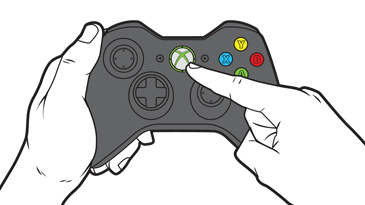
2.  Press and hold the Guide button on the controller until it turns on.


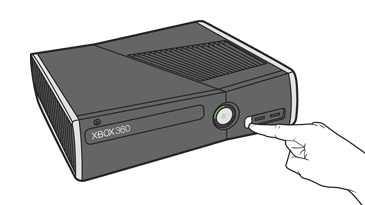
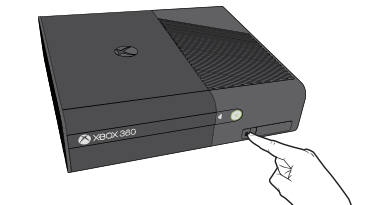
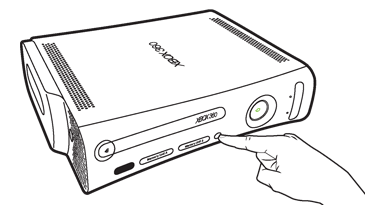
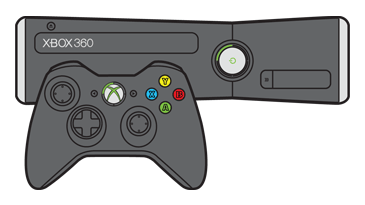
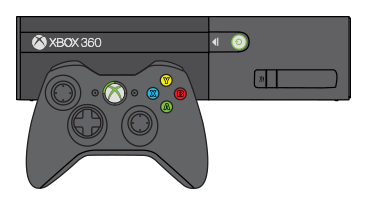
3.  Press and release the connect button on the console.

Xbox 360 S console
Xbox 360 E console
  Original Xbox 360 console
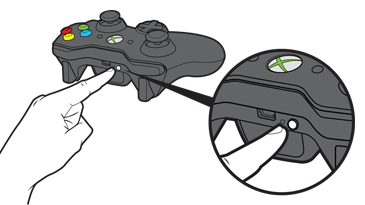
4.  Within 20 seconds, press and release the connect button on the controller.
The lights around the console's power button will stop flashing once the controller connects to the console.

On the Xbox 360 S and Original console, connected controllers have one of four positions. Each position appears as a lighted section around the console power button and the controller Guide button. 


On the 360 E console, a solid green light on the front of the console shows that the controller is connected. To see the player position, look at the ring of light around the Guide button on your controller.


Thursday, March 19, 2015

HOW TO: Use your Xbox One Controller on PC

The Xbox One Wireless Controller can work with your PC if you download one of the following driver packages:
PC drivers for Xbox One Controller (x86) 
PC drivers for Xbox One Controller (x64).

These drivers are compatible with Windows 7, Windows 8, and Windows 8.1.

Note For your controller to work with your PC, it needs to be connected using a micro-USB cable. It will not work wirelessly with your PC. 

After you install the drivers on your PC, connect your Xbox One wireless controller to a powered USB port on your PC using a standard micro-USB cable. When you do, the controller will vibrate to let you know that it's connected.

Note To use your Xbox One controller with your console after using it with a PC, you must re-sync the controller to the console. You can do this by using the wireless sync button or a USB cable. For details, see Connect a wireless Xbox One controller to your console.

If you want to use an Xbox 360 Controller with your PC, you can use an Xbox 360 Controller for Windows. Or, you can use an Xbox 360 Wireless Controller together with an Xbox 360 Wireless Gaming Receiver for Windows.