Welcome to XboxIssues

Welcome. I decided to make this blog after being a Xbox Ambassador for a number of years.

If you don't know an Ambassador is a Volunteer that Microsoft uses to help ease the load on the actual hard working support people.

I noticed that alot of the questions I would get could easily be solved by using Microsofts Xbox.com site.

Since some of the help articles may be hard to find, understand or the issue may be called something different in the gaming community making it more difficult to solve, I've decided to make this blog to make it easier for fellow gamers to get xbox assistance, news and all things Xbox.

If you have any Xbox related question you can find the answer to feel free to contact me on YouTube, twitter or in the comments.
Showing posts with label Android. Show all posts

Thursday, October 22, 2020

NEWS: Xbox Touch Controls on Mobile Streaming (xCloud) Come to More Games

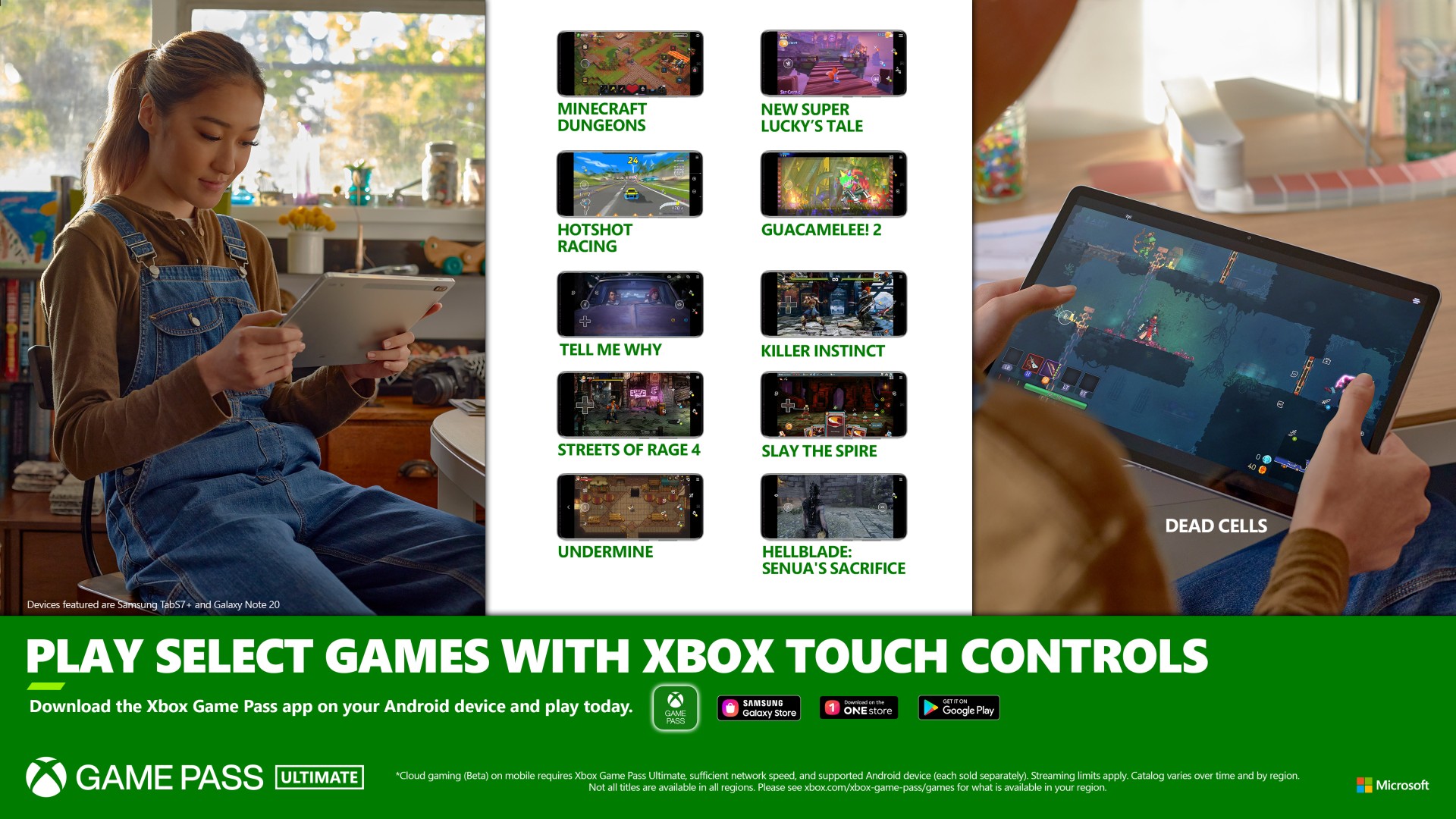
Xbox’s vision for cloud gaming is to provide you with choice in how and when you play games. Last month, we shared that Xbox Game Pass Ultimate members in 22 countries can play more than 100 games on their Android mobile phones and tablets via the cloud. Xbox touch controls unlock new ways to jump in and play and we are excited to announce that there are 10 additional titles available with Xbox touch controls in Xbox Game Pass Ultimate starting today.

And as we bring cloud gaming to Android devices, we have continued to look at how we can create more native experience so that you can jump right in and play. With Minecraft Dungeons we launched our first game with touch controls, and your reaction blew us away. So today we’re making 10 more games available that play great on Android mobile devices – no controller required.


Touch controls have been one of the top-requested features for cloud gaming, so to build this collection we worked closely with players and game designers to create a familiar experience, and support a level of play that you’re used to with a physical controller. For each title that uses Xbox touch controls we’ve worked to create an experience designed specifically for that game on mobile devices.

Here’s the list of games featuring Xbox touch controls available beginning today:

  • Dead Cells
  • Gucamelee! 2
  • Hellblade: Senua’s Sacrifice
  • Hotshot Racing
  • Killer Instinct
  • New Super Lucky’s Tale
  • Slay The Spire
  • Streets of Rage 4
  • Tell Me Why
  • UnderMine
READ MORE AT THE SOURCE

Please Don't Forget To Share:

Wednesday, September 9, 2020

NEWS: Xbox Series X Release Date,Price Announced, Xbox Game Pass adding huge 3rd Party Addition

Just announced by Microsoft, Xbox Series X, Microsoft's most powerful console ever made, and Xbox Series S, next-generation performance in Microsoft's smallest console ever built at a more affordable price, launch globally November 10, pre-orders start September 22.  Series X will cost about $499 U.S. and the series S will cost about $299 U.S.


Microsoft is teaming up with Electronic Arts to provide Xbox Game Pass Ultimate and PC members with an EA Play membership at no additional cost starting this holiday. This means Ultimate members can enjoy EA Play on Xbox One, Xbox Series X and S, and Windows 10 PCs, and Xbox Game Pass for PC members get EA Play on Windows 10.

Formerly known as EA Access and Origin Access, EA Play will bring the best of EA to Game Pass, including:

More than 60 of EA’s biggest and best console and PC games like FIFA 20, Titan fall 2 and Need for Speed Heat, as well as titles from some of EA’s most popular franchises like Battlefield, Mass Effect, Skate, and The Sims.

Not only will EA Play titles be available on console and PC, this holiday, some of the best EA Play games will also be available for Xbox Game Pass Ultimate members to play on Android devices via the cloud at no additional charge.


Please Don't Forget To Share:

Thursday, June 4, 2020

NEWS: Xbox Announces the Xbox Family Settings App (Preview) to Help Manage Children’s Gaming

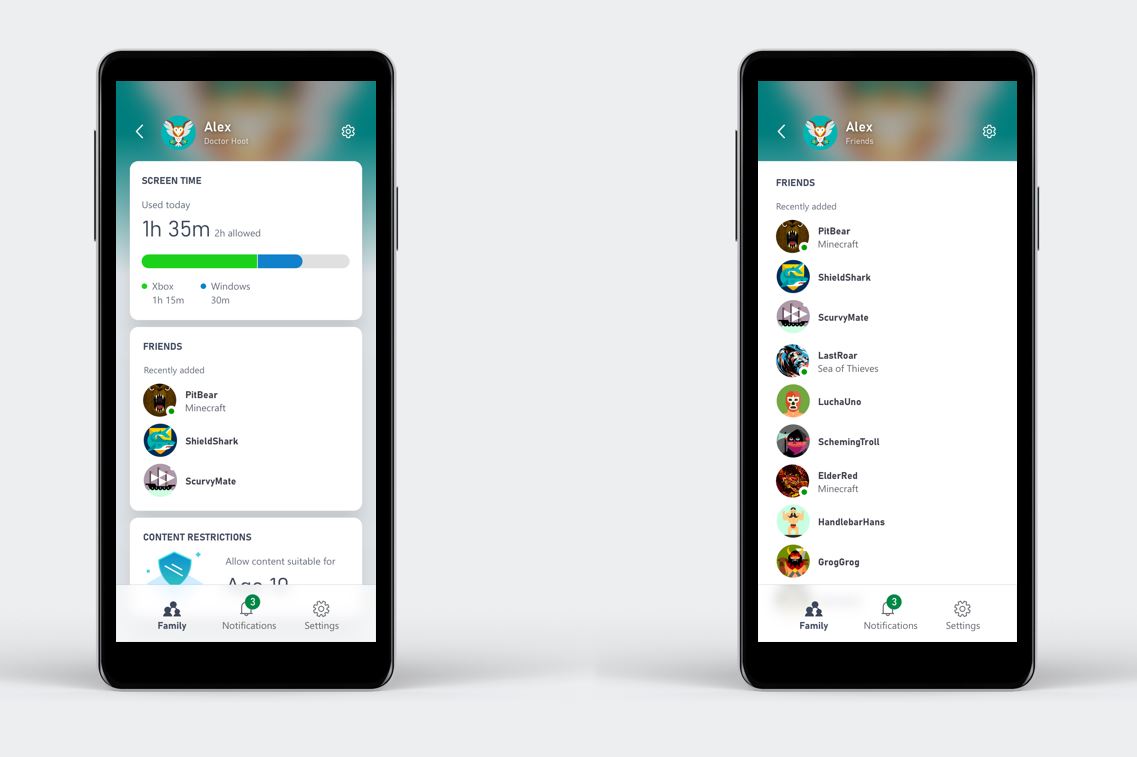
Safety is a huge priority at Xbox, and we’ve worked for years to offer families tools to find the right balance of gaming in their lives and to fit their unique needs. Family settings on Xbox include more than 20 customizable features to help parents set screen time limits, set content filters and manage who their children can play and communicate with. This provides parents with the choice and flexibility to decide what settings are right for their children. Today, I’m excited to announce an update in our safety offerings: the Xbox Family Settings app, available now in preview on Android and iOS, which makes it easy to manage family settings from anywhere. See here for more details.


The Xbox Family Settings app (Preview) empowers parents and caregivers to manage their children’s gaming on Xbox consoles through their mobile device. It provides a simple and convenient way to create child accounts and customize family settings on the Xbox console to ensure your kids have access to gaming that you feel is appropriate. The Xbox Family Settings app (Preview) includes helpful features such as:

Screen time limits – set limits for each day of the week, for example, you have the ability to allow for more time on the weekends or reduce time during the school week

Content filters – set filters based on the age of each child; an 8-year old can only access games rated E, and will be blocked from accessing titles that are too mature

Play and communication settings – block all access to play and communication with other players, limit access to “friends only” or grant permission for older children to play and chat with “everyone”
Activity reports – view daily and weekly activity reports for each child to understand how they are spending their time on Xbox

With the app, parents and caregivers can respond to notifications in real time, such as requests from their child to extend the console screen time limit for the day. We have also built in a new feature within the app to easily enable access and multiplayer capability for Minecraft, which is rated E10+.  Sometimes parents of younger children want to provide access to Minecraft and possibly enable online play with their friends, and a convenient toggle in the app unlocks those specific capabilities quickly.  Based on customer feedback on this feature, we may include similar functionality for other games in the future.

Additionally, once the app is available to broad consumers later this year, parents will be able to view and manage their child’s friends list and approve or decline requests to add new friends via notifications sent to the app.

READ MORE AT THE SOURCE

Please Don't Forget To Share:

Thursday, September 26, 2019

HOW TO: Get started with Xbox for Google Assistant (Console Preview OS)

Based directly on feedback from Xbox fans, Microsoft is pleased to announce the public beta of the Xbox Action for Google Assistant! Please tell them what you think or if you're running into any issues in the comments here. The team would love to hear your feedback.

With the release of the Xbox Action for Google Assistant, you can now interact with your Xbox One in even more ways using just your voice, including the ability to turn your console on and off, launch games and apps, play and pause videos, and more, from the Google Assistant and Home-enabled devices, as well as the Google Assistant apps on Android and iOS.


The new Xbox Action for Google Assistant releases to public beta on Xbox One today and is available to all customers in English during the beta period. Google and Xbox are working together to expand language support before launching more broadly to the Xbox community later this fall.

Here’s how to get started with the beta:

1.  Join our Google Group with the Google Account you intend to use: Join Here
2.  Sign into your Xbox
3.  In the Google Home app for iOS or Android:
     1.  Tap “+ Add”
     2.  Tap “Set up device”
     3.  Tap “Have something already set up?”
     4.  Search for and select “[beta] Xbox"
4.  Sign in with the Microsoft account you use on Xbox
5.  Follow the instructions to link your Xbox and give it a device name
   **(If no devices are found, try enabling the Digital Assistants setting on your console (Settings    Kinect & Devices > Digital Assistants)***

Once you’re all set up, here are a few actions you can try to get you started with controlling your Xbox One with Google Assistant:

  • “Hey Google or Ok Google, play Gears 5 on Xbox.”
  • “Hey Google or Ok Google, turn on Xbox.”
  • “Hey Google or Ok Google, turn off Xbox.”
  • “Hey Google or Ok Google, launch YouTube on Xbox.”
  • "Hey Google or Ok Google, pause on Xbox."
  • “Hey Google or Ok Google, resume on Xbox."
  • “Hey Google or Ok Google, volume up on Xbox.”
  • “Hey Google or Ok Google, take a screenshot on Xbox.”

You’ll notice the default device name for Xbox consoles is "Xbox"; however, you can change the device name for your smart home commands at any time in the Google Home and Assistant apps if you have more than one Xbox in your home. When triggering an action, just use the device name you set in your commands. For example, you would say, “Hey Google, turn on Basement Xbox.”

Over the coming weeks as you begin to check out this feature, we’d love to hear from you so you can help us test and refine this new capability. Your feedback is invaluable in helping us shape the experience for all gamers on Xbox. We will also continue to improve on this experience following release and will be listening to your feedback to help determine how we expand our capabilities in the future.

Here's the full command list if you want to explore more:

Please Don't Forget To Share:

Wednesday, September 25, 2019

NEWS: Project xCloud Public Preview

Our vision for Project xCloud is to empower the gamers of the world to play the games they want, with the people they want, anywhere they want. We’re building this technology so gamers can decide when and how they play. Customers around the world love the immersive content from Xbox in their homes and we want to bring that experience to all of your mobile devices.


Since announcing Project xCloud just under a year ago, we’ve been on a journey to create, develop, and prepare the technology for gamers. A big step for us was opening up the program to Microsoft employees – since then I’ve enjoyed seeing people’s excitement and hearing the stories of how they play. At home, I’ve been using Project xCloud to play Sea of Thieves with my kids while they’re playing on the console and PC. Around the office, I’ve seen our team having an amazing time playing Halo 5: Guardians tournaments and Gears 5 campaign on nothing more than a phone or tablet. We saw the same joy of gaming as we shared the experience with fans at E3 and gamescom, and now we’re ready for what’s next.

Today we’re inviting the community to take the next step with us and join the Project xCloud (Preview), coming this October to the United States, United Kingdom and Korea.

Public preview is a critical phase in our multi-year ambition to deliver game streaming globally at the scale and quality of experience that the gaming community deserves and expects. It’s time to put Project xCloud to the test in a broader capacity, with a range of gamers, devices, network environments and real-world use-case scenarios, and this is where you come in. At Xbox, we’ve made it a priority to engage with all of you to help in the creation process. We now want you to play with us and share your feedback on Project xCloud so we can iterate and improve, week after week. Join us, have fun playing, share your stories and feedback, and be part of the journey.

Here’s what to expect from the Project xCloud public preview and how you can register to
participate:

Register for Project xCloud Review:  HERE


Please Don't Forget To Share:


Monday, June 10, 2019

E3 2019: Everything Announced at the Xbox E3 2019 Briefing

Today, Xbox showcased a blockbuster lineup of 60 anticipated games for both console and PC in its Xbox E3 Briefing and shared a glimpse of the future with Project Scarlett, which launches alongside Halo Infinite in 2020. Headlined by the biggest game of 2019, Gears 5, along with over 30 games premiering with Xbox Game Pass, the Xbox E3 Briefing delivered 11 world premieres and a record 14 games from Xbox Game Studios, which will soon include legendary game development studio Double Fine Productions.


The Future of Console Gaming
During its briefing, Xbox demonstrated its commitment to console gaming as a critical choice for players who want a device designed, built and optimized for gaming.

Project Scarlett will set a new bar for console power, speed and performance, arriving Holiday 2020 alongside Halo Infinite. Powered by a custom-designed processor, leveraging the latest Zen 2 and Radeon RDNA architecture from our partners at AMD, Project Scarlett will deliver a new level of immersion. Paired with high bandwidth GDDR6 memory, and a next generation solid state drive (SSD), Project Scarlett will provide developers the power they require to bring their creative visions to life. Featuring hardware accelerated raytracing, variable refresh rate, 8K capability and ultra-low latency input, Project Scarlett will deliver a new level of fidelity, precision and accuracy never before seen in console gaming.

With Project Scarlett, we continue our commitment to compatibility by ensuring your gaming accessories and Xbox career will also move forward with you, along with thousands of games across four console generations which will look and play best on Project Scarlett.

Bringing Xbox to the Cloud
In addition to delivering players the games they want, with the people they want, across console and PC, Xbox is also empowering people to play wherever they want by bringing Xbox to the cloud.

First, Xbox announced the ability to stream games from your Xbox One console, starting in preview this October. With console streaming, gamers will have access to their Xbox One game library and Xbox Game Pass titles on the go, streamed directly from an Xbox One console to a mobile device.

The Xbox E3 Briefing also marked a new milestone for Project xCloud, with E3 2019 attendees being among the first in the world to play Xbox One games like Halo 5: Guardians and Hellblade: Senua’s Sacrifice streaming on smartphones and tablets. With Project xCloud, Xbox is investing to ensure players have the choice and freedom to play the games they want, with the friends they want, how and where they want.

The World’s Most Advanced Controller
In addition, Xbox unveiled the Xbox Elite Wireless Controller Series 2. Inspired by fan feedback, the Xbox Elite Wireless Controller Series 2 is the world’s most advanced controller, designed with the most passionate gamers in mind.

The Elite Series 2 is the second iteration of the fan-favorite Xbox Elite Wireless Controller and is re-engineered for ultimate performance, customization, and durability, and includes 30 new and improved features such as adjustable-tension thumbsticks, wraparound rubberized grip, shorter hair-trigger locks, and up to 40 hours of rechargeable battery life.

The Elite Series 2 will launch in 24 markets on November 4 for $179.99 USD/£159.99 GPB/€179.99 EUR

CLICK "READ MORE" to See the Rest


Tuesday, June 4, 2019

NEW RELEASES: Xbox Events App iOS and Android

Xbox fans gain access to exclusive content during events like E3, gamescom, and X0. Features include live streaming, the latest game videos, building a custom schedule of sessions to attend, and receiving notification of breaking Xbox news.


Download it for Android devices here
Download it for iOS devices here


Please Don't Forget To Share:

Thursday, March 14, 2019

NEWS: Microsoft announces Xbox Live for any iOS or Android game

Microsoft is bringing its Xbox Live network to iOS and Android devices. The software giant is launching a new cross-platform mobile software development kit (SDK) for game developers to bring Xbox Live functionality to games that run on iOS and Android. Xbox Live features like achievements, Gamerscore, hero stats, friend lists, clubs, and even some family settings will all be available on iOS and Android.


“We believe so strongly in community, and Xbox Live really being at the heart of our gaming community,” explains Kareem Choudhry, Microsoft’s gaming cloud chief in a media briefing this week. “If you watch what we’ve done, especially with Minecraft, over the past few years we’ve taken Xbox Live to as many platforms as Minecraft is on as possible. Really uniting all those communities together with a consistent singular experience for those gamers.”

Microsoft wants game developers to take a similar Minecraft approach and bring Xbox Live to more mobile games. Some iOS and Android games already have Xbox Live Achievements, but they’re only enabled in titles from Microsoft Studios at the moment and this new SDK will open up Xbox Live functionality to many more games.

READ MORE AT THE SOURCE


Please Don't Forget To Share:

Tuesday, August 21, 2018

HOWTO: Install Xbox Game Pass Games with an Android App

With the new Xbox Game Pass Android App, you can view and install any Game from the Game pass collection.  While on the go you can start to download and install Game Pass Games on your Home Console, and be notified on your Android Device when the install is done.

Here is how to manage your Xbox Game Pass Collection on an Android Device!


You can download the Game Pass Android App from the Google Play Store Here: https://play.google.com/store/apps/details?id=com.gamepass

Tuesday, August 7, 2018

NEWS: Microsoft Movies & TV Now Supports Movies Anywhere

Today we are excited to announce that the Microsoft Movies & TV app for Xbox and Windows 10 devices now supports Movies Anywhere, which brings your favorite film libraries together in one place.

When you connect your Microsoft account with your Movies Anywhere account, all of your eligible movies from Microsoft can be enjoyed across your favorite screens at no extra cost. This includes Xbox and Windows, iOS and Android, smart TVs, and streaming devices.


In addition, eligible movies you previously purchased from other participating digital retailers will now be viewable through the Movies & TV app on Xbox and Windows 10.

As part of our launch, we have a limited time offer for anyone who connects their Microsoft account to Movies Anywhere for the first time. Once you connect, you will receive X-Men Days of Future Past in your digital collection on us. This offer begins today and only runs for a limited time, so head here to connect your accounts today.

Microsoft Movies & TV allows you to watch the newest movies and TV shows across your favorite devices, before streaming services or disc, and without subscription or membership fees. You can download for offline viewing and take it on the go, or watch the latest episode of a show the day after it airs on TV. There are weekly deals in Sales & Specials to grow your collection, and all of your purchases earn you credits through Microsoft Rewards.

We have been working to bring you the best viewing experience on Xbox and Windows 10 for your favorite movies. Thank you for sharing your feedback and happy movie watching!

For a list of system requirements and available markets, please visit the official website.

Wednesday, June 13, 2018

HOW TO: Access Fortnite Cross Platform Play

Epic Games has officially announced that they are bringing cross platform play, cross progression, and cross purchases to Fortnite between Xbox One, PC, MAC, iOS,  Nintendo Switch, and eventually Android. Sorry PS4 fans, Sony stated, once again they are not interested in cross platform play, so this does not include you.

This means you can play with and against gamers on other devices.  Your purchases and progression will also carry over to an devices you play Fortnite on.

Here is:  HOW TO: Access Fortnite Cross Play Features:


Monday, July 27, 2015

UPDATE: Screenshots in Xbox One SmartGlass on iOS and Android

With over 500 total votes on Xbox Feedback, they are adding the ability to view, share, and save Xbox One screenshots in the iOS and Android Xbox One SmartGlass apps.

You will find screenshots in the Activity Feed, on profile pages, and in the new Capture hub available from the drawer. This feature will be available soon in the Android Xbox One SmartGlass Beta app (build 2.4.1507 or higher) which is accessible by all users; the beta version for iOS is currently limited to users that are already part of the Xbox One SmartGlass Beta via the Apple store (Build 2.108 or higher).