Game Description: Stealth Inc. 2: A Game of Clones is a puzzle platformer where you play the role of a clone escaping a sinister and high-tech testing facility. Stealth Inc. 2 tests both your brain and your reflexes over 60 varied levels linked together by a sprawling and detailed overworld.
Welcome to XboxIssues
Welcome. I decided to make this blog after being a Xbox Ambassador for a number of years.
If you don't know an Ambassador is a Volunteer that Microsoft uses to help ease the load on the actual hard working support people.
I noticed that alot of the questions I would get could easily be solved by using Microsofts Xbox.com site.
Since some of the help articles may be hard to find, understand or the issue may be called something different in the gaming community making it more difficult to solve, I've decided to make this blog to make it easier for fellow gamers to get xbox assistance, news and all things Xbox.
Friday, April 3, 2015
RELEASE: Stealth Inc. 2: A Game of Clones Xbox One
Stealth Inc. 2: A Game of Clones
Game Description: Stealth Inc. 2: A Game of Clones is a puzzle platformer where you play the role of a clone escaping a sinister and high-tech testing facility. Stealth Inc. 2 tests both your brain and your reflexes over 60 varied levels linked together by a sprawling and detailed overworld.
Wednesday, April 1, 2015
RELEASE: R.B.I. Baseball 15 is Now Available for Xbox One
R.B.I. Baseball 15
The legendary Major League Baseball franchise returns to the diamond. Master the art of hitting and fielding with 2-button retro controls or control the movement of your pitch from start to finish. Includes Season, Postseason & Exhibition Modes and authentic ballparks with unique characteristics from every Major League Baseball club. Make History.
Tuesday, March 31, 2015
NEWS: Halo 5: Guardians will launch on Xbox One on October 27th
Microsoft has announced that Halo 5: Guardians will be released for the Xbox One on October 27th.
343 Industries studio head Bonnie Ross also added a little background about the game, noting it deliver "epic scope and scale and drama," while expanding and changing the existing Halo universe.
"We wanted Halo 5: Guardians to be the game that pays off the epic promise of the Halo universe in scope and scale and drama," Ross said. "We want to amaze players with the sheer size of the worlds and battles they'll experience, even as they question everything they thought they knew about its heroes, marvels, and mysteries."
The Master Chief returns October 27th. #HUNTtheTRUTH #Halo5 pic.twitter.com/d3QQIjzDop
— Xbox (@Xbox) March 30, 2015
Monday, March 30, 2015
YSK: How to Reset the 360 display settings without working screen
If you ever tinker with the graphics settings of the 360, swap to a different type of TV or for whatever reason you are not getting an image on your TV from the 360. Here is how to reset the graphics settings to default on the 360 without a picture on the TV.
- Remove any discs from the disc tray.
- Turn off the console.
- Turn on the console.Note If you are using an Xbox 360 Wireless Controller, turn on the console by using the Guide button on the controller. Make sure that you use the player 1 controller when you do this. The player 1 controller will have the upper-left light illuminated.
- As the console starts, on the controller, press and hold Y while pulling the right trigger. The display settings are reset to the default settings, and then the console automatically restarts.
If this does not work you will have to call support as there is might be something wrong with your 360.
HOW TO: Connect your Xbox One to Live with a Windows PC instead of a router
There are two ways you can connect to Xbox Live without using a router:
Use Windows Internet Connection Sharing
Create a network bridge connection
Use Windows Internet Connection Sharing
You can use Windows Internet Connection Sharing to share your Internet connection between your computer and your Xbox One console. If you do this, both the console and the computer can access the Internet at the same time.
To use Windows Internet Connection Sharing, you must have the following:
- A computer that has two network adapters
- Note Most laptop computers have two network adapters, one for a wired connection and one for a wireless connection.
- A USB modem that has at least one Ethernet connection
- Windows XP, Windows Vista, Windows 7, or Windows 8
- Note The Windows 7 Starter edition does not support this feature.
- High-speed Internet access
- A standard Ethernet cable
Set up Windows Internet Connection Sharing
Note The following steps show Windows 7 and Windows 8 screen images. However, the steps are the same for earlier versions of Windows unless otherwise indicated.
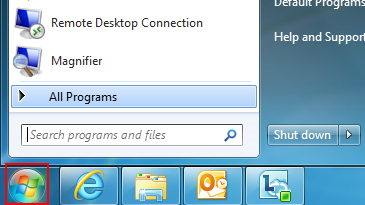
1. Click the Start button.
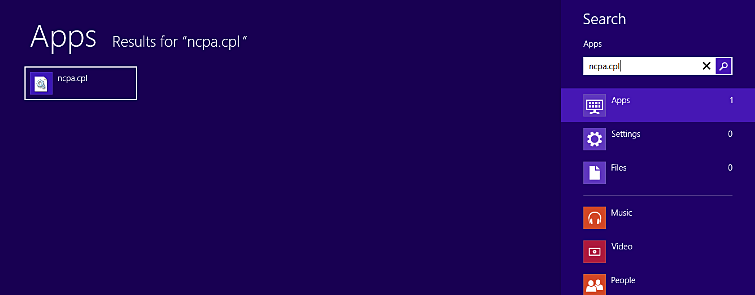
2. In the Search programs and files box, type ncpa.cpl, and then press Enter.
For Windows XP: Click the Start button, click Run, type ncpa.cpl in the Open box, and then click OK.
| Windows 7 |
| Windows 8 |
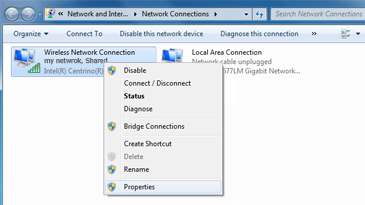
3. Right-click the network connection that you want to share, and then click Properties. The appropriate network connection to share is the one between your computer and your modem, not the one between your computer and your Xbox One console.
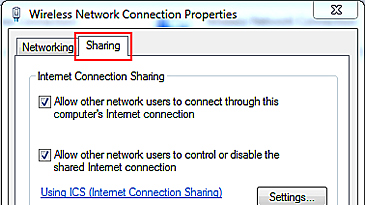
4. Click the Sharing tab. If you are using Windows XP, select the Advanced tab.
5. Select Allow other network users to connect through this computer's Internet connection, and then click OK.
6. Wait for the network connection status to change to Shared.
7. Start your web browser and try to connect to the Internet. If you can’t connect, make sure that you’re sharing the primary Internet connection in step 3.
8. Plug one end of the Ethernet cable into the network port on your computer. Plug the other end into the back of your console.
9. On your console, make sure that all network settings are set to Automatic.
Here's how:
Note If you’re connecting to a wireless network, or if you have PPPoE settings entered, note the settings because you might have to enter them later.
- Press the Menu button on your Xbox One controller, and then select Settings.
- Select Network.
- Select Advanced settings.
- Select IP settings, then select Automatic.
- Select DNS settings, then select Automatic.
- Select Alternate MAC address, then select Clear.
- Select Restart.
10. Test your Xbox Live connection. To do this, follow these steps:
- Press the Menu button on your Xbox One controller, and then select Settings.
- Select Network.
- Select Test network connection.
Troubleshooting Internet Connection Sharing issues
Solution 1: Make sure Windows Internet Connection Sharing is set up correctly
If the Sharing tab isn’t displayed or, in Windows XP, you don’t see the option “Allow other network users to connect through this computer's Internet connection,” one of the following might be true:
Your computer doesn’t have two network adapters. To resolve this problem, install a second network adapter in your computer or check to see if your existing network adapters are functioning correctly.
You might be trying to share the wrong network connection. To resolve this problem, repeat step 3 above, and select a different network connection.
Solution 2: Set your console's IP settings manually
If you receive either of the following error messages, try the steps below:
Can't obtain an IP address from your router or modem
- Your DNS server can't resolve Xbox Live server names
- Press the Menu button on your Xbox One controller, then select Settings.
- Select Network.
- Select Advanced settings, then select IP settings.
- Select Manual. You’ll be prompted for the IP address. Enter 192.168.0.2, and then select Enter.
- You‘ll then be prompted for the Subnet mask. Enter 255.255.255.0, and then select Enter.
- Next, you’ll be prompted for the Gateway. Enter 192.168.0.1, and then select Enter.
- Select DNS settings.
- Select Manual. You’ll be prompted for the Primary DNS and then the Secondary DNS server. Enter 192.168.0.1 for both servers.
- Press B on your controller, and then select Test network connection.
Friday, March 27, 2015
RELEASE: Forza Horizon 2 Presents Fast & Furious
Forza Horizon 2 Presents Fast & Furious
This standalone expansion will be available at no additional cost until April 10, 2015 (regular price is $9.99 ERP). The next great automotive adventure begins with the Forza Horizon 2 Presents Fast & Furious standalone expansion for Xbox One! For the first time ever, the Forza experience of thrilling driving and amazing cars is combining with the unstoppable Fast & Furious movie franchise to create an original adventure filled with adrenaline-fueled automotive action.
![]() |
| Buy on Xbox One |
![]() |
| Buy on Xbox 360 |
RELEASE: Oddworld: New ‘n’ Tasty Xbox One
Oddworld: New ‘n’ Tasty
Many dangers await Abe on his journey to discover his people’s heritage. Built from the ground up, enjoy breathtaking visuals, enhanced audio and improved, deeper gameplay as New ‘n’ Tasty reignites the original Oddworld game using the latest next-generation technology.
Thursday, March 26, 2015
UPDATE: April System Update: Voice Messages, Party Chat Updates and More Now in Preview
You may have noticed a few new features that rolled out to preview over the weekend, including game hub links and more detailed achievement notifications. Now this week, we’re bringing even more features to Xbox One in Preview, making it easier to keep in touch with friends on Xbox One or Xbox 360.
Check out the list below for features in the April preview update that are starting to roll out tonight:
- Voice messages – Xbox One preview program members will be able to compose and playback voice messages in the messages app when snapped on Xbox One. Quickly and easily record audio to send to your friends or others through your snapped messages app accessed through a simple quick double tap of the Xbox button. Additionally, voice messages can be exchanged between Xbox 360 and Xbox One consoles.
- Dedicated servers for party chat – We’re enhancing party chat with dedicated chat relay servers that will enable Xbox One owners that may have historically had NAT issues to party chat more reliably. Parties where players are unable to form direct peer-to-peer connections for party chat will automatically leverage dedicated server infrastructure to relay traffic. This service is only enabled for parties where one or more members are previewing the April system update.
- What’s On – The Xbox engineering team is continuing to experiment with the What’s On area, which highlights popular videos, movies, TV shows and game broadcasts. We’re continuing to test different experiences for preview members in the U.S. and this month, the preview of this feature is being expanded to Canada and the UK as well.
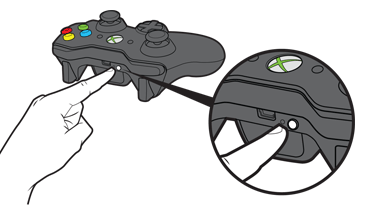
HOW TO: Connect a wireless controller to your Xbox 360
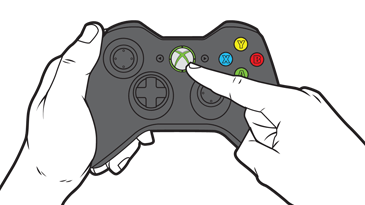
1. Turn on your console.
2. Press and hold the Guide button on the controller until it turns on.
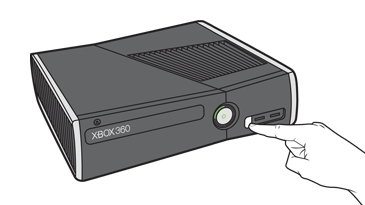
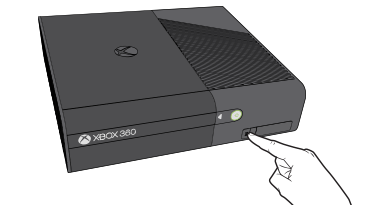
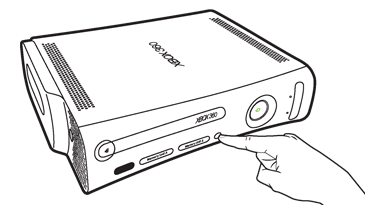
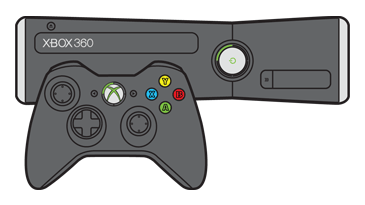
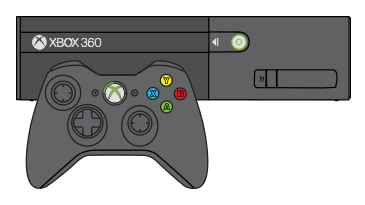
3. Press and release the connect button on the console.
| Xbox 360 S console |
| Xbox 360 E console |
| Original Xbox 360 console |
The lights around the console's power button will stop flashing once the controller connects to the console.
On the Xbox 360 S and Original console, connected controllers have one of four positions. Each position appears as a lighted section around the console power button and the controller Guide button.
On the 360 E console, a solid green light on the front of the console shows that the controller is connected. To see the player position, look at the ring of light around the Guide button on your controller.
Freebies: Xbox Live Games with Gold for April 2015
For the month of April, Xbox Live Gold members will receive six new free games (double the normal amount) on Xbox One and Xbox 360 as part of the Games with Gold program.
On Xbox One, Xbox Live Gold members can download Pool Nation FX ($9.99 ERP) AND Child of Light ($14.99 ERP) for free during the month of April.


On Xbox 360, starting Wednesday, April 1st, Gears of War Judgement ($19.99 ERP) and Terraria ($14.99 ERP) will be free for Xbox Live Gold members through April 15th.
Then on April 16th, Xbox Live Gold Members can download Assassin’s Creed: Black Flag ($19.99 ERP) and Army of Two The Devil’s Cartel ($19.99 ERP) for free through April 30th.
Read more about April Games with Gold titles over at Xbox Wire.
*Titles are available as free downloads for qualifying Xbox Live Gold members in all markets where Xbox Live is available. Some regions may offer different titles depending on market availability.
On Xbox One, Xbox Live Gold members can download Pool Nation FX ($9.99 ERP) AND Child of Light ($14.99 ERP) for free during the month of April.

On Xbox 360, starting Wednesday, April 1st, Gears of War Judgement ($19.99 ERP) and Terraria ($14.99 ERP) will be free for Xbox Live Gold members through April 15th.
Then on April 16th, Xbox Live Gold Members can download Assassin’s Creed: Black Flag ($19.99 ERP) and Army of Two The Devil’s Cartel ($19.99 ERP) for free through April 30th.
Read more about April Games with Gold titles over at Xbox Wire.
*Titles are available as free downloads for qualifying Xbox Live Gold members in all markets where Xbox Live is available. Some regions may offer different titles depending on market availability.
Subscribe to:
Posts (Atom)