Welcome. I decided to make this blog after being a Xbox Ambassador for a number of years.
If you don't know an Ambassador is a Volunteer that Microsoft uses to help ease the load on the actual hard working support people.
I noticed that alot of the questions I would get could easily be solved by using Microsofts Xbox.com site.
Since some of the help articles may be hard to find, understand or the issue may be called something different in the gaming community making it more difficult to solve, I've decided to make this blog to make it easier for fellow gamers to get xbox assistance, news and all things Xbox.
If you have any Xbox related question you can find the answer to feel free to contact me on YouTube, twitter or in the comments.
Electronic Arts has added the original Plants vs. Zombies game to EA Access, the subscription service for Xbox One and PC.
Although the game is already available via the magic of backward-compatibility, this is the first time a non-Xbox One game has been made available via the Vault.
As with all Vault games, you now have full access to the full game.
"We'll be rolling out more back compat[ible] games as they're made available on Xbox One," EA said on Twitter. "Stay tuned."
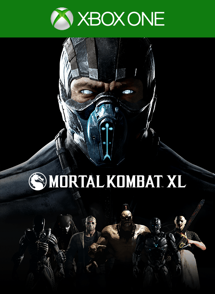
Mortal Kombat XL
One of the best-selling titles of 2015 has gone XL! Komplete The Mortal Kombat X Experience with new and existing content. Includes the main game, and new playable characters the Xenomorph from Alien, Leatherface, Tri-borg, and Bo’Rai Cho. Previously released playable characters include Predator, Jason Vorhees, Tremor, Tanya, and Goro. Also includes new skin packs Medieval Pack, Apocalypse Pack, and a new environment, the Pit Stage. All previously released skins packs included.
This month’s update is all about our continued commitment to listen to all of you and transform the Xbox experience based on your feedback. Today, we’re excited to announce a few features that you’ve been asking for which are coming to Xbox One, the Xbox app, or both. The host of updates include top-voted Xbox Feedback requests such as the ability to purchase Xbox 360 Backward Compatible games on Xbox One and improving social features like Party Chat broadcasting to Twitch. The updates will begin to rollout to the Xbox One Preview audience starting today and to Xbox app (beta) members starting tomorrow.
Here’s what’s coming to Xbox One Preview:
– Purchase Xbox 360 Backward Compatible games on Xbox One: Fans have spent more than 30 million hours playing Xbox 360 games on Xbox One and so it’s natural that being able to purchase Xbox 360 Backward Compatible games on Xbox One ranks as one of your top requests. With this update, you’ll be able to do so! Find and purchase Xbox 360 Backward Compatible games the same way you would Xbox One titles and, once purchased, Xbox 360 Backward Compatible content will automatically download to your Xbox One and be ready to play!
– Include Party Chat in Twitch broadcasts: A top voted-for feature on Xbox Feedback, Xbox One Preview members will be able to broadcast Party Chat when using the Twitch app. If you are broadcasting from your console and in a party, you can invite other people to include their chat audio in your broadcast. If a member of your party declines, they’ll still be able to chat in the party; they just won’t be heard in the broadcast. Additionally, as the party leader, you have the option to mute a party member’s chat audio, even if they opted-in. You can also include party members on Windows 10 PCs in your Twitch broadcast.
– Output your Party Chat to headset and speakers simultaneously: Xbox One Preview members will be able to select their preference for where Party Chat audio is heard: their headset, speakers, or both. To do this, go to Settings – Display & Sounds – Volume.
– Customizable Game DVR recording length: Based on Xbox Feedback, it’s clear that fans want to be able to configure the length of their Game DVR recordings. Currently, Game DVR recording is fixed to a 30 second duration. With this update, Xbox One Preview members can adjust the recording length to 15 seconds, 30 seconds, 45 seconds, 1 minute, 3 minutes or 5 minutes. To change the preferences, visit Settings – Preferences – Game DVR & streaming.
– Track Achievement progress in the Xbox One guide: We’re making it easier to access your Achievements by including them in the Xbox One guide. In the new Achievements area you’ll find a quick link to see all of your Achievements and you’ll be able to track your Achievement progress in real time directly in the guide, without having to snap a separate Achievements app.
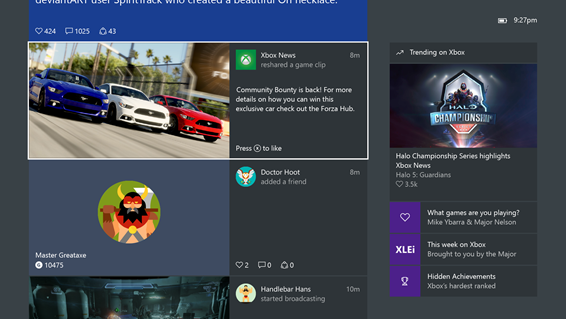
– Video playback directly in the Xbox One Activity Feed: We’ve made improvements to video playback in the Xbox One Activity Feed. Xbox One Preview members will be able to play an entire video inline rather than having to leave their feed to launch it. You can even ‘like’ the video while previewing it by pressing X. Preview members will also enjoy new pause, restart, and full-screen playback options, when they do choose to launch a video from their Activity Feed.
Here’s what’s coming to both Xbox One Preview and the Xbox app (beta) this month:
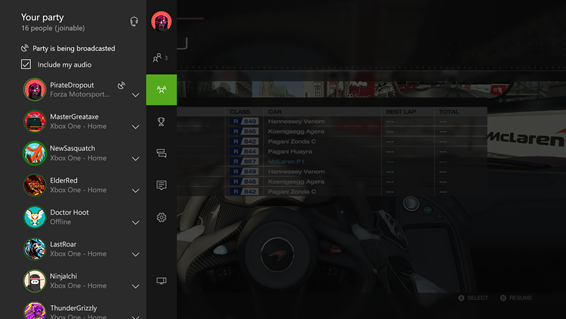
– 16-person Party Chat: Last fall, we expanded Party Chat to enable 12-person Parties on Xbox One and the Xbox app. This feature has been very popular with the community, so now we’re enabling 16-person Parties across both Xbox One Preview and the Xbox app (beta) starting today.
– Xbox 360 Achievements in Xbox One and Xbox app Activity Feeds: Starting this month for both Xbox One Preview and Xbox app (beta) participants, Xbox 360 Achievements will automatically post to your console and Windows 10 PC Activity Feeds. As with Xbox One game Achievements, the Xbox 360 Achievement graphic will feature a description of the Achievement, the game you earned it from, and the Gamerscore associated with it.
– Follow web links and YouTube videos from Game Hubs: Community managers of Game Hubs will now be able to populate Game Hubs with web and YouTube hyperlinks, making the Game Hubs experience even more interactive and engaging for gamers. For Xbox One Preview members, web links will display in a browser via the Edge app and YouTube links will open in the YouTube app. For the Xbox app (beta), links will open in your default web browser. As with any other item in your Activity Feed, you can caption, like, comment on, and share these links.
– Compare your Avatars: In Xbox One Preview shortly and releasing to the Xbox Avatars app later this month, you’ll be able to compare your Avatar with your friends’ Avatars. You can click through on a specific friend’s Avatar; preview their Avatar’s clothing, accessories and props on your Avatar; and also see how you can purchase or earn the items yourself. Using the ‘Compare Avatars’ feature will help you customize your Avatar leveraging the best of all your friends’ outfits! You can also compare your Avatar with anyone else’s in the Xbox Live community – just select ‘Compare Avatars’ when you are viewing another member’s profile.
– Reputation rating interface changes: The Xbox Live community is comprised overwhelmingly of players with positive reputations, and so, the vast majority of profiles are rated ‘good.’ As a result, we are changing our reputation interface to draw attention only to players who have been rated ‘needs work’ or ‘avoid me’. For Xbox One Preview and Xbox app (beta) members, ‘good’ players’ profiles will no longer feature a reputation gauge, however, gamers whose profiles are tagged ‘needs work’ or ‘avoid me’ will continue to feature the reputation flag.
CLICK READ MORE TO SEE WHAT'S COMING THE THE XBOX APP(BETA)
Carcassonne is a turn-based strategy video game, based upon the board game of the same name.
Master strategy in the medieval world! In the classic board game Carcassonne, the medieval countryside thrives as you and your opponents place tiles and complete towns, roads, and farms while competing to amass the most points. Own the largest towns, longest roads, and biggest farms.
The object of Geometry Wars is to survive as long as possible and score as many points as possible by destroying an ever-increasing swarm of enemies. The game takes place on a rectangular playfield and the player controls a claw-shaped "ship" that can move in any direction using the left thumbstick, and can fire in any direction independently using the right thumbstick. The player also has a limited number of bombs that can be detonated and destroy all enemies on the playfield. As the game progresses, the player can earn extra lives and additional bombs at set score increments, and the primary weapon changes at regular intervals (10,000 points). Also, enemies spawn in progressively larger quantities and at greater frequency as the game progresses. If an enemy touches the player's ship, the ship explodes and a life is lost, plus the multiplier worked up by how many enemies are killed in one life is also lost. The game is over when the player runs out of lives.
The Evolved version of the game takes place on a playfield that is slightly larger than the display area of the TV screen, and the camera follows the player's movements. A background grid pattern adds to the graphical effects by warping in reaction to player shots and the behavior of certain enemies. This version introduces new enemies and a score multiplier that increases as the player destroys enemies without losing a life.
For the month of March, Xbox Live Gold members will receive four new free games – two on Xbox One and two on Xbox 360 – as part of the Games with Gold program. You can play both Xbox 360 titles on your Xbox One with Backward Compatibility.
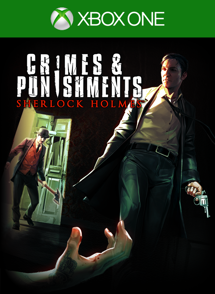
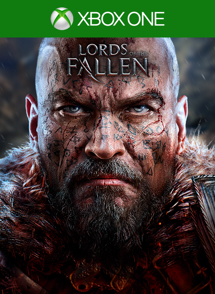
On Xbox One, Xbox Live Gold members can download Sherlock Holmes: Crimes and Punishment ($29.99 ERP) for free during the month of March. Lords of the Fallen ($39.99 ERP) will be available as a free download from March 16th to April 15th.
On Xbox 360, starting Tuesday, 01 March, Supreme Commander 2 ($29.99 ERP) will be free for Xbox Live Gold members through March 15th. Then on March 16th, Xbox Live Gold Members can download Borderlands ($19.99 ERP) for free through March 31st.
*Titles are available as free downloads for qualifying Xbox Live Gold members in all markets where Xbox Live is available. Some regions may offer different titles depending on market availability.
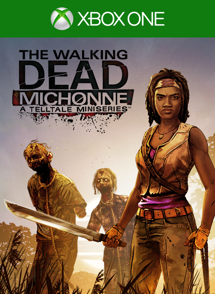
The Walking Dead: Michonne – A Telltale Miniseries stars the iconic, blade-wielding character from Robert Kirkman’s best-selling comic books. Haunted by her past, and coping with unimaginable loss and regret, the story explores Michonne’s absence between issues #126 and #139 of the comic book. Over the three episodes of the miniseries, players will discover what took Michonne away from Rick, Ezekiel, and the rest of her trusted group…and what brought her back.
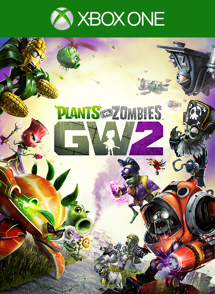
In this hilarious, action-packed shooter, zombie leader Dr. Zomboss has strengthened his horde and rebuilt suburbia as a zombie utopia. But hope remains, because for the first time the plants are taking the offensive in an all-out attack to reclaim their turf. Play as both the plants and zombies in new 24 player multiplayer and 4-player co-op modes, or go at it solo or in split-screen against the AI across all game modes. Garden Warfare 2 also introduces the Backyard Battleground, your very own interactive hub where you and up to 3 friends can take on daily quests, challenges, and interact with your favorite PvZ characters.
The Far Cry franchise returns in the Stone Age, a time of danger and adventure, when humanity is struggling to survive. Conquer this innovative open world with breathtaking environments and unpredictable savage encounters. The rich setting of the Stone Age provides a new setting filled with unpredictable mayhem, dangerous threats, and incredible stories that Far Cry is known for. Play as Takkar, a seasoned hunter and the last surviving member of your group. There is one goal: survive in a world where you are the prey.
We have a number of new features coming to Xbox One and Xbox app starting today and Mike Ybarra, Director of Program Management for Xbox, details what you can expect from this system update.
This month’s system update starts rolling out to the Xbox app today and on Xbox One tomorrow; with it, comes a host of social features that will help you stay connected to the Xbox Live community across both console and PC. A few highlights include being able to see who’s in a Party on Xbox One before joining and – on both Xbox One and the Xbox app – we have made it easier to get details on suggested friends.
Here’s what’s rolling out to the Xbox app today and on Xbox One tomorrow!
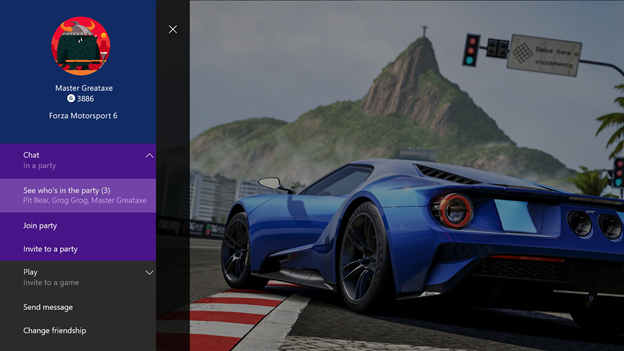
New experiences and updates launching on Xbox One: See who’s in a Party: On Xbox One, you will now be able to see who’s in a Party before joining. When you click on a friend who is in a Party from the friend tab of the guide, you’ll be able to see who else they’re playing with. Click the ‘Chat’ menu which appears immediately below your friend’s gamertag; this will show “See who’s in the Party” and list the gamertags of all the people in the Party.
Gamerscore Leaderboard: On Xbox One, from your profile in the guide, click My achievements and the restored Gamerscore Leaderboard will display. Through the Gamerscore Leaderboard, see where you stand relative to your friends by comparing total Gamerscore, as well as biggest gains over a rolling 30-day period. Click on the Gamerscore Leaderboard to view this information for all of your friends.
Re-arrange Pins on Home and access them offline: Many of you have told us that you want Pins on your Xbox One Home to be easier to organize. You will now be able to rearrange individual pins. Just press ‘Y’ on a pinned item and, once it blinks, you can move it around. We’ve also made Pins accessible for launching when you are offline.
Updating Activity Feed on Xbox One: Your Activity Feed on Xbox One will inform you when there are new items in your feed. Clicking the link will take you to the top of your feed where you’ll see a run-down of the newest posts, so that you always have the freshest content at your fingertips.
Hide games from ‘ready-to-install’ list: Fans asked that we re-enable the ability to hide content like betas, trials, games, and apps that they no longer want to install. Now, you’ll be able to start using this feature again.
‘Use a code’ shortcut in the Xbox One Store: Redeem 5×5 codes quicker while on your Xbox One console by tabbing over to the Store and using the new ‘Use a code’ shortcut. To the right of ‘Games store’ and ‘Search game store,’ the ‘Use a code’ link will enable you to enter retail codes directly from the dashboard.
Joinable Twitch Broadcasts: Many of you have asked for it to be easier to watch your friend’s game broadcasts. Now, Game Hubs as well as the game tile will allow you to easily launch Twitch.tv broadcasts if friends are broadcasting.
Improvements to Suggested Friends: Looking for people who you might know on Xbox or top content creators to follow? Check out the new Friend Suggestions area in Community and the Friends list in the Guide on Xbox One. Friend Suggestions include the gamertag, real name (if shared), gamerpic or Xbox Avatar image, and the reason the suggestion was made to you. Click through from the suggestion to view the member’s full profile and choose to grow your friends list.
Program the hotkeys for your Xbox One Chatpad: We’re making it easier for you to access your favorite apps with your Xbox Chatpad. This month’s release includes an interface which allows you to set the X1 and X2 functions on the Chatpad keypad. Just plug your Chatpad into your controller and navigate to Settings. In the Devices & accessories area of Settings, select the controller that the Chatpad is connected to and choose the desired functions for the X1 and X2 keys from the drop down box. The current hotkey defaults are ‘take screenshot’ (X1) and ‘record that’ (X2).
Click Read More to see what changes are coming to the Xbox App on Windows 10