Welcome to XboxIssues

Welcome. I decided to make this blog after being a Xbox Ambassador for a number of years.

If you don't know an Ambassador is a Volunteer that Microsoft uses to help ease the load on the actual hard working support people.

I noticed that alot of the questions I would get could easily be solved by using Microsofts Xbox.com site.

Since some of the help articles may be hard to find, understand or the issue may be called something different in the gaming community making it more difficult to solve, I've decided to make this blog to make it easier for fellow gamers to get xbox assistance, news and all things Xbox.

If you have any Xbox related question you can find the answer to feel free to contact me on YouTube, twitter or in the comments.
Showing posts with label Xbox Support. Show all posts

Friday, December 13, 2024

NEWS: Support Virtual Agent is Here to Help

After a successful Insider testing period, we’re delighted to announce that Support Virtual Agent is now rolling out to all players in the US. We’d like to thank Insiders for their help in testing and providing feedback for this new feature.

Support Virtual Agent is an AI-powered feature built to help Xbox players more efficiently solve their support-related gaming issues, and it is rolling out to select Xbox Insiders on support.xbox.com today. Support Virtual Agent can quickly access information from support.xbox.com to answer questions relevant to Xbox console and game support issues. Xbox Insiders located in the United States and with English selected as their preferred language can begin previewing the Support Virtual Agent today by visiting support.xbox.com while signed into an account that is registered with the Xbox Insider Program.
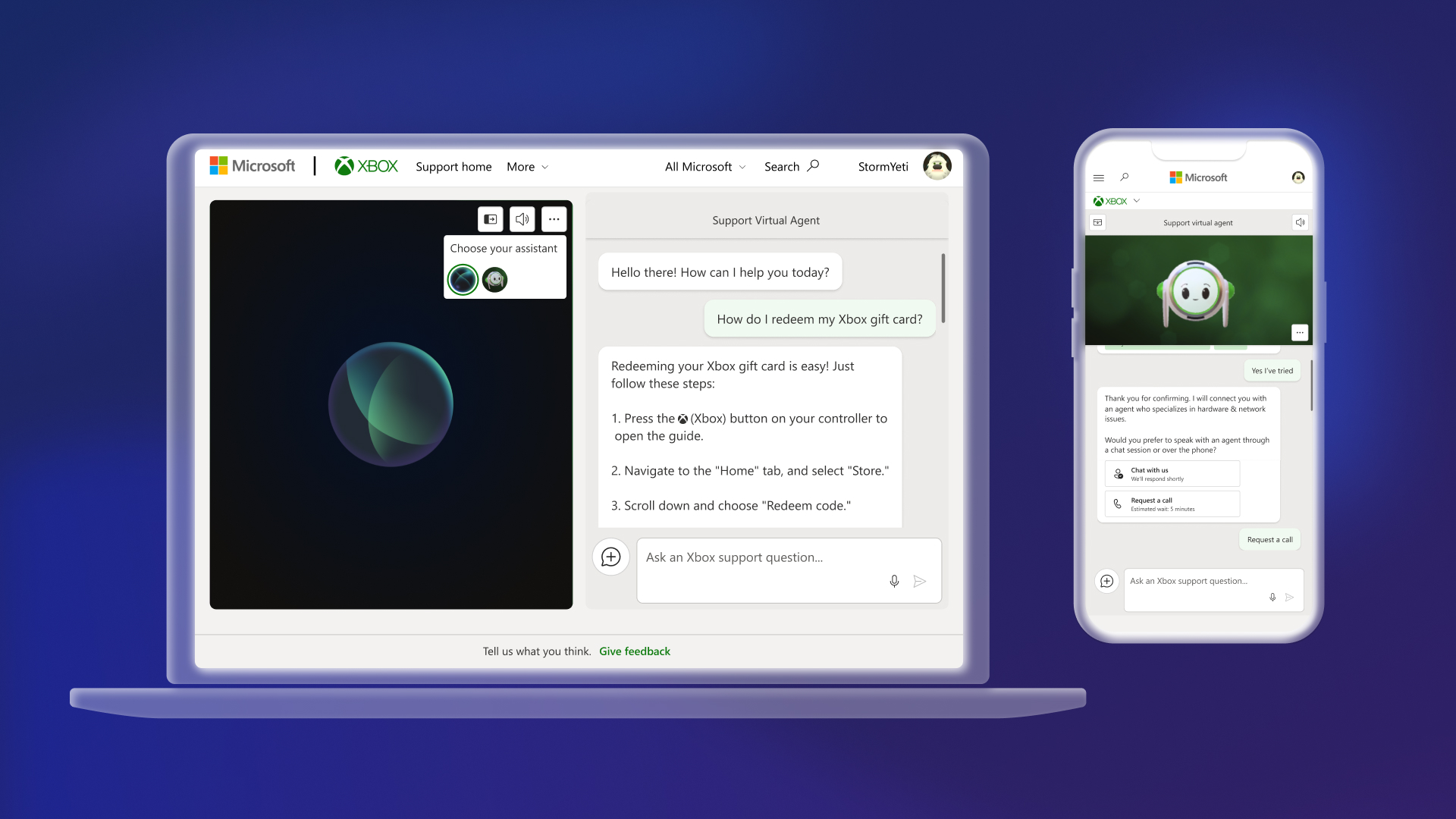


We value the feedback from Xbox Insiders for this preview experience and any feedback received will be used to improve the Support Virtual Agent. As you interact with the Support Virtual Agent, you can provide feedback via the “thumbs up” or “thumbs down” button on each of the responses or provide feedback directly via the “Give feedback” button at the bottom of the page.

How to Use Support Virtual Agent
Starting today, Xbox Insiders will see the Support Virtual Agent on the “Contact us” page on support.xbox.com. Sign in with the same account you registered with the Xbox Insider Program, then you’ll see a new option to ask our new Support Virtual Agent a question.
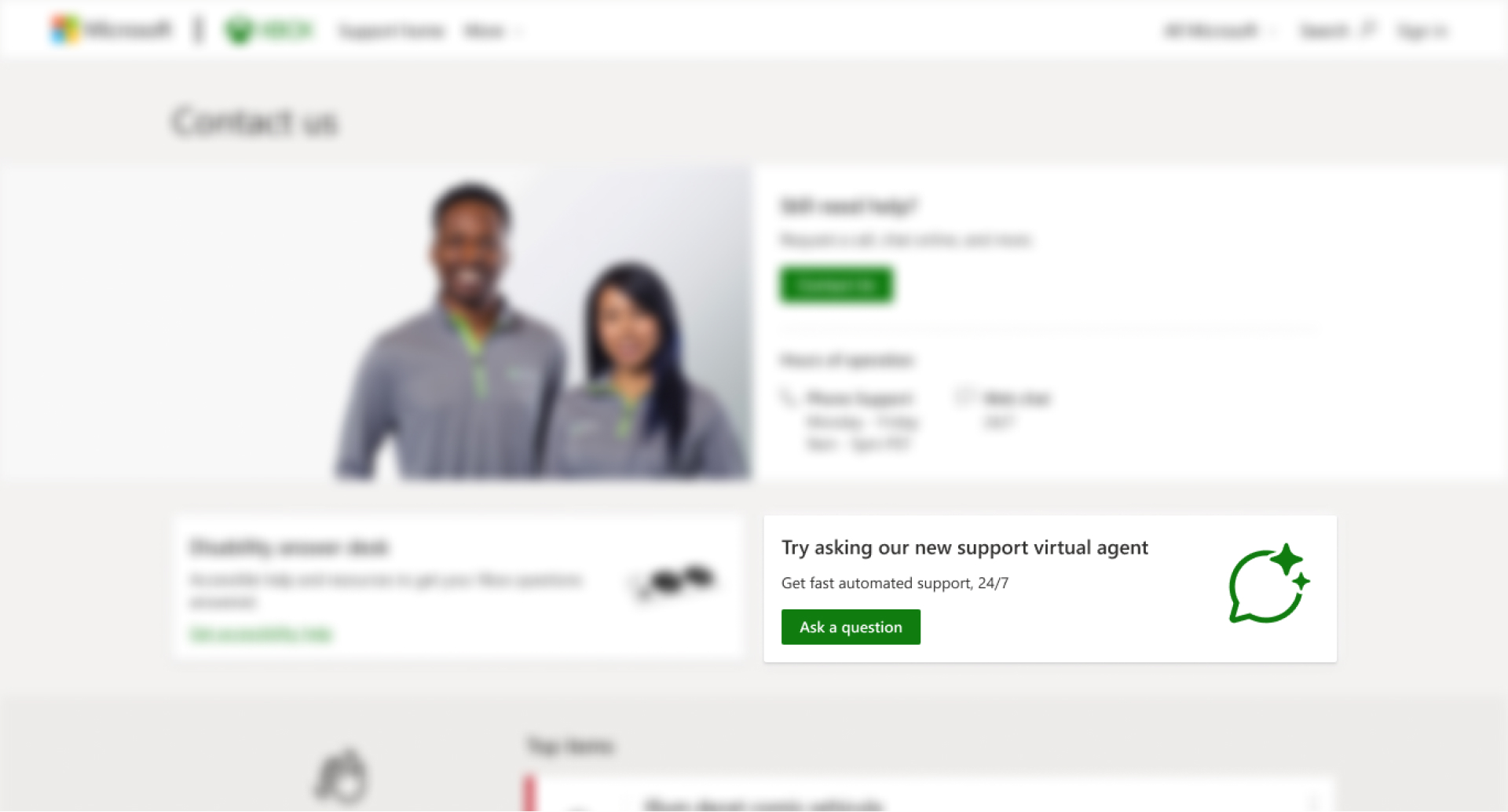
Once you click on “Ask a question,” you will see the Support Virtual Agent launch in a new browser window. You can ask the agent questions via text or voice, and it will answer with relevant information from support.xbox.com. If the Support Virtual Agent cannot solve the issue, you can request to speak with a live support agent as long as it is within Xbox Support’s normal hours of operation.

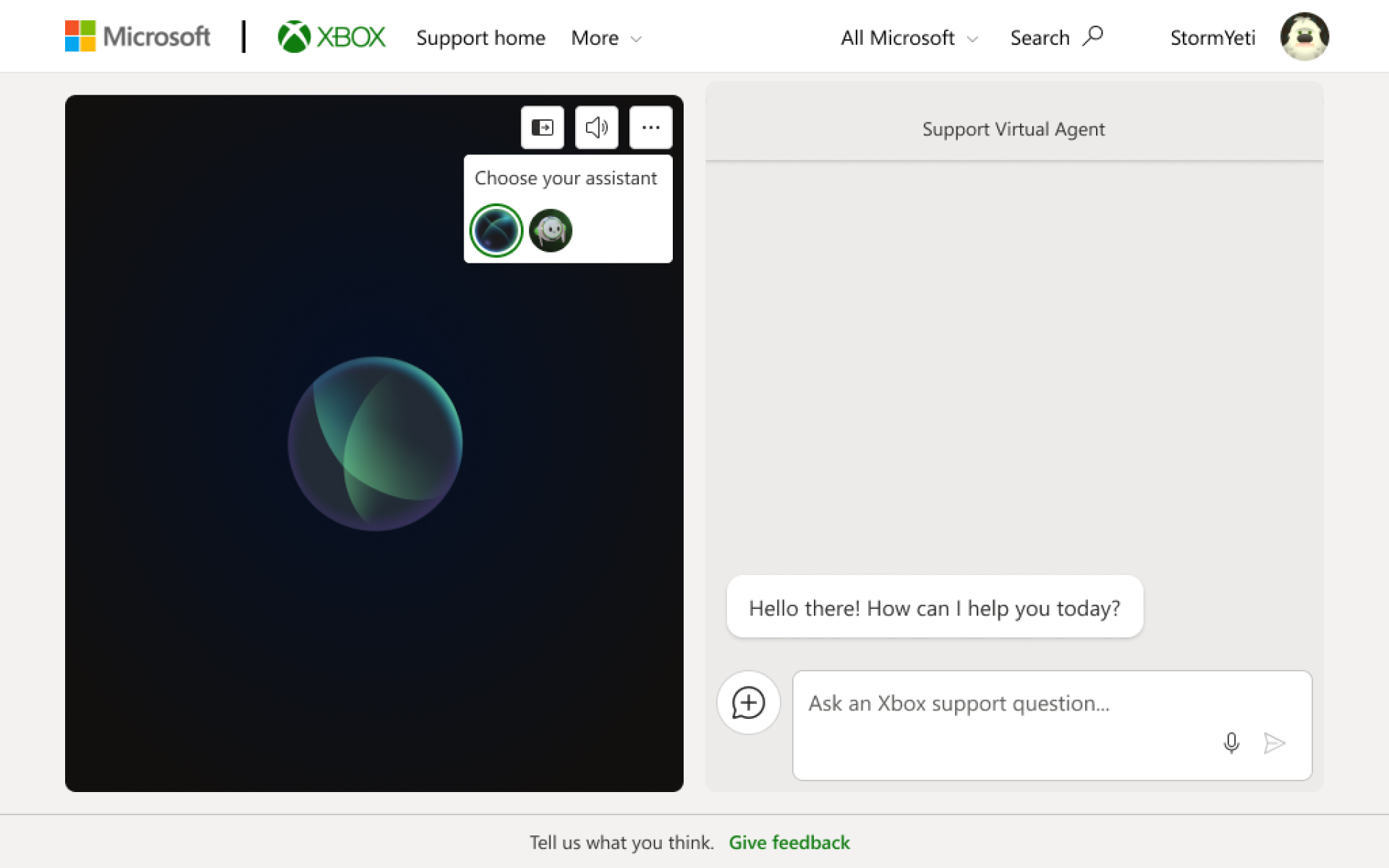
During this preview, you can also customize your support experience by clicking on the ellipsis menu icon and choosing between two different Support Virtual Agents.

DON'T FORGET TO SHARE:

Thursday, August 16, 2018

NEWS: What’s New With Xbox Customer Support

Team Xbox is always working to bring you great games, enhanced capabilities, and new ways to play and connect with your friends. As a support team we want to provide fast and effective help whenever you need it and in the form that works best for you. We’re bringing you new features and new ways to connect with your choice of support channel – whether that’s through Xbox Assist on your Xbox One, online at support.xbox.com, or through support forums.

Today we’re excited to give you a heads up on some recent changes as well as the next wave of new capabilities you’ll see in Xbox Support.


*Xbox Assist improvements. Last fall we launched Xbox Assist on Xbox One to help you with questions and learn about new ways to get the most out of your Xbox. We’re always adding new features and ways to find what you need with Xbox Assist on your Xbox One. Later this summer, we’ll be adding new troubleshooters for common problems, better Xbox Live service status information, and more details on Xbox Live Enforcement actions.

*Virtual agent improvements. Last year we introduced a virtual agent on support.xbox.com. Over the course of the summer we are adding new capabilities and improving existing ones to better help you troubleshoot and solve problems and give you even more ways to quickly get help. If you have a question that isn’t right for the virtual agent it will even help you find the best place to get an answer, including getting in touch with a support advocate.

*Support callback. Your time is precious. Waiting on hold to talk to a support advocate isn’t the best way to spend your time. We believe we can do better. Later this summer, we’ll upgrade the Xbox support phone service to a “callback” system. This means no more waiting on hold. Simply sign in to support.xbox.com and tell us the problem and we’ll call you. It’s a more convenient, more secure, faster way to get help.

*Xbox Forums improvements. Xbox Forums is joining Microsoft Community Forums at answers.microsoft.com, creating one place to chat about Xbox gaming—whether you play on an Xbox console, PC, or mobile. Forums for individual games like Forza Motorsport and Halo Waypoint remain unchanged.

*Device repair and tracking improvements. We’ve added the ability to start a device repair and track progress online. Just visit account.microsoft.com and click Devices.

This evolution in customer support means fast and effective help wherever and whenever you need it. The best part is that you don’t need to do anything new to take advantage of these improvements. Use Xbox Assist on your console or our support website as you normally do and we will make sure you have our fastest, most effective and personalized support there for you.

Hopefully you won’t need us very often, but if you do, we’ll have new and improved options in place for us to help you, on your terms.

SOURCE

Friday, May 18, 2018

NEWS: Xbox Uservoice has moved and Changed

Have you ever wanted to help improve your Xbox 360, Xbox One or Live experience?   Do you sit around complaining "Microsoft should have done this", "Why is <BLANK> Missing", or "I could have designed this better"?  If so then You Should Know about: Xbox Feedback (http://xbox.uservoice.com/)

The url has changed to: https://xboxideas.uservoice.com/ and they now have a review process so the new site won't get cluttered and bogged down with duplicate and asinine requests.


To help build the best gaming experiences across Xbox and Windows, we’ve created this site in partnership with UserVoice, a third-party service designed to let your voice be heard. Xbox Ideas, formerly Xbox Feedback, has been re-imagined from the ground up to maximize your impact on our development process. Would you like to know more?

Introducing Idea Drives

Idea Drives are the way for you to provide input on new gaming features.


  • Idea Drive Collection: we’ll gather your ideas about a specific feature or a topic for a set period 
  • Idea Drive Voting: after the Collection phase, you'll have an opportunity to vote and comment 
  • Idea Drive Completion: Feature Teams will review the results of your voting, as well as your comments 

Although we can’t guarantee any specific ideas will be implemented, we’ll ensure that your ideas and comments are a key influence on future innovations.

Using Xbox Ideas

You can add suggestions, votes, and comments to active Idea Drives or suggest an Idea Drive!


  • Select an active Idea Drive from the “Idea Drives” section 
  • Search for your idea or submit a new suggestion 
  • Ideas are then reviewed for clarity, language, and impact 

Feature Teams regularly review your suggestions and comments during an Idea Drive. Is there a feature or topic that you think is ready for an Idea Drive? Visit the Idea Drive Suggestion Box to suggest potential new Idea Drives for Xbox One, Gaming on Windows 10, Game Pass, and other gaming experiences.

Tuesday, April 21, 2015

YSK: How to Help make Xbox Better With Uservoice


Original Xbox Uservoice has moved to https://xboxideas.uservoice.com


Have you ever wanted to help improve your Xbox 360, Xbox One or Live experience?   Do you sit around complaining "Microsoft should have done this", "Why is <BLANK> Missing", or "I could have designed this better"?  If so then You Should Know about: Xbox Feedback (http://xbox.uservoice.com/)

"This site is the most effective place to share your feature requests and ideas for improving Xbox products and services. The feature teams working on Xbox One, Xbox 360, Xbox on Windows and Xbox Live regularly review the ideas and incorporate them into future product planning discussions and prioritization meetings.We are committed to delivering upon your ideas that are directly actionable. Of course, your great ideas do take time to design, develop, test, and deploy to Xbox, but we'll be sure to update entries when we announce or release a suggestion. We will mark things “In Progress” when we have good line of sight that an idea will be delivered in the coming months.  And, as items are released to everyone, we will mark them as “Completed”. 


This site allows you to suggest a new feature, enhancements to an existing feature, or to vote on ideas that others have submitted.   You can view newly trending ideas (Hot ideas) or view the ideas with the most votes (Top ideas).  To get started, choose the category that best fits your idea from the menu on the right of this page.  Browse existing ideas, vote, and comment.  
As you add new ideas, please create discrete requests – 1 idea per post - so that your fellow community members can vote for a specific idea or feature request.  Laundry list postings of ideas, multiple ideas in a single post, are usually deleted to ensure that the site can be appropriately managed. "
Along with suggesting you own ideas, you can also vote on other users suggestion.  This site is owned and run by Microsoft so don't worry about logging in with your Live credentials.

I have seen a number of requests by users on Uservoice make it over to the Xbox One in their monthly updates.


Friday, April 17, 2015

YSK: Fix "This disc is unreadable" when you use a Games on Demand game

So you just downloaded the latest free Games With Gold for the Xbox 360 or purchase a great no game from Games On Demand.

It has downloaded and installed and you want to play, but when you click on the game you get  "This disc is unreadable".  WTF the games does not have a disc I downloaded it.

You should know how to fix "This disc is unreadable" error when you use a Games on Demand game


If you see the following error message when you try to play a Games on Demand game on your Xbox 360:

This problem can occur if your Xbox 360 console can’t read game files on the hard drive.

You may be able to resolve this problem by storing the game on a different part of your hard drive. 

 To do this, delete and download the game again. Here’s how:


  1. Select settings, and then select System. 
  2. Select Storage, and then select your storage device. For example, select the Xbox 360 Hard Drive. 
  3. Select Games and Apps, and then select the Games on Demand game that doesn’t play. Take note of the size. 
  4. Select the Games on Demand game, and then select Delete. 
  5. Go to the Games Store and download a game demo or other content that is approximately the same size as the Games on Demand title. 
  6. Press the Guide button on your controller.
  7. Select Settings, and then select Account. 
  8. Select Download History. 
  9. Select the Games on Demand game, and then select Download Again. 
  10. Once it’s downloaded, play the Games on Demand game.
If you keep experiencing the problem, contact Xbox Support.


Thursday, March 19, 2015

YSK: XBOX Customer Support Numbers and contacts

You will find XBOX Customer Support number and toll free numbers in this post. Very useful if you run into problems and need customer support or technical support with your Xbox gaming console.

Calling up and getting help is not the easiest things when it comes to XBOX Customer Support. So try hard and you will be able to get the desired support from Xbox.


For Xbox US:
Phone assistance is available:
9:00 A.M. to 1:00 A.M. Eastern Time
6:00 A.M. to 10:00 P.M. Pacific Time

Phone numbers
Toll free: (800) 4MY-XBOX or (800) 469-9269
Direct dial: (425) 635-7180
Hearing impaired (TDD device): (866) 740-9269 or (425) 635-7102

You can also twitter Xbox on twitter @ http://twitter.com/xboxsupport

Don’t like to call Xbox or tweet them? The you can probably Email Xbox @ http://support.xbox.com/en-us/pages/email-us.aspx

For Xbox Canada:
Phone assistance is available.
9:00 A.M. to 1:00 A.M. Eastern Time

Phone numbers
Toll free: (800) 4MY-XBOX or (800) 469-9269
International (direct dial to US): (425) 635-7180
Hearing impaired (TDD device): (866) 740-9269 or (425) 635-7102